How to Identify and Map Enterprise Buying Committees
How to Identify and Map Enterprise Buying Committees
Your champion loves your product. They've attended every demo, asked the right questions, and assured your sales team that the deal is moving forward. Then, just when everything seems on track, the opportunity goes silent.
A week later, you discover that the CFO isn't convinced about the ROI, IT has concerns about integration, and procurement is evaluating another vendor. None of these stakeholders had been part of your conversations.
What happened? Your team built a relationship with one person, but the purchase decision involved an entire group.
This is the challenge of enterprise sales. A promising conversation with one contact doesn't mean you've reached everyone who can influence, approve, or block a deal. To navigate complex purchases, sales teams need to know who is involved, what each stakeholder cares about, how they influence one another, and where relationships are missing.
That's where enterprise buying committee mapping comes in. Let's look at how to identify the right stakeholders, understand their roles, and build a map that helps keep enterprise deals moving.
What Is an Enterprise Buying Committee?
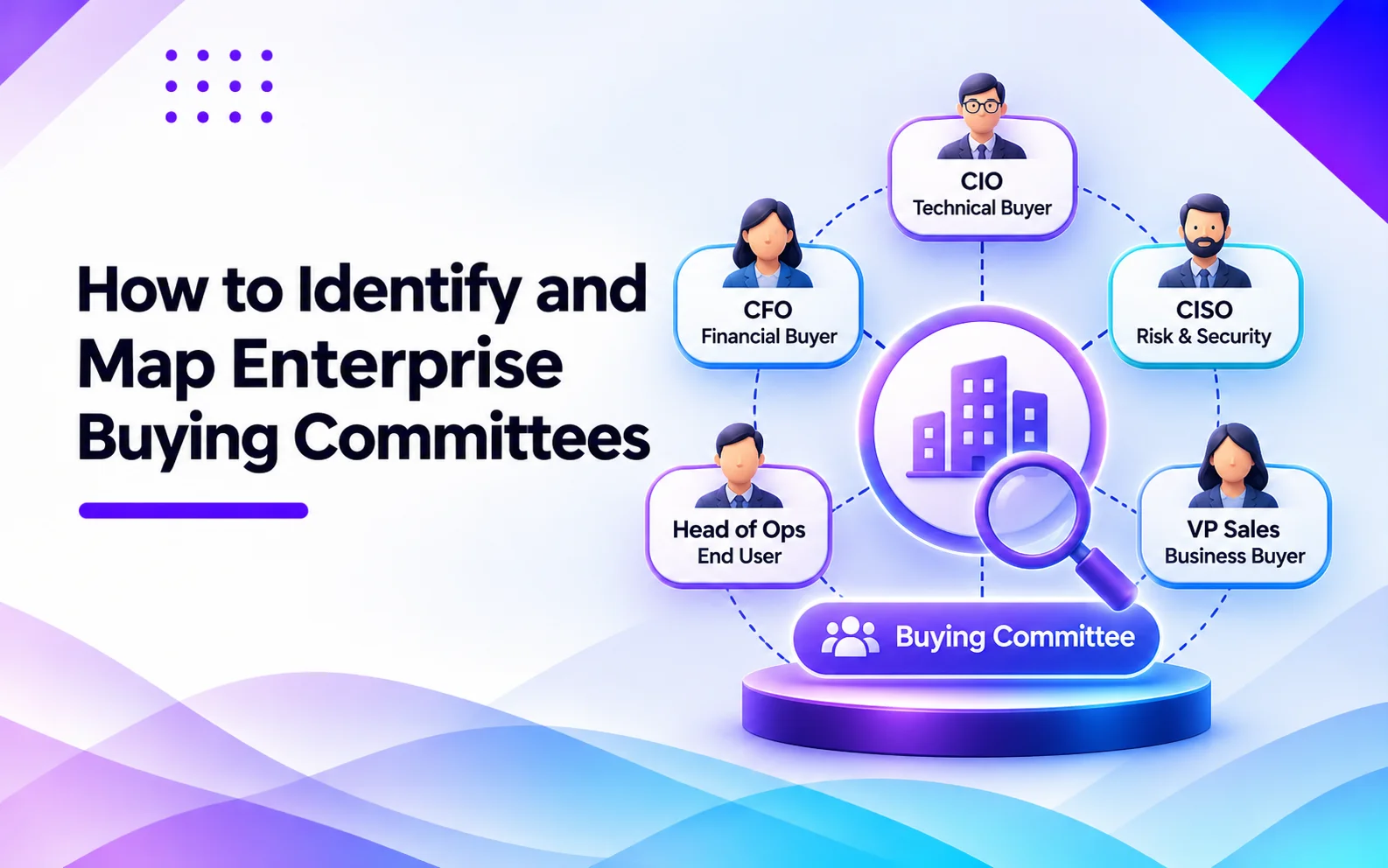
An enterprise buying committee is the group of stakeholders involved in evaluating, influencing, and approving a business purchase. Depending on the solution and the organization, this group may include department leaders, finance executives, IT and security teams, end users, procurement, and senior decision-makers.
Each stakeholder brings a different perspective to the purchase. Finance may focus on budget and ROI, IT may evaluate security and integrations, while department leaders consider whether the solution addresses their team's needs. Some stakeholders have formal approval authority, while others influence the decision behind the scenes.
This is also why a buying committee is different from an organizational chart. An org chart shows who reports to whom. A buying committee map shows who influences a specific purchase, what they care about, and how they are connected to the decision-making process.
Organizational chart
Buying committee map
Shows reporting relationships
Shows purchase-related influence
Reflects formal hierarchy
Reflects actual decision-making dynamics
Usually remains relatively stable
Changes throughout the buying process
Focuses on roles and reporting lines
Focuses on stakeholders, priorities, influence, and engagement
Why Buying Committees Matter in Enterprise Sales
Understanding the buying committee helps sales teams avoid relying on a single contact to move an entire enterprise deal forward.
Consider what happens when your champion supports the purchase, but the IT team hasn't evaluated the solution, finance hasn't approved the budget, and procurement hasn't reviewed the contract. Each missing stakeholder creates another potential obstacle.
There are several reasons why mapping the buying committee matters:
Multiple people influence the decision: The person leading conversations with your sales team may not have the authority to approve the purchase. Other stakeholders can influence the outcome or have the power to block it.
Different departments have different priorities: Finance evaluates costs and returns, IT considers technical requirements, and end users care about usability and adoption. Each group needs relevant information before supporting the purchase.
Deals can stall despite a supportive champion: Your primary contact may be convinced, but their enthusiasm doesn't guarantee internal alignment or approval.
Single-threaded relationships create risk: If your only contact leaves, loses influence, or cannot secure internal approval, your deal may lose momentum.
Multi-threading improves account coverage: Building relationships across relevant departments gives sales teams broader access, helps uncover objections earlier, and reduces dependence on one contact.
Enterprise sales teams need more than a list of contacts. They need a clear understanding of the people involved, their influence on the purchase, and the relationships that can help move the deal forward.
8 Common Roles in an Enterprise Buying Committee
An enterprise buying committee consists of stakeholders with different responsibilities and levels of influence. While their job titles and responsibilities vary across organizations, most enterprise purchases involve some combination of the following roles.
Buying role
Typical job titles
What they care about
What sales teams should establish
Economic Buyer
CFO, VP of Finance, business unit leader, senior executive
ROI, budget availability, total cost of ownership, and financial impact
Who controls the budget and what financial justification is required?
Champion
Department head, director, senior manager, team leader
Solving business problems, improving team performance, and demonstrating results
Can they advocate internally, influence other stakeholders, and help move the purchase forward?
Decision-Maker
VP, department head, business unit leader, executive sponsor
Strategic alignment, business outcomes, and implementation risks
Who has final approval authority and what criteria guide the decision?
Technical Evaluator
CTO, IT director, security lead, enterprise architect, systems administrator
Security, integrations, scalability, compliance, and technical feasibility
What technical requirements must the solution satisfy?
End User
Individual contributors, team leads, operational managers
Ease of use, productivity, functionality, and workflow improvements
Which teams will use the solution, and does it address their day-to-day needs?
These roles are a practical framework, not a fixed checklist. One person may perform multiple roles, and not every enterprise purchase involves all eight.
For example, the economic buyer and decision-maker may be the same person. Similarly, a champion may also control the budget or influence the technical evaluation.
The important thing is to identify each stakeholder's actual role in the purchase rather than assume their influence based on job title alone.
How to Identify Enterprise Buying Committee Members
Knowing the different roles in an enterprise buying committee is one thing. Finding the actual people who fill those roles within a target account is another.
A company's website might tell you who leads its finance or IT department, but that doesn't necessarily reveal who will evaluate your solution, control the budget, or influence the final decision. To identify the right stakeholders, sales teams need to combine account research, historical deal data, engagement signals, professional networks, and direct conversations.
Here are six ways to uncover the people involved in an enterprise purchase.
1. Start With Your Ideal Customer Profile
Before searching for individual stakeholders, establish which companies are most likely to need your solution. Your Ideal Customer Profile (ICP) provides a starting point for understanding the types of organizations you want to target and the people likely to participate in their purchasing decisions.
Start by defining the characteristics of your best-fit accounts, including:
Industry: Which industries have the strongest need for your solution?
Company size: Are you targeting mid-market businesses, large enterprises, or global organizations?
Business model: Does the company operate in SaaS, financial services, manufacturing, or another sector?
Use case: Which business problems are most likely to trigger a purchase?
Next, segment accounts based on company size, operational complexity, and use case. A cybersecurity purchase at a 500-person SaaS company may involve a different group of stakeholders than a similar purchase at a global financial institution.
Your historical deals can help refine this picture. Review closed-won and closed-lost opportunities to identify which departments, seniority levels, and buying roles were involved. Look for patterns in who evaluated the solution, who approved the budget, and whose concerns influenced the outcome.
Over time, this gives you an expected stakeholder profile for each ICP segment, making it easier to identify the people you should look for when researching a new account.
2. Identify Relevant Departments and Job Functions
Once you know which accounts to target, determine which departments are likely to participate in the purchase.
A common mistake is searching for one specific job title, such as CTO or VP of IT, and assuming that person represents the entire technical buying group. Enterprise organizations have different reporting structures, and similar responsibilities can sit under different titles.
For example, a B2B cybersecurity purchase may involve:
IT and information security: Evaluate technical requirements, integrations, infrastructure, and security risks.
Finance: Assess the budget, expected return, and financial justification.
Procurement: Review vendor requirements, pricing, and purchasing terms.
Legal and compliance: Evaluate contractual obligations, regulatory requirements, and data protection.
Business leadership: Assess strategic value, business impact, and overall investment priorities.
Instead of relying exclusively on exact job titles, search by department, job function, and seniority. This helps uncover relevant stakeholders even when their titles differ from the ones you initially expected.
Also, don't assume that every department needs to be involved in every purchase. Use the product category, company structure, and complexity of the buying decision to determine which functions are most relevant.
3. Use Website and Content Engagement to Find Interested Stakeholders
Your target accounts may already be showing signs of interest before anyone submits a demo request or contacts your sales team.
Website and content engagement can help uncover these potential buying committee members. For example, look for patterns such as:
Multiple employees from the same company visiting your product pages.
Different visitors exploring pricing, comparison, and integration pages.
Several employees engaging with the same research reports, guides, or product content.
People from different departments showing interest in different product capabilities.
Visitors returning to your website across multiple sessions.
Consider a cybersecurity company where someone from IT visits your integration pages, a finance employee explores pricing, and a security leader repeatedly views your product documentation. Individually, these interactions may look like ordinary website activity. Together, they could indicate interest from multiple stakeholders within the same account.
This is where account identification and contact-level engagement data become useful. Platforms such as Knock AI help sales teams identify companies visiting their websites and surface associated contacts who are engaging with their business. This gives teams more context about which people may be relevant to an emerging buying process.
However, engagement alone doesn't confirm someone's buying role or decision-making authority. Treat these contacts as potential stakeholders and validate their involvement through further research and conversations.
4. Use CRM and Historical Deal Data
Your CRM can reveal more about enterprise buying committees than a list of current opportunities suggests. Previous deals contain valuable information about the people, departments, and approval processes involved in purchasing decisions.
Start by reviewing your closed-won opportunities. Identify the contacts who participated in discovery calls, attended demos, evaluated the solution, negotiated commercial terms, and approved the purchase.
Then compare those patterns with closed-lost and stalled opportunities. Ask questions such as:
Which stakeholder roles were missing from deals that failed?
Did successful deals involve earlier engagement with economic buyers?
Were technical evaluators or procurement teams introduced too late?
Which departments consistently participated in the final evaluation?
Did opportunities stall because the champion lacked internal influence?
Look for recurring patterns across accounts with similar industries, company sizes, and use cases. For example, you may discover that enterprise customers in financial services typically involve security, compliance, procurement, and finance much earlier than customers in other industries.
Use these findings to refine your expected buying committee personas. Rather than guessing which stakeholders might matter, your sales team can use evidence from previous deals to guide account research and outreach.
5. Use LinkedIn and Professional Networks
LinkedIn and professional networks can help you identify stakeholders who may not appear in your CRM or have interacted with your website yet.
Start by researching your target company's employees and leadership team. Use filters such as company, department, seniority, job function, and experience to find people whose responsibilities align with your expected buying committee roles.
You can also look beyond current job titles:
Leadership changes: A newly appointed CTO or VP may influence technology or vendor decisions.
New hires: Recent additions to IT, security, finance, or operations teams may signal organizational priorities.
Professional engagement: Employees interacting with your company's LinkedIn posts may be worth researching further.
Existing connections: Your colleagues may already have relationships with people at the target account.
Warm introductions: Mutual connections can help your sales team reach stakeholders beyond its initial contact.
The last two are particularly valuable. Your team might already have a relationship with an influential person at a target account, even if that person has never interacted directly with your sales team.
Tools such as LinkedIn Sales Navigator can help sales professionals research accounts, identify relevant contacts, and explore relationship paths through their professional networks.
Remember that professional activity and job titles are useful discovery inputs, not proof that someone is part of a particular buying committee. Validate their relevance before treating them as an active stakeholder.
6. Ask Your Existing Contact to Map the Buying Process
Account research and engagement data can help you identify potential stakeholders, but direct conversations are often the best way to understand how a purchase decision actually happens.
Your existing contact may know which departments need to evaluate the solution, who controls the budget, and whose approval is required before the organization can move forward.
Instead of simply asking, "Who else is involved in this decision?", ask questions that help uncover the buying process naturally:
Who else will evaluate this solution before a decision is made?
Which teams will use the product if you move forward?
Who owns the budget for this initiative?
Does IT or security need to review and approve the vendor?
Who signs off on the final decision?
Has anyone raised concerns about moving forward?
What does your internal approval process typically look like?
These questions help you understand both the people involved and the process they follow to reach a decision.
For example, your champion might explain that the department head is sponsoring the initiative, finance needs to approve the budget, and IT security must complete a vendor assessment. You now have a clearer picture of the buying committee and the next relationships your sales team needs to build.
The goal isn't simply to collect more contact names. It's to understand who participates in the decision, what each person contributes, and how your team can build relationships with the right stakeholders before the deal reaches its final stages.
How to Map an Enterprise Buying Committee: A Step-by-Step Process
Identifying potential buying committee members gives your sales team a starting point, but it doesn't tell you how those people influence the purchase or where your relationships stand.
A useful buying committee map brings all that information together. It shows who is involved in the decision, what each stakeholder is responsible for, how they influence one another, and which relationships your team still needs to build.
Here are eight steps to create and maintain a buying committee map for an enterprise account.
Step 1. Define the Expected Buying Committee
Before mapping individual stakeholders, establish which roles you expect to find within the account.
Start with your Ideal Customer Profile (ICP) and historical deal data. Review previous enterprise opportunities to understand which departments, seniority levels, and decision-making roles typically participate in similar purchases.
For example, a cybersecurity vendor might expect to engage IT leadership, security teams, finance, procurement, and legal. A marketing technology purchase may involve marketing leadership, revenue operations, IT, and finance.
Use these patterns to create an expected stakeholder profile for each account segment. Consider:
Industry: Different industries have different compliance, security, and purchasing requirements.
Company size: Larger organizations may involve more departments and approval layers.
Product complexity: Solutions requiring technical integration may need additional IT and security reviews.
Use case: The business problem determines which departments are most likely to participate.
This expected committee gives your team a reference point when researching an account. It also helps identify important roles that haven't been discovered yet.
Step 2. Build a Stakeholder Roster
Once you've defined the expected roles, create an initial list of people who could be involved in the purchase.
Bring together information from multiple sources, including:
CRM contacts: Review existing contacts, account owners, previous conversations, and opportunity history.
Website and content engagement: Identify people associated with the account who have interacted with your website, product pages, or content.
LinkedIn and professional networks: Research employees by department, seniority, job function, and professional connections.
Existing customer and champion intelligence: Use information from your current contact to discover other stakeholders and potential introduction paths.
Sales conversations and meeting attendees: Review discovery calls, demos, email exchanges, and meeting participants for additional names.
Don't assume that everyone on this list is automatically part of the buying committee. At this stage, distinguish between confirmed and suspected stakeholders.
For example, someone from the IT department who visited your integration page may be a potential technical evaluator. However, you still need to establish whether they're involved in evaluating the solution or simply researching it independently.
This distinction keeps your buying committee map grounded in evidence rather than assumptions.
Step 3. Assign Each Stakeholder a Buying Role
With your initial roster in place, assign each person a likely buying committee role.
Common roles include:
Economic buyer
Champion
Decision-maker
Technical evaluator
End user
Influencer
Blocker
Procurement or legal
Don't assign roles based on job titles alone. A VP may have budget authority but no involvement in the technical evaluation. Similarly, a director who isn't the final decision-maker may have considerable influence over the recommendation.
Use discovery conversations, meeting participation, stakeholder feedback, and observed involvement to validate each person's role.
For example, if someone from finance is reviewing the financial justification and discussing budget availability, they may be the economic buyer or a key financial approver. If an IT leader is reviewing integration requirements and security documentation, they're more likely to be a technical evaluator.
Also, allow for overlapping roles. Your champion could be a department head who also controls the budget. The objective is to understand what each person actually contributes to the decision.
Step 4. Map Influence and Relationships
A stakeholder roster tells you who is involved. A relationship map helps you understand how those people connect and influence the purchase.
This distinction matters because formal reporting structures don't always reflect how enterprise buying decisions happen. Someone without a senior title may have significant influence because other stakeholders trust their technical expertise or recommendations.
For each stakeholder, investigate:
Who influences the final decision?
Who reports to or works closely with whom?
Who has an established relationship with your champion?
Which stakeholders can introduce your team to other decision-makers?
Who has strong internal credibility or influence?
Where are relationships missing, weak, or dependent on a single contact?
For example, your champion may have a strong relationship with the department head but limited access to the CFO or IT leadership. Another member of your sales team might already know someone in IT who could provide a warm introduction.
Visualizing these connections helps your team identify the best paths into the account rather than relying entirely on cold outreach.
A relationship map should capture both internal stakeholder connections and your team's existing relationships with those people. This gives sales representatives a clearer picture of where they have access and where they need to build new relationships.
Step 5. Understand Each Stakeholder's Priorities and Position
Knowing someone's role doesn't automatically tell you what they think about the purchase. Two stakeholders with similar responsibilities may have completely different priorities or concerns.
Document the following information for each person:
Business priorities: What outcomes are they trying to achieve?
Main concerns: What could prevent them from supporting the purchase?
Level of influence: How much weight does their opinion carry?
Current position: Are they supportive, neutral, resistant, or unknown?
Supporting evidence: What conversations or interactions indicate their position?
Next action: What does your team need to do to move the relationship forward?
Consider an enterprise software purchase. The IT director may support the solution because it integrates with existing systems, while the finance team may remain neutral until it sees a stronger ROI justification. Both stakeholders are involved, but they need different information before they can support the decision.
Avoid treating stakeholder positions as permanent labels. Someone who initially appears neutral may become supportive after a successful technical evaluation. A champion may also become less enthusiastic if the project loses internal priority.
Update each stakeholder's position as new information becomes available.
Step 6. Identify Buying Committee Coverage Gaps
Once you've mapped the stakeholders, compare the actual committee against the expected one. This helps reveal the roles your team hasn't reached or relationships that need attention.
Look for gaps such as:
No confirmed economic buyer or budget owner.
No direct access to the technical evaluator.
A champion who lacks influence across other departments.
Missing procurement or legal contacts.
Important stakeholders who haven't engaged with your sales team.
Key decision-makers with no clear relationship or introduction path.
For example, your sales team may have strong relationships with the champion and end users, but no contact in finance. The deal could progress through several demos before someone asks for a formal business case or budget approval.
Identifying this gap early gives your team time to engage the relevant stakeholder before it becomes a late-stage obstacle.
Not every account needs every possible role covered. Focus on the stakeholders required for that particular purchase, and prioritize gaps based on their potential influence on the decision.
Step 7. Create a Stakeholder-Specific Engagement Plan
Once you understand each stakeholder's role, priorities, and position, create an engagement plan that addresses their individual concerns.
Sending the same pitch to everyone rarely works because different stakeholders evaluate the purchase from different perspectives.
For example:
Stakeholder
What to emphasize
Relevant engagement
Economic buyer
ROI, financial impact, and business value
Business case and executive presentation
Technical evaluator
Security, integrations, and architecture
Technical documentation and product walkthrough
End user
Usability, productivity, and workflow improvements
Product demonstration and hands-on evaluation
Procurement
Pricing, contract terms, and vendor compliance
Commercial proposal and vendor documentation
Champion
Internal alignment and business outcomes
Presentation materials, case studies, and stakeholder enablement
Your champion may need a concise business case to share with executives, while the technical evaluator may require security documentation before agreeing to move forward.
Coordinate these conversations so that stakeholders receive relevant information without creating conflicting messages or unnecessary communication.
The goal is to build support across the buying committee, not simply increase the number of people receiving sales outreach.
Step 8. Keep the Buying Committee Map Updated
A buying committee map should evolve as the opportunity progresses. New stakeholders may enter the process, existing contacts may change positions, and previously supportive people may raise new concerns.
Make updates whenever meaningful changes occur:
After discovery calls and product demonstrations.
When new stakeholders attend meetings or engage with your content.
When the opportunity moves into technical evaluation, procurement, or negotiation.
When someone changes roles or leaves the organization.
When new objections, approval requirements, or decision-makers emerge.
Before major deal milestones, to reassess stakeholder coverage and outstanding relationships.
It's also useful to assign an owner responsible for maintaining the map and ensuring that important changes are reflected in your CRM or sales workspace.
For example, before submitting a final proposal, your team should know whether the economic buyer has reviewed the business case, whether IT has completed its evaluation, and whether procurement has been introduced.
The more accurately your buying committee map reflects the current state of the account, the easier it becomes to identify risks, coordinate engagement, and keep the opportunity moving.
Ultimately, buying committee mapping isn't a one-time research exercise. It's an ongoing process of discovering stakeholders, validating their influence, strengthening relationships, and adapting your sales strategy as the buying process changes.
Enterprise Buying Committee Mapping Template
A buying committee map helps your sales team keep track of who is involved in a purchase, what matters to each stakeholder, and where relationships still need to be developed.
Here's a simple template you can adapt for your enterprise accounts:
Stakeholder
Buying role
Department
Influence
Position
Priority
Relationship status
Sarah
Champion
Marketing
High
Supportive
Improve campaign efficiency
Active
David
Economic Buyer
Finance
High
Unknown
ROI and budget
Not contacted
Alex
Technical Evaluator
IT
Medium
Neutral
Security and integrations
Initial contact
Priya
End User
Operations
Medium
Supportive
Ease of use
Active
James
Procurement
Legal/Procurement
High
Unknown
Contract and compliance
Not contacted
*Example data only.
What to Track in Your Buying Committee Map
Beyond stakeholder names and roles, include these fields to make the map useful throughout the sales cycle:
Name, job title, department, and seniority: Identify each stakeholder and their position within the organization.
Buying role and influence: Record their role in the purchase and how much influence they have over the decision.
Position and priorities: Track whether they're supportive, neutral, resistant, or unknown, along with their main business concerns.
Relationship owner and engagement history: Document who manages the relationship and previous interactions with the stakeholder.
Last validated date: Record when their role, priorities, and position were last confirmed.
Next action: Specify the next step needed to strengthen the relationship or move the purchase forward.
Update these details as new stakeholders emerge and the buying process evolves. This keeps your map actionable rather than turning it into a static contact list.
How Knock AI Helps Sales Teams Identify and Map Enterprise Buying Committees
Identifying buying committee members is only part of the challenge. Sales teams also need to understand which stakeholders matter, how they're connected, and how to engage them at the right time.
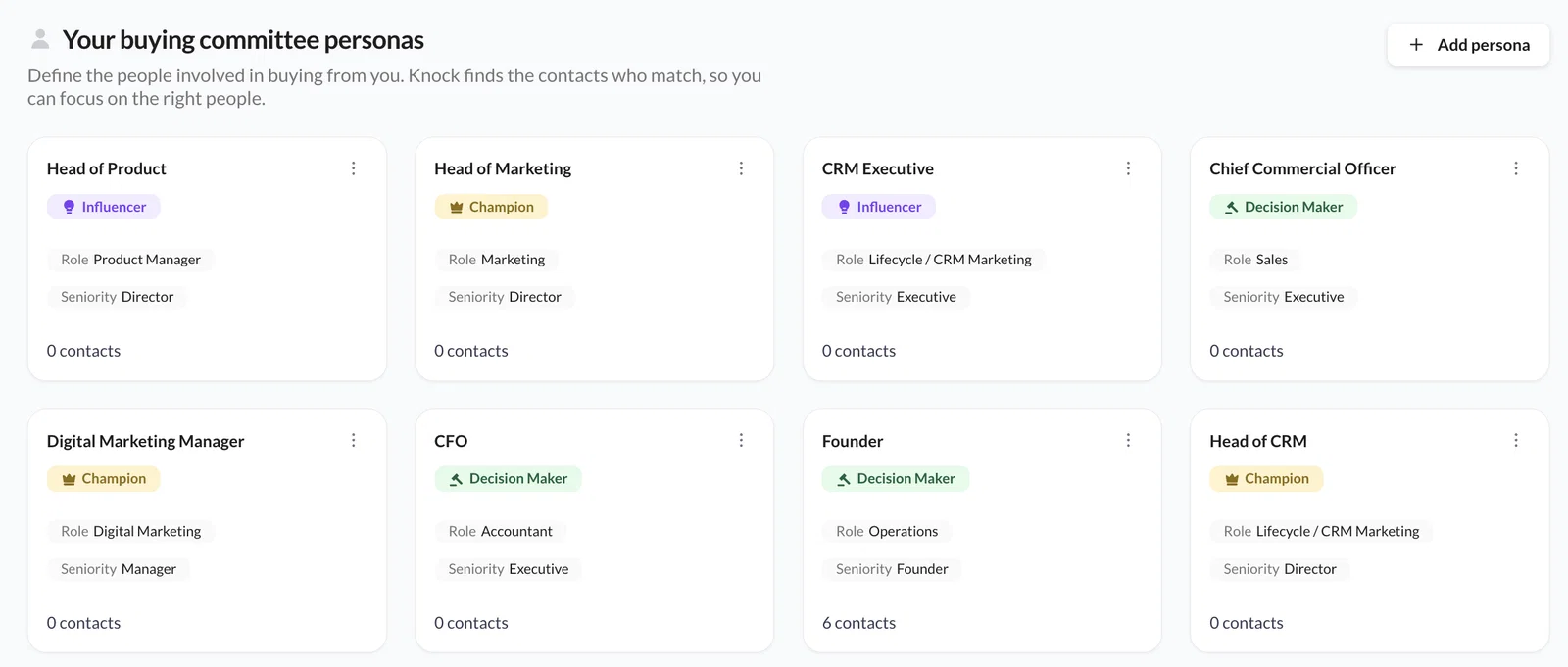
1. Build Buying Committee Personas From Your Historical Customers
Instead of guessing which job titles belong in a buying committee, Knock AI uses historical customer and CRM data to suggest ICP groups and the personas involved in successful deals.
Its buying committee framework includes five configurable personas:
Champion: Internal advocates who support the purchase.
Decision Maker: People responsible for approving or selecting a solution.
Influencer: Stakeholders who shape the purchasing decision.
User: People who will use the product or solution.
Blocker: Stakeholders who may oppose or delay the purchase.
Teams can customize suggested personas, edit their criteria, or create new ones based on their sales process. This helps define which roles Knock AI should look for when identifying potential stakeholders at target accounts.
2. Identify Relevant People at Engaging Accounts
Once buying committee personas are configured, Knock AI helps surface people who match those personas at identified accounts engaging with your business.
This includes relevant contacts interacting with your website and people engaging with your company's LinkedIn posts. Enriched contact and company information gives sales teams additional context about the people behind account activity.
For example, if several employees from a target company engage with your business, Knock AI can help identify which of them match your configured Champion, Decision Maker, or Influencer personas.
One important detail: Knock AI looks for people matching the personas your team has configured. If a particular role isn't included, Knock AI won't look for that role.
3. Understand Stakeholder Relationships With Relationship Graph
Finding relevant stakeholders doesn't automatically reveal how they influence one another or how your sales team can reach them.
Knock AI's Relationship Graph helps teams understand commercial relationships between people and accounts, including existing connections, relationship history, and potential warm introduction paths.
Sales teams can use this context to understand:
Which team members already know specific stakeholders.
How stakeholders are connected to other people in the account.
Where warm introduction opportunities exist.
The strength and history of available relationships.
Which important stakeholder relationships are missing or underdeveloped.
This gives sales teams more context than a traditional contact list and helps them identify ways to build relationships beyond their initial point of contact.
4. Turn Buying Committee Insights Into Targeted Engagement
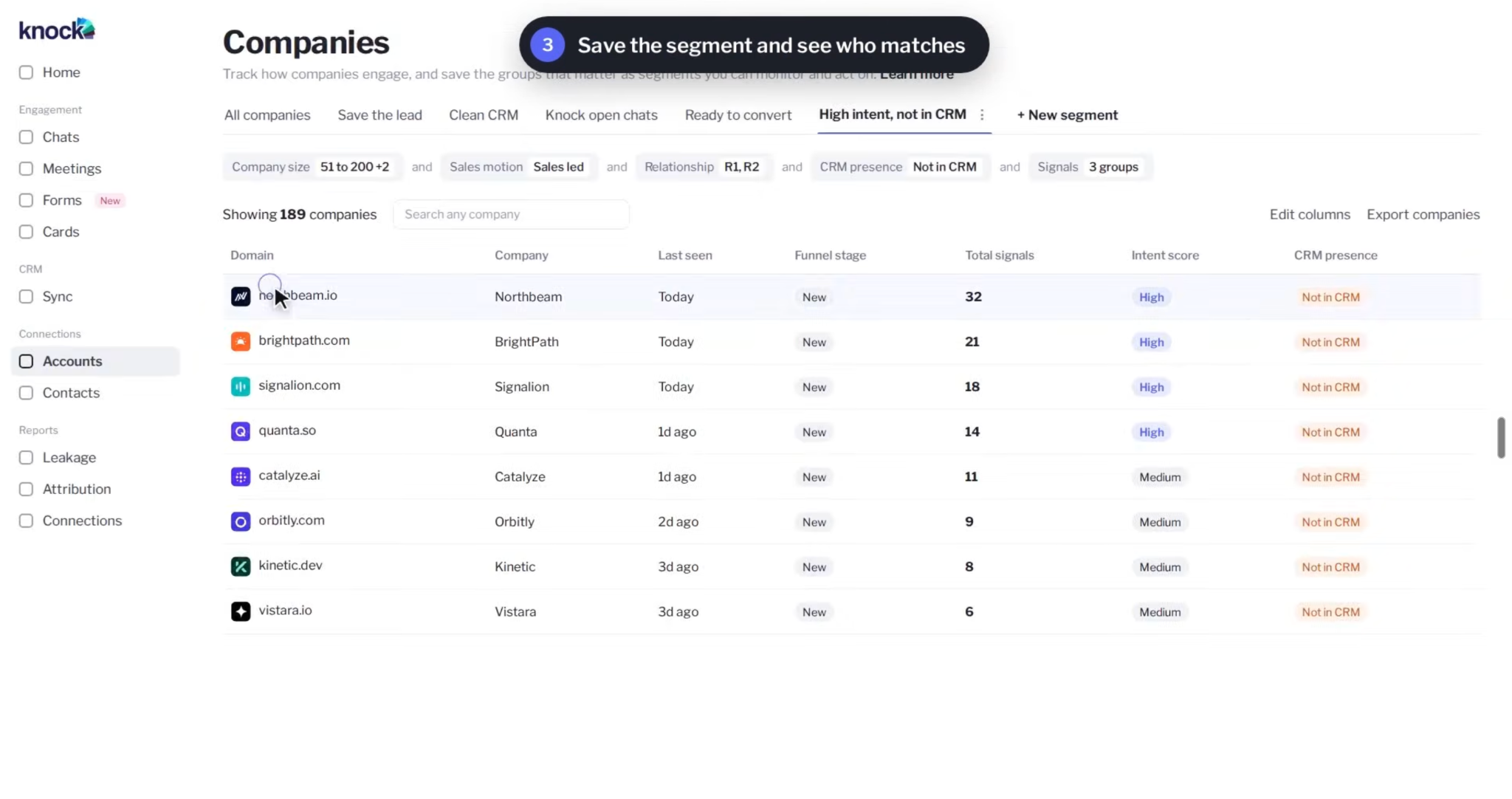
Knock AI also connects stakeholder identification with sales execution through configurable segment workflows.
A typical workflow looks like this:
Identify an engaging account: Detect a target company showing relevant activity.
Enrich the account: Gather additional company and contact information.
Select buying committee personas: Choose which stakeholder roles your team wants to engage.
Route to the right owner: Assign the account or contacts to the appropriate sales representative.
Configure personalized outreach: Set up LinkedIn messaging with different messages for different personas, based on their responsibilities and priorities.
Manage responses: Receive replies in Slack and sync relevant information with your CRM.
For example, a finance leader could receive messaging focused on business value and ROI, while a technical evaluator receives messaging relevant to integrations and security.
The outreach is based on the personas, routing rules, and messaging configured by your team. This allows sales teams to coordinate engagement across multiple stakeholders instead of relying on one generic message.
5. Connect Buying Committee Coverage to Revenue Opportunities
Buying committee mapping becomes more valuable when sales teams can connect stakeholder relationships with account intent, ICP fit, and CRM context.
Knock AI brings these signals together to help teams understand which accounts deserve attention, which relevant stakeholders are engaging, where relationships are strong, and where important buying committee roles remain uncovered.
This gives sales teams a clearer picture of account readiness and helps them identify the next steps needed to build stakeholder coverage and progress opportunities.
Want to identify the people behind your next enterprise opportunity? Explore how Knock AI connects buying signals, buying committee intelligence, and relationship insights to help your sales team turn account engagement into coordinated revenue opportunities.
FAQs
How many people are typically in an enterprise buying committee?
There is no fixed number of people in an enterprise buying committee. Its size depends on the organization's structure, purchase complexity, industry, potential risks, and internal approval requirements. A relatively straightforward purchase may involve only a few stakeholders, while a complex enterprise solution may require input from multiple departments and senior decision-makers.
What is the difference between a buying committee and a buying group?
The terms buying committee and buying group are often used interchangeably to describe people involved in a purchase decision. Some organizations use buying groups to refer to a broader set of stakeholders who participate in researching, evaluating, influencing, or approving a purchase.
Who should be included in a buying committee map?
A buying committee map should include the people who influence, evaluate, or approve the specific purchase. Common roles include the economic buyer, champion, decision-maker, technical evaluator, end users, influencers, and blockers. Procurement and legal stakeholders should also be included when they are part of the organization's purchasing and approval process.
How do you identify the real decision-maker in an enterprise account?
Start by understanding who controls the budget, who has final approval authority, and who influences the vendor selection process. Review historical deal data, ask your existing contact about the internal approval process, and speak with relevant stakeholders to validate their responsibilities. Don't assume that the most senior contact or your primary point of contact is automatically the decision-maker.
What is the difference between stakeholder mapping and buying committee mapping?
Stakeholder mapping is a broader process of identifying people who influence or are affected by a business relationship, project, or decision. Buying committee mapping focuses specifically on the stakeholders involved in evaluating and purchasing a product or service. It examines their buying roles, priorities, influence, relationships, and involvement in a particular purchase.
How often should sales teams update a buying committee map?
Sales teams should update their buying committee maps whenever meaningful changes occur. This includes after discovery calls, product demonstrations, new stakeholder introductions, changes in deal stage, and organizational restructuring. Reviewing the map before major milestones also helps identify missing decision-makers and unresolved objections before they delay the opportunity.
How can sales teams identify hidden buying committee members?
Sales teams can combine several sources of information to uncover stakeholders who haven't interacted directly with them. Review CRM records and historical deals, monitor website and content engagement, research employees on LinkedIn, and ask existing champions about other people involved in the decision. Relationship intelligence can also reveal existing connections and potential warm introduction paths to stakeholders your team hasn't reached yet.