Why Is a User Journey Map Important?
Here's the real value of a user journey map: it helps you see problems that are easy to miss when you're only looking at individual screens, pages, or touchpoints.
You might find that a user isn't dropping off because one page is broken. Maybe they don't have the information they need earlier in the journey, or they're moving between channels and losing context along the way.
A journey map can help you:
- Find friction and pain points: See where users get confused, frustrated, delayed, or drop off.
- Create a shared view across teams: Give product, UX, marketing, sales, and support the same picture of what the user is experiencing.
- Challenge internal assumptions: What your team thinks users do isn't always what actually happens. Mapping the journey can expose those gaps.
- Spot unmet needs: Look for questions, expectations, or problems that your current experience isn't addressing.
- Prioritize improvements: Once the biggest problems are visible, it's easier to decide what deserves attention first.
- Connect behavior to business decisions: User behavior can help explain why conversion, retention, adoption, or other business outcomes are changing.
- Find gaps between touchpoints: A user may have a smooth experience on your website but a frustrating handoff to sales or support. A journey map helps you see the entire experience rather than one channel at a time.
So, don't think of a journey map as something you create just to document the customer experience. The useful part comes when you use it to decide what to fix, improve, or investigate next.
What Are the Types of User Journey Maps?
Not every journey map is trying to answer the same question. The type you choose depends on what you want to understand.
| Type |
Purpose |
| Current-state map |
Shows how users experience the journey today |
| Future-state map |
Shows the experience you want to create |
| Day-in-the-life map |
Shows the user's broader context beyond a specific product interaction |
| Service blueprint |
Adds the internal processes, people, and systems supporting the customer experience |
A current-state map is useful when you're trying to figure out what's going wrong today. A future-state map flips the question around and helps your team think about what the experience should look like instead.
A day-in-the-life map goes beyond your product or website. It looks at what the user is doing, thinking, and dealing with more broadly, which can reveal needs you wouldn't see by looking at your own touchpoints alone.
A service blueprint takes things one step further by connecting the user's experience to what is happening behind the scenes, such as internal teams, processes, and systems.
You can also create journey maps around a specific context, such as a UX journey map for a product experience or a sales journey map for the path from initial interest to purchase. The basic idea stays the same: understand what the user experiences and find where you can make that experience better.
User Journey Map vs User Flow vs Customer Journey Map
These three terms sound pretty similar, so it's easy to mix them up. The easiest way to think about them is to ask what you're trying to understand.
|
User Journey Map |
User Flow |
Customer Journey Map |
| Focus |
User experience |
Task completion |
Broader customer relationship |
| Captures emotions |
Yes |
Usually no |
Yes |
| Scope |
Product or service experience |
Specific task |
End-to-end relationship |
| Primary use |
Understand the experience |
Optimize a task flow |
Improve customer experience |
A user journey map gives you the bigger picture of what someone experiences while trying to accomplish a goal. You're looking at their actions, thoughts, emotions, touchpoints, and pain points.
A user flow is much more specific. It focuses on the steps someone takes to complete a particular task, such as signing up for an account or checking out. It helps you figure out whether that path is simple and easy to follow.
A customer journey map usually looks at the relationship with the company more broadly. It can cover everything from discovering the brand and becoming a customer to support, retention, and expansion.
So, if you want to understand the experience, use a journey map. If you want to understand how someone completes a task, look at the user flow. If you want to understand the broader relationship with your company, use a customer journey map.
How to Create a User Journey Map
You don't need a complicated framework to get started. The important thing is to make the map specific enough that it tells you something useful.
1. Define the Goal and Scope
Start by deciding what journey you're actually trying to understand. "The entire customer experience" is usually too broad.
Instead, choose something specific, such as the journey from discovering your product to booking a demo.
2. Choose the User Persona
Decide whose journey you're mapping. Different users can have very different experiences, so avoid trying to represent everyone with one map.
For a B2B product, for example, a marketing manager and a sales leader might have completely different goals and questions.
3. Define the Scenario
Now clarify what the user is trying to accomplish. This gives the journey a clear starting point and goal.
For example:
Scenario: A potential customer is researching solutions to improve their website conversion rate.
4. Identify Journey Stages and Touchpoints
Break the experience into the major stages the user moves through and note where they interact with your company.
These touchpoints could include your website, search results, email, social media, product, chat, sales calls, or support.
5. Map Actions, Thoughts, and Emotions
For each stage, ask three simple questions:
- What is the user doing?
- What are they thinking or trying to figure out?
- How are they feeling?
This is where the map starts becoming more useful than a basic flowchart. You aren't just documenting what happened. You're trying to understand why the experience feels the way it does.
6. Identify Pain Points and Opportunities
Look for places where the user gets stuck, has to do unnecessary work, can't find an answer, or loses momentum.
Then ask what you could change. Maybe the solution is better content, a simpler process, clearer messaging, or a more relevant experience.
7. Validate the Map With Real User Data
This step is easy to skip, but it's one of the most important.
Don't build the entire map around what your team thinks users are doing. Check it against real evidence such as interviews, surveys, website analytics, session data, support conversations, chat transcripts, and CRM activity.
Your first map is a hypothesis. Real user behavior should help you confirm it, challenge it, and improve it.
User Journey Map Example
Let's say you're a B2B SaaS company trying to understand how a potential customer moves from discovering your product to booking a meeting.
The journey might look like this:
Discover → Visit Website → Explore Product → Compare Options → Start Conversation → Book Meeting → Evaluate → Purchase
Here's what that could look like in practice:
| Stage |
User Action |
User Need |
Friction |
Opportunity |
| Discovery |
Searches for a solution |
Understand available options |
Too much generic information |
Create more relevant content |
| Evaluation |
Visits the website |
Determine whether the product fits |
Can't find specific answers |
Provide a more personalized experience |
| Conversation |
Chats with sales |
Get answers to specific questions |
Context gets lost between interactions |
Keep conversation and buyer context connected |
| Meeting |
Books a demo |
Evaluate the solution |
Scheduling creates extra steps |
Make meeting booking easier |
Notice that the map isn't just showing what the user does. It's also showing what they need, where things become frustrating, and what the business can do about it.
That's the part that makes a user journey map useful. It turns a messy experience into something your team can actually look at, discuss, and improve.
How to Make a User Journey Map More Accurate
Here's the thing: your journey map is only as good as the information behind it.
It's easy for a team to sit in a room and map out what they think users do. The problem is that real users don't always follow the journey you designed for them. They skip steps, come back later, switch channels, ask questions, and sometimes do things nobody expected.
So, before treating your map as fact, validate it with real user data.
You can use:
- User interviews to understand goals, motivations, and frustrations directly from users
- Surveys to collect feedback from a larger group
- Website analytics to see how people actually move through your site
- Session recordings to spot confusing interactions and unexpected behavior
- Conversion data to find where users drop off
- Support conversations to uncover recurring problems and questions
- Chat transcripts to understand what users need help with
- CRM data to connect user activity with sales outcomes
- Behavioral signals to understand what users are doing across different touchpoints
The process doesn't really end once you've created the map. Think of it as a cycle:
Map → Validate → Identify Friction → Improve → Measure → Update
As you learn more about your users, the map should change too. That's what keeps it useful instead of turning it into a document that looks great but no longer reflects reality.
How Is AI Changing User Journey Mapping?
AI is making it much easier to work with the amount of user behavior data that companies collect today.
Instead of manually going through thousands of interactions, teams can use AI to analyze that information, spot patterns, and surface areas that deserve a closer look.
For example, AI can help teams:
- Analyze large volumes of behavioral data
- Find patterns that might be difficult to spot manually
- Surface common friction points and drop-off areas
- Group journeys by persona, behavior, or intent
- Generate initial journey maps from existing research and data
- Keep journey maps updated as user behavior changes
- Personalize experiences based on what someone is doing in real time
There's also a bigger change happening: AI agents are becoming part of digital journeys themselves.
A user journey used to assume that a human was clicking through pages, filling out forms, comparing products, and talking to a salesperson. Now, an AI assistant or agent might research a product, compare options, ask questions, or even take actions on the user's behalf.
That means teams increasingly need to understand not just where people go, but also what signals they create and how those interactions change over time.
How Knock AI Helps Turn User Journeys Into Real-Time Engagement
A journey map helps teams understand the path users take. Knock AI helps teams act on what is happening along that path.
This is especially useful for B2B websites, where a visitor's journey can involve multiple visits, channels, people, and conversations before a meeting ever happens.
Knock connects that activity through a simple progression:
Signal → Identity → Context → Engagement → Conversation → Meeting → Pipeline
For example, a visitor might show meaningful interest through several website interactions. Instead of treating each visit as an isolated event, Knock AI can help identify the relevant visitor or account, connect their interactions, preserve the context, and create a more relevant opportunity to engage.
That engagement can then move into a direct conversation or meeting, while the resulting activity remains connected to the account and CRM.
The important point is that Knock AI doesn't create the user journey map for you. The map helps you understand what the user experiences. Knock AI helps operationalize the next interaction based on what is actually happening along that journey.
So you can think about it this way:
Journey mapping helps you understand the experience. Knock AI helps you respond to it in real time.
User Journey Map FAQs
What is a user journey map?
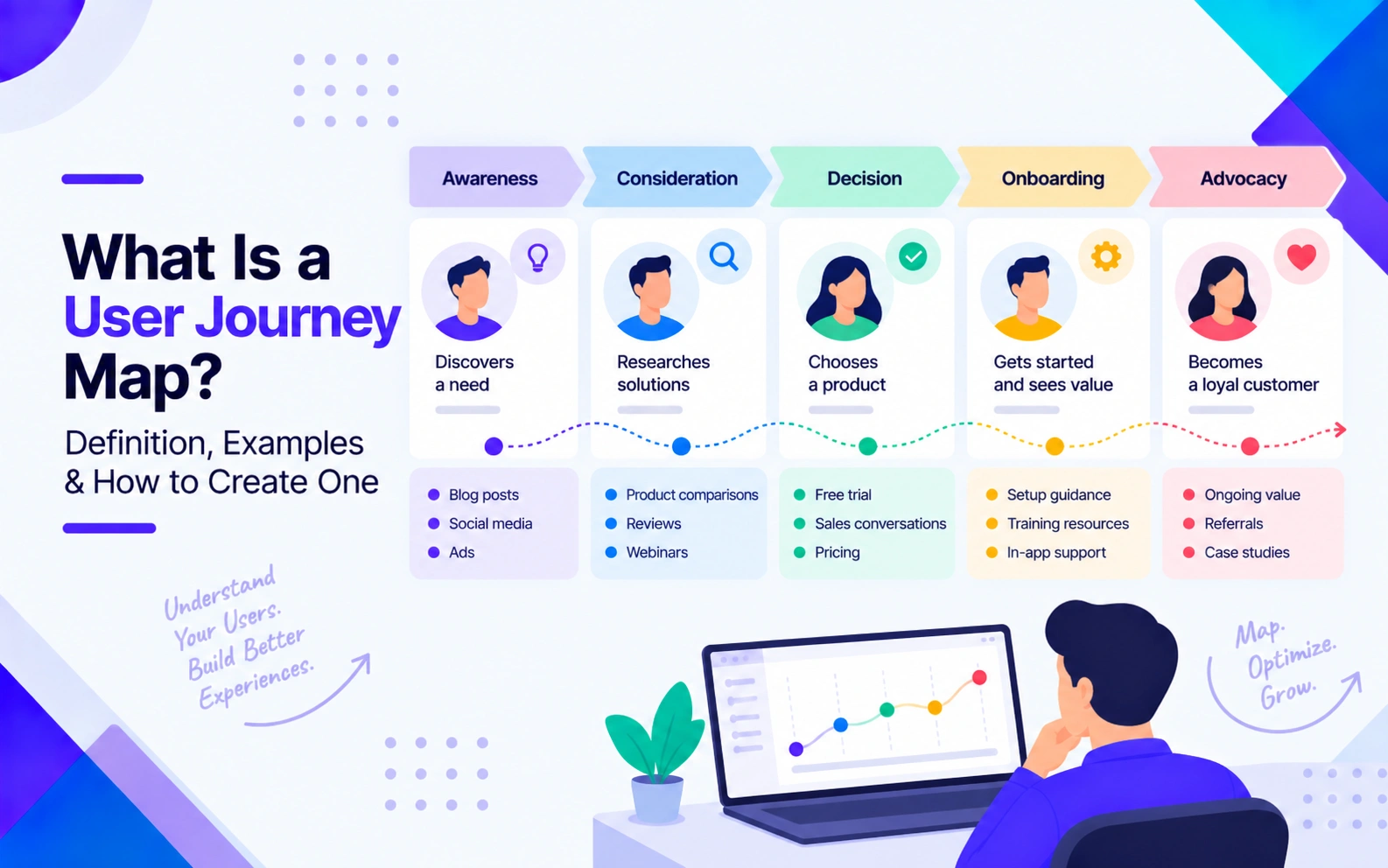
A user journey map is a visual representation of how a specific user or persona moves through an experience to accomplish a goal, including their actions, thoughts, emotions, pain points, and touchpoints.
What are the 5 elements of a journey map?
The core elements are typically persona, scenario, journey stages, actions, and thoughts or emotions. Many maps also include touchpoints, pain points, and opportunities to make the experience more actionable.
What is the difference between a user journey map and a user flow?
A user journey map looks at the broader user experience, including actions, thoughts, and emotions. A user flow focuses on the specific steps someone takes to complete a task.
What is the difference between a user journey map and a customer journey map?
A user journey map usually focuses on a specific user's experience with a product or service, while a customer journey map can cover the broader relationship between a customer and a company across multiple stages and touchpoints.
What are the four types of journey maps?
The four common types are current-state, future-state, day-in-the-life, and service blueprint. Each looks at the experience from a slightly different angle.
How do you create a user journey map?
Start by defining the goal and scope, choosing a persona and scenario, mapping the journey stages and touchpoints, documenting actions and emotions, identifying pain points and opportunities, and validating the map with real user data.
What tools can you use to create a user journey map?
You can create a journey map with tools such as UXPressia, Miro, FigJam, Lucidchart, or even a spreadsheet. The tool matters less than having reliable user research and a clear structure behind the map.
Why are user journey maps important?
They help teams see where users get confused, frustrated, or drop off, while creating a shared understanding of the experience. More importantly, they help teams identify what to improve and where those improvements can have the biggest impact.


.svg)


.svg)
.svg)
.svg)


.svg)
.svg)


.svg)


