LinkedIn Sales Navigator Cost: Full Pricing Guide 2026
LinkedIn Sales Navigator pricing starts at $119.99 per month for Core and $159.99 per month for Advanced when billed monthly. Advanced Plus uses custom pricing, so you'll need to contact LinkedIn for a quote.
If you pay annually, Core costs $1,079.88 per license, while Advanced costs $1,799.88 per license. The right plan depends on whether you're an individual sales professional looking for better prospecting tools, a team that needs collaboration features, or an organization requiring deeper CRM integration.
In this guide, we'll break down LinkedIn Sales Navigator's plans, compare monthly and annual costs, calculate potential savings, and help you decide which option makes the most sense for your sales workflow.
TL;DR: LinkedIn Sales Navigator Pricing at a Glance
Plan
Monthly billing
Annual billing
Best for
Core
$119.99/month
$1,079.88/year
Individual sellers
Advanced
$159.99/month
$1,799.88/year
Sales teams needing collaboration and additional insights
Advanced Plus
Custom quote
Custom quote
Teams needing deeper CRM integration
What Is LinkedIn Sales Navigator?
LinkedIn Sales Navigator is a B2B sales prospecting tool that helps sales professionals find potential customers, identify decision-makers, and build targeted lead lists using advanced search filters and account insights.
Unlike standard LinkedIn or Premium Business, Sales Navigator is designed specifically for sales workflows. It offers features such as lead recommendations, saved searches, InMail messaging, and account tracking to help sales teams identify relevant prospects and build relationships more efficiently.
It's particularly useful for SDRs, account executives, recruiters working in business development, and sales teams that rely on LinkedIn to generate leads and find new business opportunities.
LinkedIn Sales Navigator Features and How They Work
Feature
How It Works
Why It Matters
Advanced Lead Search
Filter prospects by job title, seniority, company, function, experience, and other criteria.
Helps you build targeted prospect lists instead of manually searching LinkedIn profiles.
Lead & Account Alerts
Track saved prospects and companies for updates such as job changes and relevant activity.
Gives you timely reasons to reconnect or personalize your outreach.
TeamLink
Identify potential introductions through your colleagues' professional networks.
Helps you find warmer routes into target accounts instead of relying entirely on cold outreach.
InMail
Message eligible prospects outside your immediate LinkedIn network using InMail credits.
Opens another route to decision-makers you cannot contact through a direct connection.
AI Message Drafting
Generate outreach suggestions using available LinkedIn insights and buyer signals.
Reduces writing time while helping you tailor messages to individual prospects.
Account IQ & Lead IQ
Generate AI-powered summaries about target companies and individual buyers.
Helps salespeople prepare for meetings and understand potential buyer priorities faster.
CRM Integration
Connect Sales Navigator insights with supported CRM workflows. Advanced Plus offers deeper integration capabilities.
Helps sales teams connect prospect research with account management and existing sales processes.
Saved Leads & Searches
Save prospects and search criteria for ongoing prospecting.
Makes it easier to revisit relevant leads and maintain a consistent prospecting workflow.
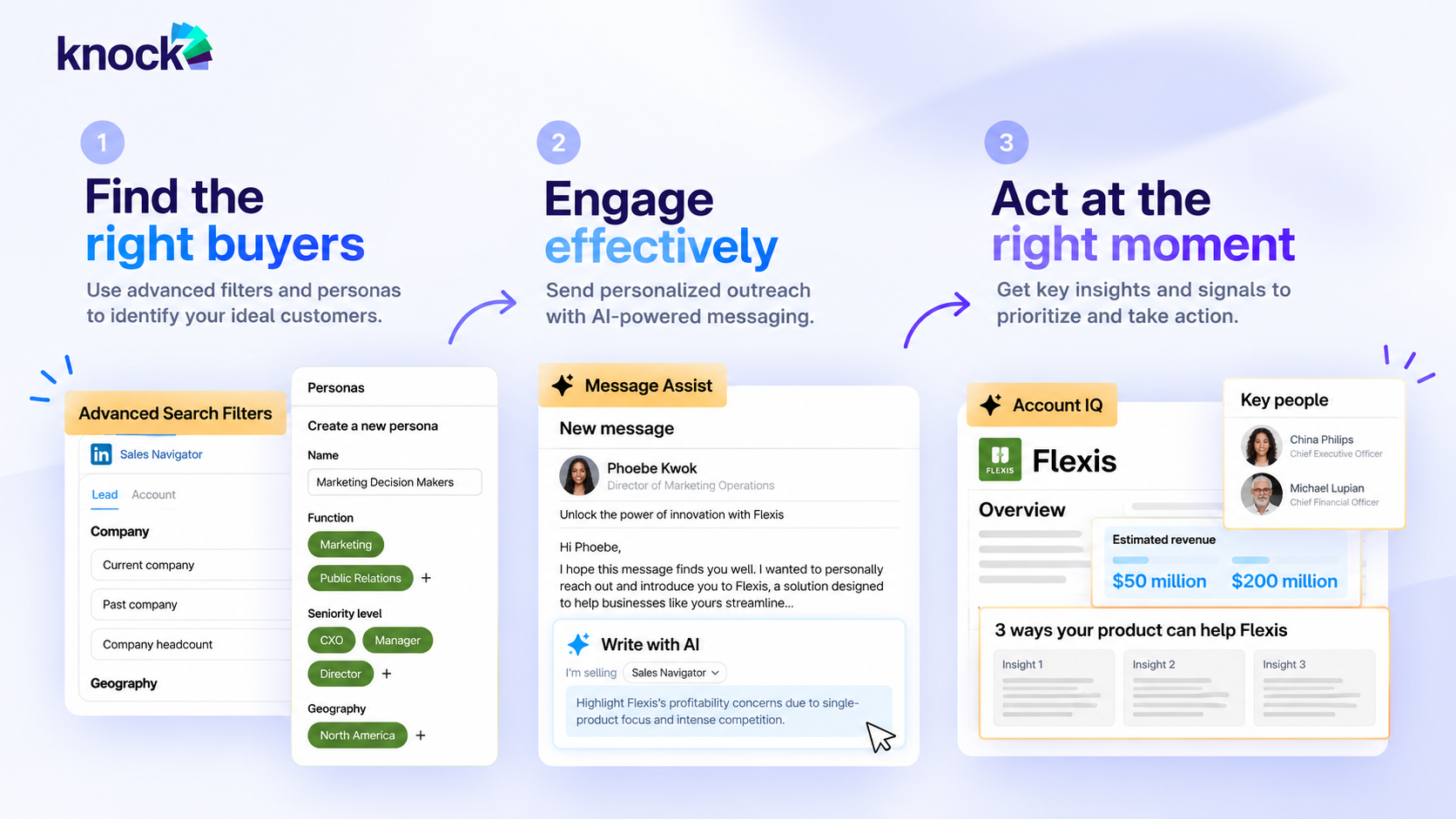
See Knock AI in Action — Book Your Live Demo Today
Feature availability varies by subscription. TeamLink and AI-powered capabilities have plan or language restrictions, while deeper CRM integrations are associated with Advanced Plus.
Our take: Sales Navigator's biggest advantage is helping salespeople identify the right prospects, understand their context, and find relevant ways to engage. However, it isn't a complete outbound sales stack. Teams may still need separate tools for verified contact data, email sequencing, and broader outreach automation.
How Much Does LinkedIn Sales Navigator Cost?
LinkedIn Sales Navigator starts at $119.99 per month for Core and $159.99 per month for Advanced when billed monthly. Annual billing reduces the effective monthly cost, while Advanced Plus requires a custom quote.
Here's how the costs compare:
Plan
Monthly billing
Annual billing
Annual savings
Core
$119.99/month
$1,079.88/year
$360.00
Advanced
$159.99/month
$1,799.88/year
$120.00
Advanced Plus
Custom quote
Custom quote
Not publicly specified
LinkedIn Sales Navigator Pricing Plans Compared
LinkedIn offers three Sales Navigator plans: Core for individual sellers, Advanced for sales teams, and Advanced Plus for organizations that need deeper CRM integration. While all three provide prospecting capabilities and 50 monthly InMail credits, their collaboration and integration features differ.
LinkedIn Sales Navigator Core Pricing
LinkedIn Sales Navigator Core starts at $119.99 per month or $1,079.88 per year per license. It's designed for individual sales professionals who need advanced prospecting capabilities without the additional team collaboration and CRM integration features of higher-tier plans.
Detail
Core
Monthly price
$119.99
Annual price
$1,079.88
Effective monthly cost with annual billing
$89.99
Annual savings
$360 per license
Best for
Individual sales professionals and independent sellers
LinkedIn Sales Navigator Core features
Feature
What you get
Advanced search
50+ filters to find relevant leads and accounts
Lead recommendations
Discover prospects based on your sales activity and preferences
InMail
50 credits per month
Lead and account alerts
Track changes and updates involving saved prospects
Account IQ and Lead IQ
AI-powered account and buyer insights, subject to feature availability
Saved leads and searches
Organize prospecting and revisit relevant opportunities
Core is the most suitable starting point if you're primarily using Sales Navigator to discover prospects, research accounts, and contact decision-makers. Annual billing saves $360 compared with paying monthly for 12 months.
LinkedIn Sales Navigator Advanced Pricing
LinkedIn Sales Navigator Advanced costs $159.99 per month or $1,799.88 per year per license. Compared with Core, it adds capabilities designed for sales teams that need to collaborate, identify buying signals, and coordinate prospecting activity.
Detail
Advanced
Monthly price
$159.99
Annual price
$1,799.88
Effective monthly cost with annual billing
$149.99
Annual savings
$120 per license
Best for
Sales teams and collaborative prospecting workflows
LinkedIn Sales Navigator Advanced features
Feature
What you get
Advanced search
50+ filters for targeted lead and account discovery
InMail
50 credits per month
Buyer Intent
Signals that help identify potential interest in your company
TeamLink
Find potential warm introductions through colleagues' networks
Smart Links
Share content and track prospect engagement
Team reporting
Monitor team activity and adoption
AI-assisted messaging
Generate personalized message drafts in supported languages
Account IQ and Lead IQ
AI-powered insights to prepare for buyer conversations
Advanced is worth considering when prospecting is a team activity rather than an individual task. Features such as TeamLink, Smart Links, and Buyer Intent can help salespeople coordinate outreach and prioritize relevant opportunities.
LinkedIn Sales Navigator Advanced Plus Pricing
LinkedIn Sales Navigator Advanced Plus uses custom pricing. LinkedIn does not publish a standard monthly or annual price because quotes depend on factors such as team size, CRM integration, and onboarding or training requirements.
Detail
Advanced Plus
Monthly price
Custom quote
Annual price
Custom quote
Pricing factors
Team size, CRM requirements, and onboarding needs
Best for
Sales organizations that need deeper CRM integration
LinkedIn Sales Navigator Advanced Plus features
Feature
What you get
Advanced prospecting
Search filters, lead recommendations, and alerts
InMail
50 credits per month
Buyer and account insights
Account IQ, Lead IQ, and relevant sales signals
Advanced CRM integrations
Connect Sales Navigator with supported CRM systems
Lead and contact creation
Add leads and accounts directly to supported CRM workflows
CRM synchronization
Keep relevant CRM records and LinkedIn insights connected
Enhanced reporting
Custom ROI reporting and additional team capabilities, depending on the agreement
Advanced Plus is most relevant for organizations that want Sales Navigator embedded more deeply into their CRM and sales processes. If your team only needs prospect discovery and basic outreach, Core or Advanced may be sufficient without the additional complexity of an enterprise-oriented setup.
How to Purchase/Login to LinkedIn Sales Navigator?
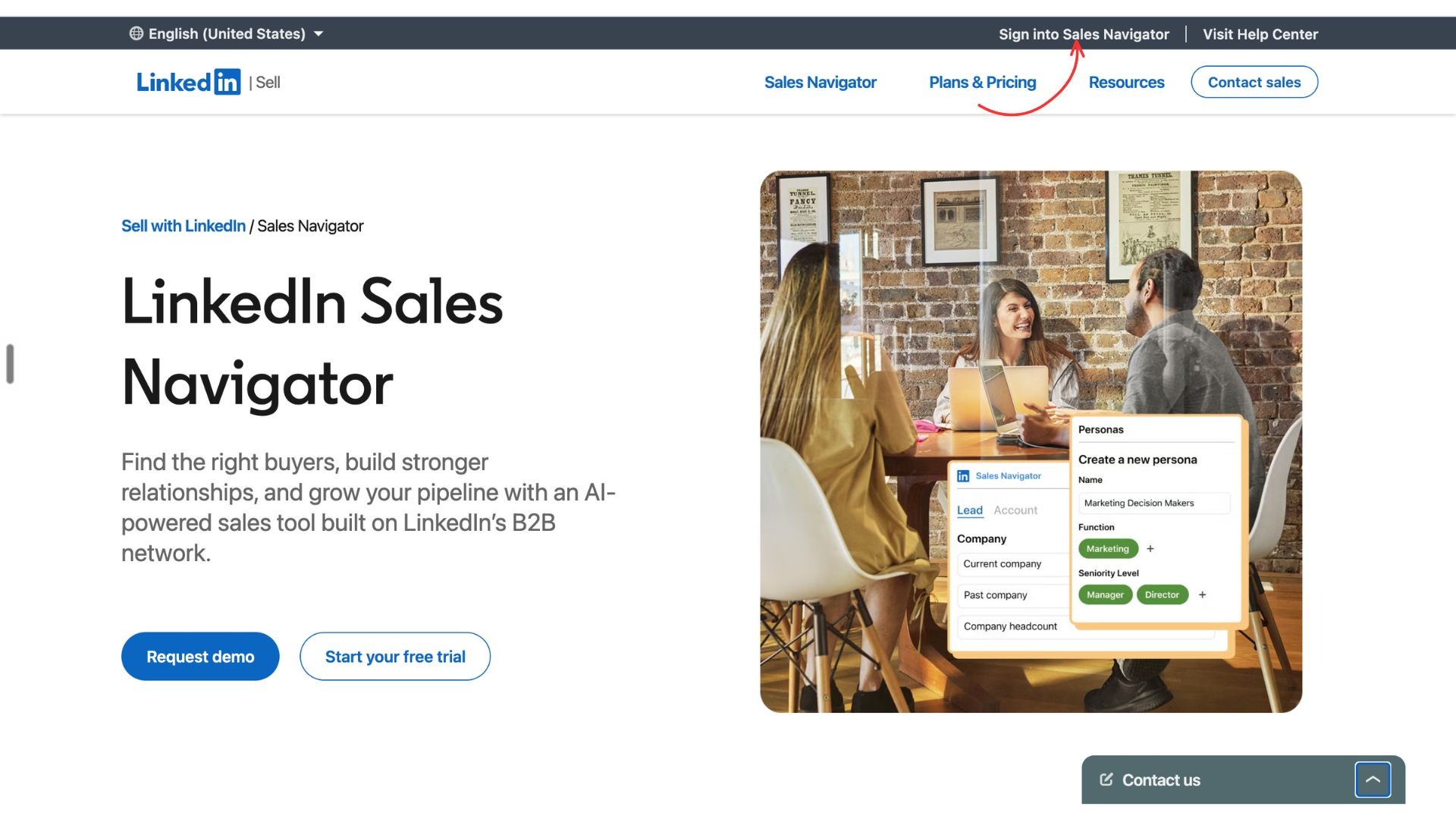
Step 1: Visit their official website and navigate to “Sign into Sales Navigator” at the top right
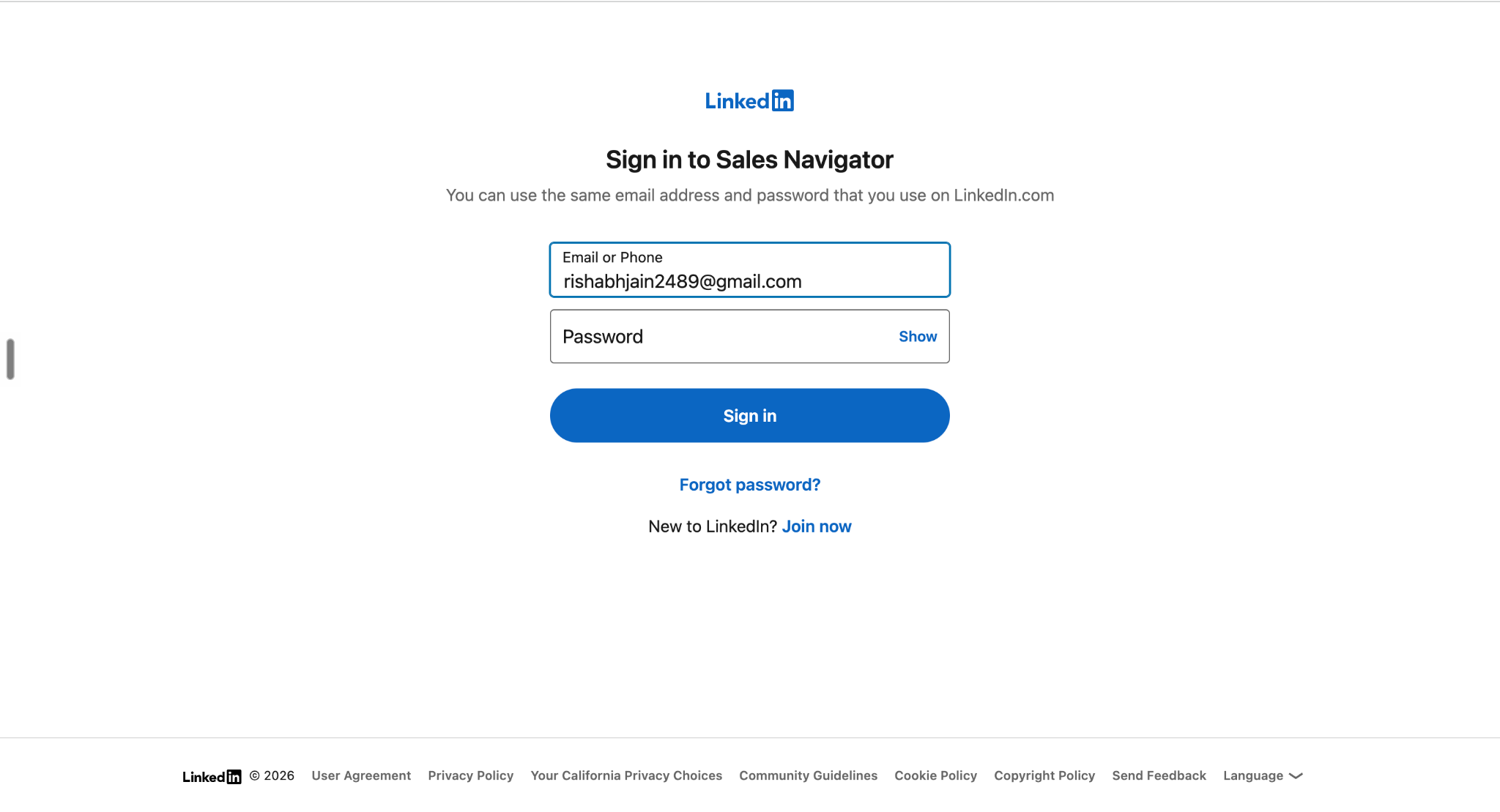
Step 2: Fill in your login information (same as your LinkedIn Account) and Click on “Sign in”
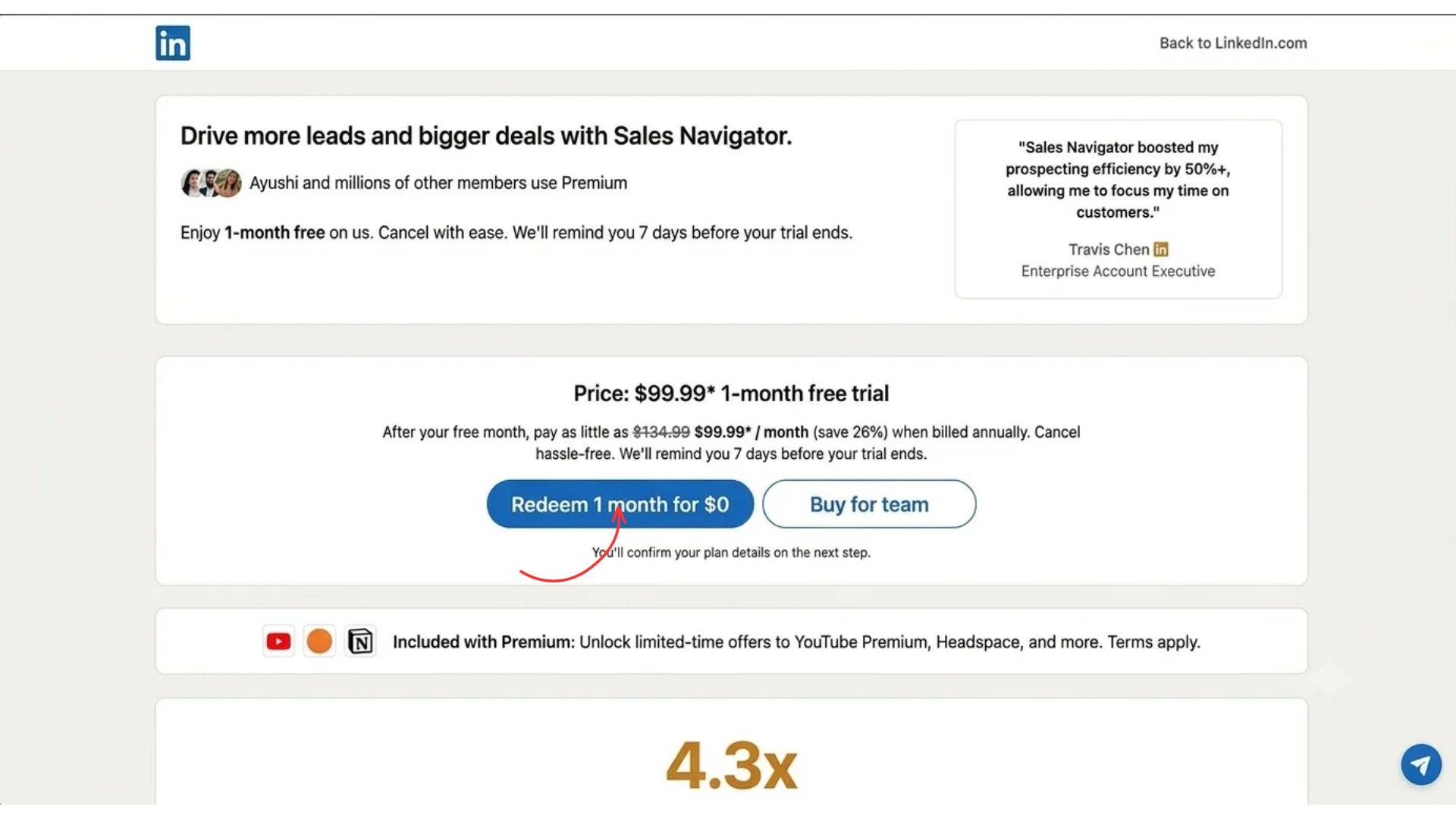
Step 3: Click on “Redeem 1 month for $0
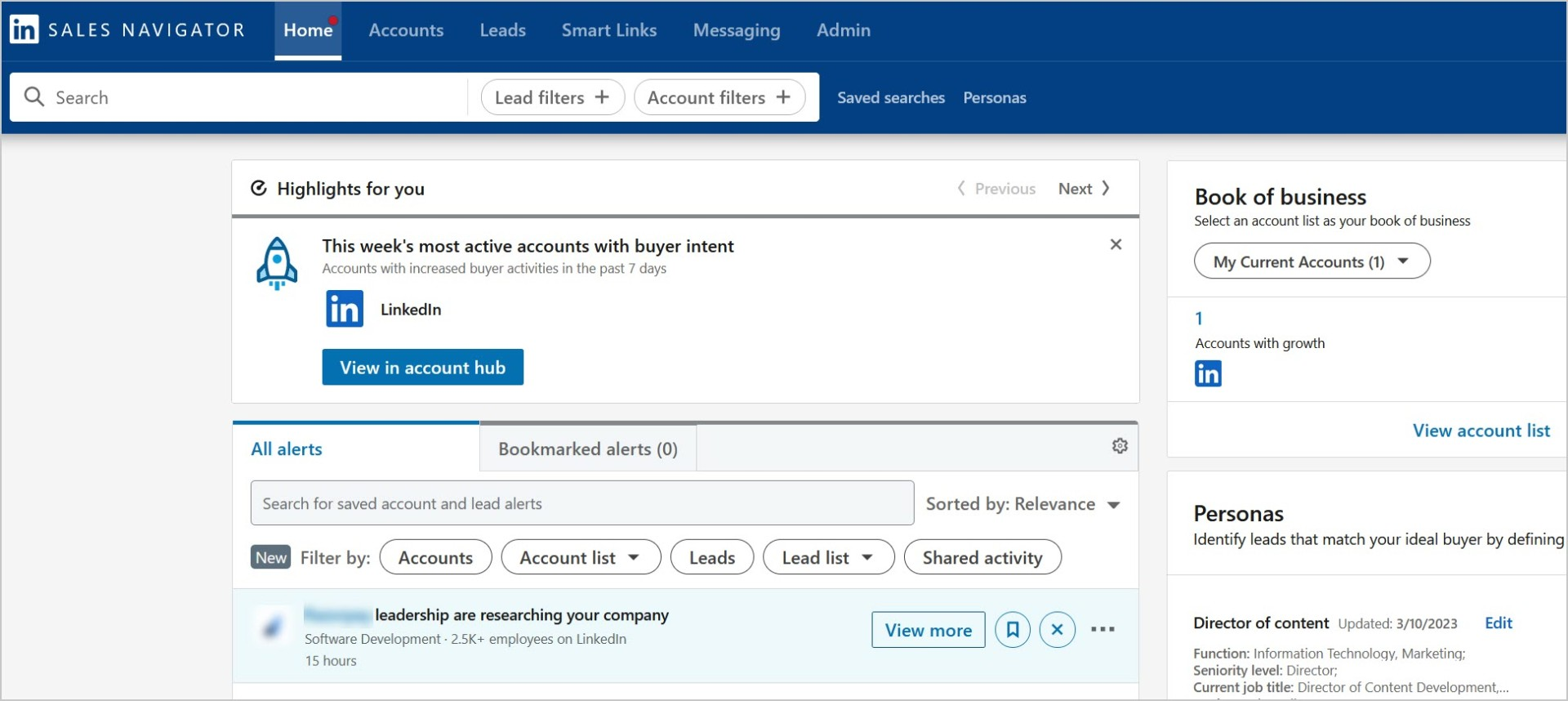
And boom, once you are signed in you will be redirected to the home page of LinkedIn Sales Navigator Dashboard
LinkedIn Sales Navigator vs. LinkedIn Premium
LinkedIn Premium Business helps professionals grow their network, strengthen their profile, and connect with potential clients. LinkedIn Sales Navigator is built specifically for B2B prospecting, with advanced search filters, sales-specific insights, and tools for managing target accounts.
The biggest difference is that Premium helps you build your professional presence, while Sales Navigator helps you systematically find and engage potential buyers.
Feature
LinkedIn Premium Business
LinkedIn Sales Navigator
Primary purpose
Networking, professional branding, and business development
B2B prospecting and sales
Search filters
General LinkedIn search
50+ sales-specific filters
InMail credits
15 per month
50 per month
Saved leads and accounts
Limited sales-specific functionality
Dedicated lead and account lists
Buyer alerts and insights
Basic insights
Sales-focused alerts and buyer signals
AI-powered sales insights
General-purpose features
Account IQ and Lead IQ, subject to plan and availability
TeamLink and warm introductions
Not the full Sales Navigator experience
Available on eligible plans
CRM integration
Not the same dedicated sales integration capabilities
Deeper CRM integrations available with Advanced Plus
Starting monthly price
From $69.99
From $119.99 for Core
Which One Should You Choose?
Choose LinkedIn Premium Business if you mainly want to expand your professional network, improve your profile, and contact potential clients occasionally.
Choose Sales Navigator Core if prospecting is a regular part of your job and you need advanced filters, saved lead lists, and more InMail credits. Advanced is worth considering when you need team collaboration and sales engagement features, while Advanced Plus suits organizations that require deeper CRM integration.
Our verdict: If you're actively building B2B prospect lists and running a structured sales process, Sales Navigator is the more specialized option. If your needs center on networking and maintaining a professional presence, Premium Business may be sufficient.
What Does LinkedIn Sales Navigator Not Include?
LinkedIn Sales Navigator helps you discover decision-makers, research target accounts, and identify opportunities to build relationships. However, finding potential buyers is only one part of the sales process.
Here's what you should know before subscribing:
Verified contact data: Sales Navigator isn't a dedicated database for retrieving verified business email addresses and direct phone numbers for every prospect.
Unrestricted lead exports: Don't assume you can freely export all saved leads. Data transfer and CRM synchronization depend on the plan and supported integrations.
Complete outbound automation: Sales Navigator supports prospecting and InMail, but it isn't a complete multichannel outreach platform with automated sequences across every channel.
Automatic lead conversion: Finding a decision-maker or receiving a job-change alert doesn't automatically qualify that person, start a conversation, or book a meeting.
This brings us to an important distinction: finding the right buyer and converting that buyer into a sales opportunity are two different jobs.
LinkedIn Sales Navigator vs. Knock AI
LinkedIn Sales Navigator and Knock AI solve different problems in the B2B sales process. Sales Navigator helps salespeople find relevant prospects and build relationships on LinkedIn. Knock AI focuses on engaging buyers, acting on first-party intent signals, qualifying opportunities, and helping revenue teams turn buyer interest into sales conversations.
Capability
LinkedIn Sales Navigator
Knock AI
Prospect discovery
Advanced LinkedIn search, lead recommendations, and account research
Buyer identification and enrichment across supported touchpoints
Intent signals
Sales-focused lead and account alerts
Uses intent signals to help teams identify and prioritize potential opportunities
Buyer engagement
LinkedIn messaging and InMail
AI-powered conversations and engagement across supported channels
Lead qualification
Helps salespeople identify relevant prospects
Supports qualification using configured criteria and available buyer context
Sales routing
Sales-specific CRM and team workflows, depending on the plan
Routes qualified opportunities to the appropriate sales representative
Meeting conversion
Helps salespeople approach and engage prospects
Connects engagement and qualification with meeting scheduling
CRM workflows
Deeper integrations available with Advanced Plus
Connects supported buyer, conversation, and qualification data with CRM workflows
Can You Use LinkedIn Sales Navigator and Knock AI Together?
Absolutely. Sales Navigator can help your team identify target accounts and decision-makers, while Knock AI helps your business act on buyer interest, engage prospects, qualify conversations, and route opportunities toward sales meetings.
For example, your team might use Sales Navigator to research decision-makers at target companies. When potential buyers show intent across touchpoints supported by Knock AI, the platform can help your team respond with relevant engagement and move qualified opportunities toward a sales conversation.
The bottom line: LinkedIn Sales Navigator helps you find and research the right people. Knock AI helps connect buyer intent with engagement, qualification, routing, and revenue conversion. They can complement each other rather than serve as direct replacements.
Yes, if prospecting is a regular part of your sales process. Sales Navigator's advanced filters, account research, lead alerts, and relationship insights can make it easier to identify relevant decision-makers and prioritize outreach.
However, the subscription may be harder to justify if you only search for prospects occasionally or rarely follow up with the leads you save. You should also factor in the cost of additional tools for verified contact data, email sequencing, and multichannel outreach, which can increase your overall prospecting expenses.
Sales professionals discussing Sales Navigator on Reddit have raised this same trade-off: some value its targeting capabilities, while others question whether the monthly fee is worthwhile without additional prospecting tools.
Our verdict: Sales Navigator is worth considering for teams that actively use its insights to generate opportunities. But if you're looking to move beyond finding prospects and turn buyer intent into qualified conversations, combining prospecting with a revenue conversion platform like Knock AI may help you build a more complete sales workflow.
Frequently Asked Questions
1. What does a Sales Navigator in LinkedIn do?
LinkedIn Sales Navigator helps sales professionals find potential buyers, identify decision-makers, research target accounts, and build relationships using advanced search filters, lead recommendations, alerts, and InMail messaging.
2. How much does LinkedIn Sales Navigator cost?
LinkedIn Sales Navigator Core starts at $119.99 per month, Advanced costs $159.99 per month, and Advanced Plus requires a custom quote. Annual billing offers lower effective monthly costs.
3. Is LinkedIn Sales Navigator free?
LinkedIn Sales Navigator is a paid subscription, although eligible users may be offered a free trial. Trial availability and terms depend on account eligibility, so check LinkedIn's official website before signing up.
4. Is LinkedIn Sales Navigator worth it?
Sales Navigator can be worth the price if you regularly prospect on LinkedIn and use its advanced filters, account insights, and relationship-building features. If you only search occasionally or need verified contact data and automated outreach, consider the additional costs of your prospecting stack.
5. What are the best LinkedIn Sales Navigator alternatives?
Alternatives depend on what you need. LinkedIn Premium Business may suit lighter networking, while tools such as Apollo.io and ZoomInfo offer broader prospecting and contact-data capabilities. Knock AI serves a different but complementary purpose, helping businesses engage buyers, qualify opportunities, route leads, and turn buyer interest into sales conversations.
6. Is LinkedIn Sales Navigator better than LinkedIn Premium?
Sales Navigator is better suited to structured B2B prospecting, with specialized search filters, saved lead lists, and sales-focused insights. LinkedIn Premium Business is generally more appropriate for professional networking, profile visibility, and lighter business development.
7. Does LinkedIn Sales Navigator provide email addresses and phone numbers?
Sales Navigator helps you discover prospects and research their professional information, but you shouldn't assume it provides verified business email addresses and direct phone numbers for every lead. You may need a separate contact-data provider for that information.


.svg)


.svg)
.svg)
.svg)


.svg)
.svg)


.svg)