Apollo Pricing 2026: Plans, Credits, Hidden Costs & Alternatives
Apollo Pricing in 2026: The Simplest Breakdown of Plans, Credits, Hidden Fees, and Real Costs
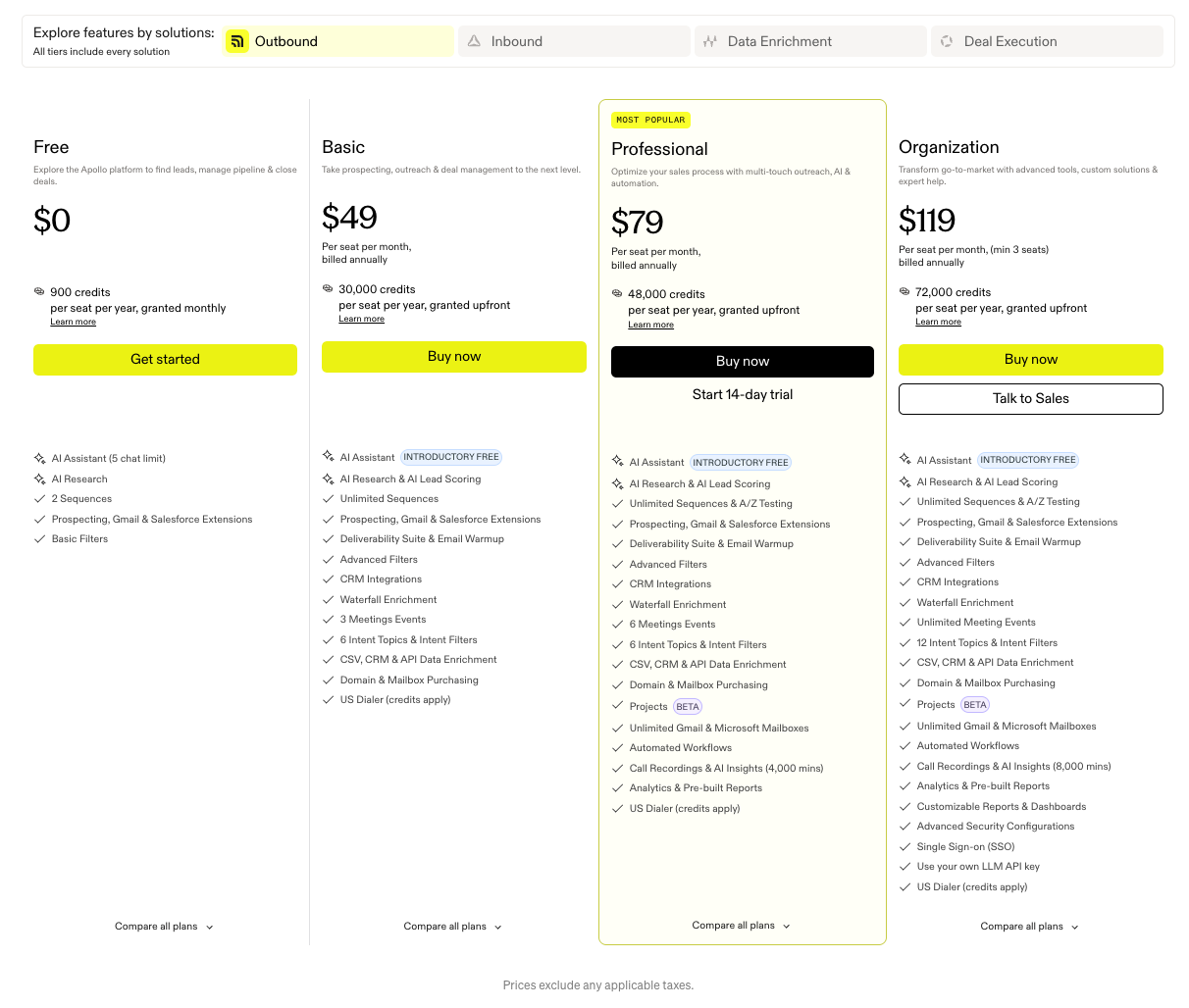
Apollo pricing starts at $49 per user/month when billed annually ($59 monthly) for the Basic plan and goes up to $119 per user/month annually ($149 monthly) for the Organization plan. However, understanding what you’ll actually pay is more complicated than the pricing table first suggests. Between credits, feature gating, workflow restrictions, add-ons, and per-seat scaling, Apollo’s real cost can increase quickly as teams grow.
That complexity is one reason many buyers end up searching for terms like “Apollo hidden costs,” “Apollo credits explained,” or “Which Apollo plan do I actually need?” Even Apollo’s own pricing page spreads features across multiple categories like Outbound, Inbound, Data Enrichment, and Deal Execution, making it difficult to compare plans side by side.
This guide simplifies everything.
We’ll break down Apollo’s pricing plans in plain English, explain how credits actually work, uncover the hidden costs most teams miss, and show what Apollo really costs for solo founders, SDR teams, and larger GTM organizations. We’ll also cover Apollo’s add-ons, feature gating, workflow limitations, and how Apollo compares with alternatives like Knock AI, ZoomInfo, Clay, and Cognism.
Whether you’re evaluating Apollo for outbound prospecting, inbound lead capture, enrichment, or full GTM workflows, this breakdown will help you determine which plan best fits your team and whether Apollo is worth the price in 2026.
Apollo pricing at a glance
Apollo’s pricing structure can feel overwhelming because features are split across multiple plans, workflows, and add-ons. Instead of forcing you to compare dozens of feature lists, here’s the simplest way to understand which Apollo plan fits different team sizes and use cases.
Which Apollo plan is right for you?
If you are…
Best Apollo plan
Testing Apollo
Free
Solo founder or SDR
Basic
Growing outbound team
Professional
Enterprise GTM organization
Organization
The biggest difference between plans is not just credits, it’s workflow automation, dialer access, reporting, integrations, security, and how well Apollo scales across larger GTM teams.
Plan
Annual Price
Monthly Price
Best For
Biggest Limitation
Free
$0
$0
Testing Apollo’s database and outreach tools
Very limited credits and workflows
Basic
$49/user
$59/user
Small outbound teams and solo SDRs
Only 2 sequences and limited automation
Professional
$79/user
$99/user
Scaling sales and SDR teams
Per-seat costs rise quickly as teams grow
Organization
$119/user
$149/user
Enterprise GTM and RevOps teams
Requires a minimum of 3 users
One important thing to know is that Apollo’s actual costs often extend beyond the base subscription price. Credits, add-ons, workflow scaling, inbound tools, and dialer functionality can significantly increase spend as usage grows.
What changes between Apollo plans?
Feature
Free
Basic
Professional
Organization
Sequences
2
2
Unlimited
Unlimited
Automated workflows
2
5
50
500
Mailboxes
1
1
Multiple
Multiple
Intent topics
1
6
6
12
Dialer
No
US only
US dialer
International dialer
Security features
No
Limited
Moderate
Advanced
CRM integrations
Basic
Standard
Advanced
Full
In practical terms, the Free and Basic plans work best for lightweight prospecting and smaller outbound operations. The Professional plan is where Apollo becomes more useful for serious SDR and sales workflows because automation, analytics, and sequencing limitations are removed. The Organization plan mainly adds enterprise-grade security, advanced workflows, international dialing, and administrative controls for larger GTM organizations.
Apollo pricing explained simply
Apollo’s pricing looks straightforward at first, but the actual cost depends on more than just the monthly subscription fee.
The platform primarily charges per user (or “seat”), meaning costs increase as more SDRs, sales reps, recruiters, or RevOps team members need access. On top of that, Apollo uses a credit-based system for actions like unlocking mobile numbers, exporting contacts, and enriching records, so heavy usage can increase costs much faster than expected.
Another thing many buyers miss is feature gating. Lower-tier plans limit important functionality like sequences, workflows, dialers, analytics, mailboxes, and automation capacity. In practice, many growing sales teams eventually move to the Professional or Organization plans simply to remove operational restrictions.
Apollo also offers additional paid add-ons for things like inbound workflows and advanced dialing capabilities, which can push total spend even higher.
For smaller teams, Apollo can feel relatively affordable. But as outbound operations scale, per-seat pricing, credits, add-ons, and workflow requirements make Apollo significantly more expensive than the advertised starting price.
Apollo Pricing Plans Explained
Apollo’s pricing can feel confusing because the platform mixes together:
As you move up Apollo’s pricing tiers, you unlock more functionality across all four solution categories. However, some advanced capabilities, especially inbound workflows and advanced dialing features, may still require additional paid add-ons.
Instead of comparing hundreds of individual features, here’s the simplest breakdown of what each plan actually gives you in practice.
Apollo Pricing Plans Comparison
Plan
Best For
Outbound
Inbound
Data Enrichment
Deal Execution
Biggest Limitation
Free
Testing Apollo
Basic prospecting & 2 sequences
Limited visitor tracking
Very limited enrichment
Basic meetings only
Extremely restrictive
Basic
Small outbound teams
More prospecting & filters
Light inbound workflows
CRM enrichment & intent
Basic workflow support
Only 2 sequences
Professional
Scaling SDR teams
Unlimited sequences & automation
Better routing & workflows
Stronger scoring & enrichment
Analytics & AI insights
Costs rise quickly with seats
Organization
Enterprise GTM teams
International outbound operations
Advanced routing & automation
Enterprise-scale enrichment
Advanced reporting & controls
3-seat minimum
See Knock AI in Action — Book Your Live Demo Today
Apollo’s Free plan is mainly designed for testing the platform rather than running a full outbound or GTM operation.
It gives users lightweight access across Apollo’s four solution categories, including basic prospecting, limited sequences, light enrichment functionality, and simple workflow capabilities. For founders or SDRs evaluating Apollo for the first time, the free tier is useful for understanding the platform and testing data quality before committing to a paid plan.
The biggest limitation is operational scale. Credits, exports, workflows, automation, and enrichment usage are all heavily restricted, so most teams outgrow this plan quickly once outbound activity increases.
This plan works well for lightweight outbound prospecting and early SDR workflows. However, Apollo still restricts several important operational capabilities at this tier.
The biggest limitation is sequencing and workflow scale. Teams only get:
2 sequences,
limited workflow automation,
restricted scaling capacity,
and fewer analytics features.
For companies running multiple outbound campaigns simultaneously, those limitations become noticeable fairly quickly.
The Basic plan is best for:
small outbound teams,
founder-led sales,
lightweight SDR operations,
early-stage GTM teams with limited automation needs.
Professional plan ($79–99/user)
The Professional plan is where Apollo becomes much more practical for scaling SDR and GTM teams.
This tier removes many of the workflow and automation limitations found in lower plans by adding:
unlimited sequences,
stronger automation,
analytics and reporting,
AI insights,
expanded workflow capacity,
multiple mailbox support.
For many growing SDR teams, this is realistically Apollo’s “working” plan. Lower tiers often become restrictive once companies start managing multiple outbound campaigns, workflows, mailboxes, and automation sequences simultaneously.
The Professional plan is best for:
scaling SDR organizations,
outbound-heavy sales teams,
growth-stage companies,
RevOps-supported outbound programs.
The main downside is pricing scale. As more users, workflows, mailboxes, and enrichment workflows are added, costs can rise significantly beyond the advertised per-user price.
Organization plan ($119–149/user)
The Organization plan is Apollo’s enterprise-focused tier built for larger GTM organizations with more advanced operational requirements.
This plan adds:
international dialing,
advanced reporting,
stronger administrative controls,
SSO,
enhanced security,
custom dashboards,
enterprise workflow management.
Apollo also requires a minimum of three users for this plan, meaning the true starting cost is higher than the advertised per-seat pricing.
The Organization plan is best suited for:
enterprise GTM teams,
larger SDR organizations,
international sales teams,
RevOps-heavy environments,
companies managing large-scale workflows across multiple regions.
For smaller organizations, however, this tier can become expensive quickly once seats, add-ons, credits, dialers, and workflow scaling are layered together.
How Apollo credits actually work
Apollo’s pricing becomes much more complicated once credits enter the picture.
While the platform advertises simple per-user pricing, many important actions inside Apollo consume credits, especially for outbound prospecting, enrichment, and large-scale SDR workflows. As teams grow, credit usage often becomes one of the biggest drivers of total cost.
What consumes Apollo credits?
Activity
Uses credits?
Unlocking mobile numbers
Yes
Contact exports
Yes
CRM or contact enrichment
Yes
AI features & workflows
Sometimes
Email discovery
Subject to fair-use limits
In practice, credits disappear much faster than many teams initially expect.
This becomes especially noticeable as sales teams scale. A solo founder might stay within plan limits fairly easily, but a 5-person or 20-person SDR team can burn through credits much faster simply because more workflows, exports, and enrichments are happening simultaneously across the organization.
Apollo also applies fair-use policies to some capabilities, particularly email discovery and AI-related functionality. That means “unlimited” usage is not always truly unlimited in practice.
The result is that Apollo’s advertised pricing often understates the real operational cost for larger outbound and GTM teams. Once credits, additional seats, automation scaling, and add-ons are layered together, total spend can rise significantly beyond the base monthly subscription price.
Apollo add-ons most buyers miss
One of the biggest reasons Apollo pricing becomes confusing is that some important functionality is not fully included in the standard plans.
Apollo also sells separate add-ons that increase total costs beyond the advertised per-user pricing.
Apollo Inbound add-on ($119/month)
Apollo’s Inbound add-on focuses on website visitor identification and inbound lead workflows.
This is the add-on that pushes Apollo beyond traditional outbound prospecting and into inbound pipeline generation and lead qualification.
For companies trying to identify anonymous website visitors or build inbound routing workflows, this functionality can become important very quickly.
Apollo Advanced Dialer add-on ($119/month)
Apollo also offers a separate Advanced Dialer add-on for teams running larger outbound calling operations.
It includes:
international dialing,
parallel dialing,
power dialing,
local presence dialing.
These features are primarily designed for higher-volume SDR and outbound sales teams that rely heavily on phone-based prospecting.
The important thing to understand is that these capabilities are not fully included in most lower-tier Apollo plans. As a result, many teams end up paying significantly more than the advertised subscription price once add-ons, credits, workflows, and additional seats are layered together.
What Apollo really costs for teams
Apollo’s advertised pricing looks relatively affordable at first glance. But once seats, credits, workflows, automation, dialers, and add-ons are layered together, the real operational cost can become much higher than the base subscription price suggests.
Here’s a more realistic look at what Apollo typically costs for different team sizes.
Solo founder using Apollo
For solo founders, consultants, or individual SDRs, Apollo is usually relatively affordable compared to enterprise sales intelligence platforms.
Most solo users start with either:
the Free plan for testing,
or the Basic plan for consistent prospecting.
Typical setup
Category
Likely Usage
Plan
Basic
Monthly cost
~$49–59/month
Main use case
Prospecting & outbound
Add-ons
Usually none
Biggest limitation
Only 2 sequences and limited workflows
For founder-led sales, Apollo’s Basic plan is often enough to:
find prospects,
enrich contacts,
run lightweight outbound,
and manage small-scale SDR workflows.
However, workflow limitations appear fairly quickly once users try to:
run multiple outbound campaigns,
automate outreach heavily,
manage several mailboxes,
or scale enrichment workflows.
5-person SDR team using Apollo
This is where Apollo pricing starts becoming meaningfully different from the advertised per-seat cost.
Most 5-person SDR teams eventually move to the Professional plan because:
the Basic plan’s 2-sequence limit becomes restrictive,
workflow limits slow operations,
and outbound scaling requires stronger automation.
Typical setup
Category
Likely Usage
Plan
Professional
Team size
5 SDRs
Base subscription
~$395–495/month
Credits & enrichment
Additional usage likely
Add-ons
Possible dialer or inbound add-on
Estimated realistic range
~$600–1,200/month
At this stage, costs rise because of:
seat multiplication,
larger export volumes,
more enrichment workflows,
mailbox scaling,
AI usage,
outbound automation,
and dialer activity.
This is also where teams begin noticing Apollo’s operational pricing structure more clearly. The base subscription is only part of the total cost once workflows and outbound scale increase.
20-person GTM team using Apollo
For larger SDR, RevOps, and GTM organizations, Apollo pricing can scale very quickly.
At this level, companies typically require:
Organization plans,
advanced workflows,
larger workflow limits,
international dialing,
advanced reporting,
inbound routing,
stronger security controls,
and additional operational support.
Typical setup
Category
Likely Usage
Plan
Organization
Team size
20+ users
Base subscription
~$2,380–2,980/month
Add-ons
Inbound + Advanced Dialer likely
Workflow complexity
High
Estimated realistic range
~$4,000–8,000+/month
At enterprise scale, Apollo pricing becomes less about the advertised seat cost and more about operational complexity.
Costs can rise significantly because of:
multiple outbound teams,
enrichment volume,
automation scaling,
dialer usage,
inbound workflows,
CRM integrations,
workflow management,
reporting requirements,
and additional credits.
This is also where many organizations begin evaluating whether Apollo should remain:
a prospecting platform,
a broader GTM operating layer,
or part of a larger multi-tool sales stack.
That distinction becomes increasingly important as GTM workflows become more inbound-driven, multi-channel, and operationally complex.
Hidden Apollo costs
Apollo’s advertised pricing only tells part of the story. In practice, many teams end up paying significantly more once credits, workflows, add-ons, and scaling requirements enter the picture.
Here are the biggest Apollo costs most buyers underestimate.
Hidden cost
Why it matters
Credit overages
High-volume prospecting and enrichment can increase costs quickly
Per-seat pricing
Costs scale aggressively as SDR and GTM teams grow
Add-ons
Important capabilities like inbound workflows and advanced dialing cost extra
Workflow limits
Lower plans become restrictive for larger outbound operations
For startups and growing outbound teams that want prospecting, enrichment, and sequencing in one platform, Apollo offers a relatively accessible entry point compared to larger enterprise sales intelligence platforms.
Its biggest strength is combining multiple outbound sales workflows into a single system without requiring an overly complex setup.
Where Apollo becomes limiting
As GTM operations become more advanced, Apollo’s workflow structure can start feeling restrictive for some organizations.
This is especially noticeable for teams focused on:
inbound orchestration,
real-time buyer engagement,
visitor intelligence,
advanced routing,
live qualification,
multi-channel buyer journeys,
conversion continuity across sales and marketing.
While Apollo has expanded beyond traditional prospecting, many companies eventually need additional tooling for more sophisticated inbound engagement and buyer-conversion workflows.
Best Apollo alternatives by use case
Different platforms solve different GTM problems. Apollo works well for outbound prospecting, but other tools may fit better depending on your operational priorities.
Use case
Best tool
Large B2B database
ZoomInfo
GDPR-focused prospecting
Cognism
Waterfall enrichment
Clay
Visitor identification
Warmly
Buyer engagement & conversion orchestration
Knock AI
Which Apollo plan should you choose?
The right Apollo plan depends less on company size and more on how complex your outbound and GTM workflows actually are.
Here’s the simplest way to think about it.
Team type
Recommended plan
Solo founders
Basic
SDR teams
Professional
RevOps teams
Professional or Organization
Enterprise GTM teams
Organization
Inbound-heavy teams
Depends on add-ons and workflow complexity
For most serious SDR and outbound teams, the Professional plan is usually the practical starting point because lower tiers become restrictive once automation, sequencing, reporting, and multi-user workflows scale.
Meanwhile, larger organizations typically move toward the Organization plan for:
security controls,
reporting,
international dialing,
workflow management,
and administrative oversight.
Companies focused heavily on inbound routing, visitor identification, and buyer engagement may also need Apollo’s additional inbound-related functionality or complementary tooling depending on how advanced their workflows are.
Is Apollo worth the price in 2026?
For many outbound-focused sales teams, Apollo still offers strong value relative to its starting price.
The platform works particularly well for:
outbound prospecting,
SDR workflows,
contact enrichment,
cold outreach sequencing,
lightweight GTM operations.
Its biggest advantage is consolidating several outbound sales workflows into one platform without the extremely high entry costs associated with larger enterprise sales intelligence vendors.
However, Apollo pricing becomes much more complicated as teams scale.
Costs can increase quickly because of:
per-seat pricing,
credits,
workflow limitations,
add-ons,
dialer usage,
automation scaling,
and operational complexity.
In addition, companies running more advanced GTM motions, especially around inbound orchestration, visitor intelligence, real-time qualification, and buyer engagement, may eventually require additional tooling beyond Apollo’s core outbound-focused workflows.
Overall, Apollo remains a strong option for outbound prospecting and SDR operations in 2026, but the real value depends heavily on:
team size,
workflow complexity,
enrichment usage,
and how advanced your GTM processes have become.
Frequently Asked Questions
How much does Apollo cost?
Apollo pricing starts at $49 per user/month when billed annually or $59 per user/month on monthly billing for the Basic plan. The Organization plan goes up to $119 per user/month annually or $149 monthly, with a minimum of three users required.
However, total costs can increase significantly once credits, add-ons, workflows, and additional seats are factored in.
Is Apollo free?
Yes, Apollo offers a Free plan that includes limited prospecting, sequences, enrichment, and workflow functionality.
The free version is useful for testing the platform, but most teams outgrow it quickly because credits, exports, workflows, and automation capabilities are heavily restricted.
How do Apollo credits work?
Apollo uses a credit-based system for several actions inside the platform.
Credits are commonly consumed when:
unlocking mobile numbers,
exporting contacts,
enriching records,
running certain AI-powered workflows.
Some features, like email discovery, are also subject to fair-use limits rather than being truly unlimited.
Does Apollo charge per user?
Yes. Apollo primarily uses per-seat pricing, meaning each user requires a separate subscription.
As SDR and GTM teams scale, per-user pricing can become one of the biggest contributors to total platform cost.
What are Apollo’s hidden costs?
The most common hidden Apollo costs include:
credit overages,
add-ons,
workflow limitations,
per-seat scaling,
dialer costs,
inbound workflow upgrades.
Many teams end up paying significantly more than the advertised subscription price once operational usage increases.
Is Apollo cheaper than ZoomInfo?
Yes, Apollo is generally much cheaper than ZoomInfo at the entry level.
Apollo is often more accessible for startups and SMB outbound teams, while ZoomInfo is typically positioned toward larger enterprise organizations with more advanced data and sales intelligence requirements.
Which Apollo plan is best for startups?
For most startups, Apollo’s Basic plan is usually the best starting point because it provides prospecting, enrichment, and lightweight outbound workflows at a relatively affordable price.
However, startups running larger SDR operations may eventually need the Professional plan to remove sequencing and workflow limitations.
What happens when Apollo credits run out?
Once credits are exhausted, users may lose access to certain prospecting, export, or enrichment actions until credits reset or additional credits are purchased.
This is one reason Apollo costs can rise quickly for larger outbound teams running high-volume workflows.
What is the best Apollo alternative?
The best Apollo alternative depends on your specific use case.
For example:
ZoomInfo is stronger for enterprise-scale databases,


.svg)


.svg)
.svg)
.svg)


.svg)
.svg)



.svg)