What You Actually Get at Each Plan
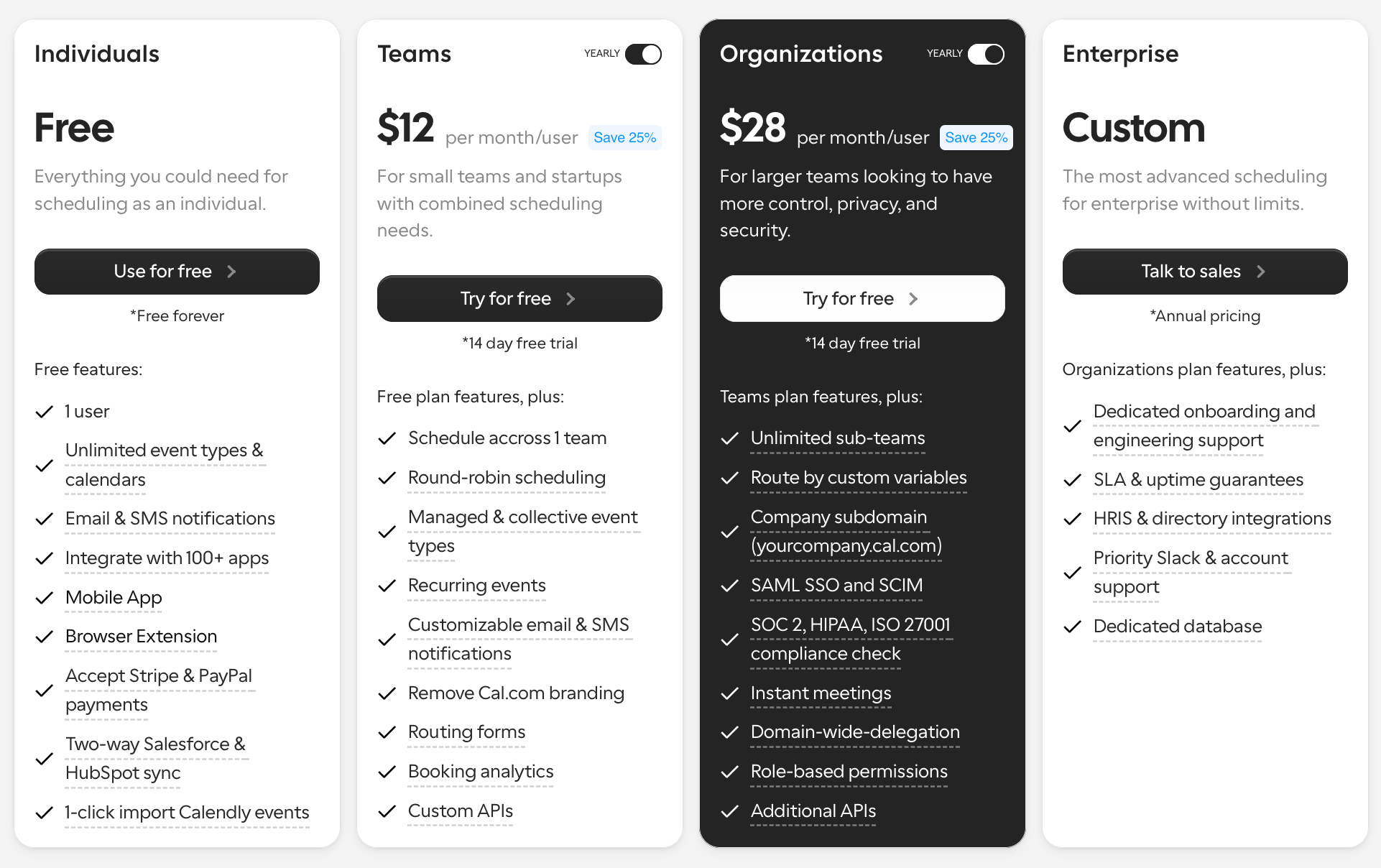
Free
The Free plan is surprisingly generous compared to most scheduling tools. It includes:
- unlimited event types
- unlimited calendars
- payment collection
- basic integrations
- individual scheduling workflows
For solo users and lightweight scheduling needs, the free tier is one of the strongest in the market.
Teams
The Teams plan introduces collaborative scheduling and operational workflows, including:
- round-robin scheduling
- routing forms
- booking analytics
- API access
- branding removal
- shared team coordination
This is where Cal.com starts shifting from simple scheduling into operational scheduling infrastructure.
Organizations
The Organizations plan focuses heavily on governance, compliance, and advanced routing. Features include:
- SAML SSO
- SCIM provisioning
- advanced routing logic
- sub-teams
- role-based permissions
- security and compliance controls
This tier is built for companies managing scheduling across multiple departments and operational layers.
Enterprise
Enterprise expands into full infrastructure and support territory with:
- dedicated onboarding
- SLAs
- dedicated support
- HRIS integrations
- dedicated database infrastructure
- enterprise governance workflows
At this level, Cal.com becomes less of a scheduling tool and more of an enterprise scheduling platform embedded deeply into operational workflows.
What Changed About Cal.com in 2026?
Cal.com changed significantly over the past year, both in positioning and product direction.
What originally gained attention as an open-source Calendly alternative is now evolving into a much broader commercial scheduling infrastructure platform focused on enterprise workflows, APIs, routing, governance, and AI-powered automation.
One of the biggest shifts was the move away from a purely open-source identity. Cal.com separated its open-source and commercial offerings more clearly through the introduction of Cal.diy, while the main platform moved further toward enterprise and infrastructure-focused positioning.
At the same time, the platform expanded aggressively into:
- routing workflows
- scheduling APIs
- white-label scheduling
- enterprise governance
- embedded scheduling
- AI-powered scheduling automation
The launch of Cal.ai accelerated that transition even further. Instead of functioning only as a booking interface, Cal.com now supports:
- AI scheduling agents
- AI phone workflows
- automated reminders
- conversational scheduling
- AI-powered follow-ups
This changes how buyers evaluate the platform.
The product is no longer competing only against lightweight scheduling tools. It is increasingly competing as infrastructure for scheduling operations across sales, recruiting, customer success, healthcare, and enterprise workflows.
That is the most important shift buyers need to understand in 2026:
Cal.com is evolving from a scheduling tool into a scheduling infrastructure platform.
And as infrastructure expands, pricing, governance, operational complexity, and implementation decisions become much more important than the original “free Calendly alternative” narrative that first made the platform popular.
Cal.ai Pricing & AI Scheduling Costs
Cal.ai introduces a completely different pricing layer on top of traditional scheduling.
Instead of charging only per user or per seat, Cal.ai uses usage-based AI pricing that scales with conversations and call volume. The platform currently prices AI phone workflows at roughly $0.29 per minute.
That changes the economics of scheduling significantly.
Cal.ai is designed for:
- AI phone agents
- conversational booking
- automated reminders
- AI scheduling workflows
- AI-powered follow-ups
- inbound call automation
- voice-based scheduling experiences
For teams experimenting with AI scheduling, this can be extremely powerful. It allows businesses to automate booking conversations, reduce manual coordination, and create more dynamic scheduling experiences without relying entirely on static forms or booking pages.
But there is an important operational tradeoff:
AI usage scales with activity.
As meeting volume, reminders, inbound calls, and AI conversations increase, costs become directly tied to workflow usage rather than fixed subscription pricing.
That means organizations need to think carefully about:
- meeting volume
- outbound reminders
- support workflows
- conversational scheduling frequency
- AI call duration
- automation scaling
Unlike traditional scheduling plans with predictable seat pricing, AI scheduling introduces variable operational costs that can become difficult to forecast as workflows grow.
For smaller teams, the impact may be minimal.
For larger organizations running AI-heavy scheduling workflows across sales, recruiting, support, or customer success, AI usage can scale unpredictably over time.
Hidden Costs Most Buyers Miss
Cal.com can look inexpensive at first, especially compared to traditional enterprise scheduling platforms. The free plan is generous, and entry-level paid pricing appears relatively affordable.
But as organizations scale scheduling into routing, governance, APIs, AI workflows, and operational infrastructure, total costs can rise much faster than many buyers initially expect.
Seat-Based Pricing Adds Up Quickly
Cal.com uses seat-based pricing across paid plans, which means costs increase directly as teams grow.
This becomes especially noticeable when companies expand:
- SDR teams
- RevOps operations
- recruiting teams
- customer success teams
- admin and routing operators
- cross-functional scheduling workflows
A platform that feels inexpensive for a small startup can become a meaningful operational expense once scheduling expands across multiple departments and workflows.
Enterprise Governance Is Locked Higher Up
Many of the most important enterprise features are reserved for higher-tier plans.
Capabilities like:
- SSO and SAML
- SCIM provisioning
- advanced permissions
- compliance workflows
- enterprise routing
- dedicated infrastructure
- centralized governance
are primarily designed for Organizations and Enterprise customers.
For larger companies, these controls are often non-negotiable, which pushes many teams into significantly more expensive pricing tiers earlier than expected.
Self-Hosting Is Not Truly “Free”
One of the biggest misconceptions around Cal.com is self-hosting.
While the platform became popular partly because of its open-source roots, self-hosting is no longer a lightweight hobby setup for most serious operational use cases.
In reality, self-hosting introduces:
- infrastructure ownership
- deployment complexity
- security management
- maintenance overhead
- engineering resource allocation
- uptime responsibility
- workflow monitoring
- support limitations
For many organizations, the internal operational cost of maintaining self-hosted scheduling infrastructure can exceed the simplicity of managed SaaS plans.
Cal.com’s self-hosting strategy has also become increasingly enterprise-oriented over time, especially as governance, routing, APIs, and AI workflows become more complex.
AI & API Usage Can Scale Operationally
Cal.ai and API-heavy workflows introduce another layer of pricing complexity.
As organizations scale:
- AI phone agents
- conversational scheduling
- automated reminders
- embedded scheduling
- routing workflows
- custom API automations
operational costs can become much harder to forecast.
Usage-based AI pricing means costs scale alongside meeting volume and automation activity, while API-heavy workflows often require ongoing developer maintenance and operational oversight.
For infrastructure-heavy teams, this becomes less of a simple scheduling subscription and more of an operational platform cost.
Monthly vs Annual Pricing Changes the Real Cost
Cal.com heavily incentivizes annual billing, with yearly plans offering roughly 25% savings compared to monthly pricing.
That discount can be substantial for larger organizations.
But annual contracts also introduce:
- longer-term commitments
- forecasting complexity
- scaling uncertainty
- enterprise negotiation cycles
For fast-growing teams, the difference between monthly flexibility and annual operational commitment becomes an important budgeting consideration over time.
Where Cal.com Works Extremely Well
Cal.com is one of the strongest scheduling platforms available for teams that need flexibility, customization, and infrastructure-level control rather than just simple booking links.
The platform works especially well for:
- developer-heavy organizations
- API-first companies
- embedded scheduling use cases
- enterprise scheduling operations
- white-label scheduling products
- advanced routing workflows
- infrastructure-focused teams
One of Cal.com’s biggest advantages is flexibility.
Unlike many traditional scheduling tools that operate as closed workflows, Cal.com gives teams significantly more control over:
- APIs
- customization
- UI experiences
- routing logic
- integrations
- workflow architecture
- deployment models
That makes it particularly attractive for startups and enterprises building scheduling directly into their own products, onboarding systems, marketplaces, healthcare workflows, recruiting flows, or customer-facing platforms.
The platform is also strong for:
- routing forms
- team scheduling
- custom workflows
- enterprise governance
- security-conscious organizations
- compliance-heavy environments
For companies that care about SSO, SCIM, permissions, auditability, embedded scheduling, and infrastructure ownership, Cal.com offers much deeper operational flexibility than lightweight scheduling tools.
Self-hosting flexibility is another major differentiator. While self-hosting has become more enterprise-oriented over time, organizations that want greater control over infrastructure, data handling, compliance, or deployment environments still view Cal.com as one of the strongest options in the scheduling market.
In short:
Calendly optimizes simplicity.
Cal.com optimizes flexibility and scheduling infrastructure.
scheduling ends at booking Core line: Cal.com optimizes scheduling infrastructure. It does not optimize buyer conversion.
Where Cal.com Starts Breaking Down
Cal.com is extremely strong as scheduling infrastructure.
But modern GTM teams increasingly need much more than scheduling infrastructure alone.
The platform focuses heavily on:
- calendars
- routing
- APIs
- governance
- workflows
- booking coordination
What it does not deeply solve is the actual revenue layer around the meeting.
Cal.com does not focus heavily on:
- buyer qualification
- person-level identity resolution
- intent validation
- pipeline prioritization
- revenue orchestration
- conversational engagement
- multi-channel buyer persistence
In most workflows, scheduling still begins only after the buyer decides to book time.
That creates a major visibility gap for modern revenue teams trying to identify and engage buyers earlier across:
- LinkedIn
- Slack
- websites
- AI search
- communities
- dark-funnel research journeys
The other major limitation is context.
Cal.com can schedule meetings efficiently, but it does not deeply understand:
- who the buyer is
- why they are converting
- how qualified they are
- how engaged they are across channels
- or how likely the meeting is to become pipeline
And once the meeting is booked, most workflows effectively stop at calendar coordination rather than continuing buyer engagement across the full revenue journey.
The core difference is simple:
Cal.com optimizes scheduling infrastructure.
It does not optimize buyer conversion.
Scheduling Infrastructure vs Revenue Activation
For years, scheduling software focused on one problem:
schedule → calendar → meeting
The goal was simple: reduce back-and-forth emails and make booking easier.
But modern GTM workflows have changed dramatically.
Today’s revenue teams care far less about simply booking meetings and far more about:
- conversion quality
- buyer intent
- qualification accuracy
- show rates
- engagement continuity
- pipeline efficiency
That has created an entirely new operational model:
identity → intent → qualification → conversation → meeting → pipeline
In this model, the meeting itself is no longer the primary objective.
The objective is generating qualified pipeline from real buyer intent.
That shift matters because meetings alone do not create revenue.
A booked calendar slot means very little if:
- the buyer is unqualified
- intent is weak
- engagement disappears after booking
- follow-up breaks down
- no-show rates increase
- or pipeline never materializes
Traditional scheduling platforms, including infrastructure-heavy tools, still focus primarily on coordinating time.
Modern revenue activation platforms focus on coordinating outcomes.
That means:
- identifying buyers earlier
- validating intent before meetings happen
- qualifying conversations in real time
- maintaining engagement before and after meetings
- and improving conversion efficiency across the full buyer journey
This is the biggest structural shift happening inside modern GTM operations:
Scheduling is evolving from calendar coordination into revenue orchestration.
Cal.com vs Calendly
Cal.com and Calendly solve scheduling very differently.
Calendly focuses on simplicity, ease of adoption, and lightweight scheduling workflows. Cal.com focuses far more heavily on customization, APIs, infrastructure control, routing, and enterprise flexibility.
That makes the right choice highly dependent on how operationally complex your scheduling workflows actually are.
| Category |
Cal.com |
Calendly |
| Customization |
Strong |
Moderate |
| APIs |
Strong |
Moderate |
| Routing |
Advanced |
Moderate |
| Developer flexibility |
Excellent |
Limited |
| Enterprise controls |
Strong |
Strong |
| Ease of use |
Moderate |
Excellent |
| Self-hosting |
Yes |
No |
| Best for |
Infrastructure-heavy teams |
Simple scheduling |
Calendly is generally the better choice for teams that want fast setup, minimal configuration, and simple scheduling workflows that work immediately out of the box.
Cal.com becomes much more attractive for organizations that need:
- embedded scheduling
- API-heavy workflows
- white-label experiences
- advanced routing
- enterprise governance
- infrastructure ownership
- deeper customization
In short:
Calendly wins on simplicity.
Cal.com wins on flexibility and infrastructure depth.
Cal.com vs Revenue-Focused Scheduling Platforms
Most scheduling platforms are designed to solve calendar coordination.
Modern revenue teams need to solve something much larger:
- buyer qualification
- intent validation
- meeting quality
- engagement continuity
- pipeline generation
That is where revenue-focused scheduling platforms take a fundamentally different approach.
Knock AI: Best for Revenue-Driven Scheduling
Knock AI is not positioned as another scheduling tool.
It is built as a revenue activation platform designed to turn buyer intent into qualified pipeline.
Instead of focusing only on booking meetings, Knock AI combines:
- person-level identity resolution
- conversational qualification
- buyer intent scoring
- AI SDR workflows
- meeting qualification
- multi-channel engagement
- routing orchestration
- post-booking persistence
into one connected inbound revenue workflow.
That creates a very different operational model from traditional scheduling infrastructure.
Rather than waiting for a buyer to manually book time, teams can identify high-intent visitors earlier, qualify them dynamically, continue engagement across channels like LinkedIn and Slack, and reduce drop-offs before and after meetings occur.
This also changes the economics of conversion.
Traditional scheduling platforms optimize booking efficiency.
Revenue activation platforms optimize pipeline efficiency.
The core difference is simple:
Cal.com optimizes scheduling infrastructure.
Knock AI optimizes qualified pipeline around the meeting.
Cal.com vs Knock AI
| Capability |
Cal.com |
Knock AI |
| Scheduling |
Excellent |
Excellent |
| Routing |
Strong |
Strong |
| Buyer identity |
Limited |
Strong |
| Intent scoring |
No |
Yes |
| AI SDR workflows |
Limited |
Yes |
| Multi-channel engagement |
Limited |
Strong |
| Qualification |
Basic |
Advanced |
| Revenue orchestration |
No |
Yes |
| Pipeline focus |
Limited |
Strong |
For infrastructure-heavy scheduling workflows, Cal.com is extremely capable.
For teams that need scheduling tied directly to buyer intent, qualification, engagement, and revenue outcomes, platforms like Knock AI represent a very different category entirely.
Who Should Use Cal.com?
Best Fit
Cal.com is a strong fit for organizations that need flexibility, customization, and infrastructure-level scheduling control rather than simple plug-and-play booking.
It works especially well for:
- developers
- API-first companies
- startups needing customizable scheduling workflows
- enterprises requiring governance and compliance controls
- embedded scheduling products
- infrastructure-heavy scheduling operations
- organizations wanting white-label scheduling experiences
- teams building custom routing and workflow logic
The platform is particularly attractive when scheduling needs to become deeply integrated into internal systems, products, APIs, marketplaces, recruiting platforms, or customer-facing workflows.
Probably Not Ideal For
Cal.com is less ideal for teams where scheduling is tightly tied to revenue orchestration and buyer engagement.
That includes:
- teams needing buyer qualification
- inbound revenue teams
- AI SDR workflows
- pipeline orchestration
- conversational qualification
- multi-channel engagement workflows
- organizations optimizing conversion rates and meeting quality
For those use cases, scheduling alone is usually not enough. Teams increasingly need buyer identity, intent validation, qualification, engagement continuity, and revenue context surrounding the meeting itself.
Is Cal.com Worth It in 2026?
Cal.com is absolutely worth considering if your priority is customizable scheduling infrastructure.
Yes, if:
- you want flexible scheduling workflows
- APIs matter
- routing matters
- governance matters
- developer flexibility is important
- you need embedded or white-label scheduling
- infrastructure ownership matters
The platform is one of the strongest options available for API-first scheduling and enterprise scheduling operations.
No, if:
- meetings must generate qualified pipeline
- buyer intent visibility matters
- qualification is critical
- scheduling must connect directly to revenue outcomes
- you need conversational engagement around meetings
- you want scheduling tied to pipeline orchestration
Modern GTM teams increasingly need more than booking coordination.
They need systems that identify buyers, validate intent, qualify conversations, maintain engagement before and after meetings, and improve conversion efficiency across the full revenue journey.
FAQs
How much does Cal.com cost?
Cal.com offers a free plan, while paid plans start at roughly $12/user/month for Teams and around $28/user/month for Organizations when billed annually. Enterprise pricing is custom.
Is Cal.com free?
Yes. Cal.com has one of the strongest free scheduling plans on the market, including unlimited event types, unlimited calendars, payments, and basic integrations for individual users.
Is Cal.com open source?
Partially. Cal.com still maintains open-source roots, but the platform has shifted toward a more enterprise and commercial infrastructure model over time, especially around governance, AI workflows, and managed services.
What changed with Cal.com self-hosting?
Self-hosting has become more enterprise-oriented and operationally complex than many buyers initially expect. While still available, self-hosting now involves infrastructure management, deployment maintenance, security ownership, uptime monitoring, and engineering resources.
How much does Cal.ai cost?
Cal.ai pricing is usage-based and currently starts around $0.29 per minute for AI phone and conversational scheduling workflows. Costs scale based on meeting volume and AI usage activity.
Is Cal.com cheaper than Calendly?
It depends on the use case. For developer-heavy and infrastructure-focused teams, Cal.com can provide more flexibility and customization for the price. For lightweight scheduling and simplicity, Calendly is often easier and operationally lighter.
Does Cal.com support SSO?
Yes. SAML SSO and SCIM provisioning are available on higher-tier plans designed for enterprise governance and compliance workflows.
What are Cal.com hidden costs?
The biggest hidden costs typically include:
- seat expansion
- enterprise governance upgrades
- AI usage pricing
- API-heavy workflow maintenance
- self-hosting operational overhead
- developer resources
- annual contract commitments
Is Cal.com good for enterprise teams?
Yes. Cal.com is increasingly positioned toward enterprise scheduling infrastructure with support for governance, routing, APIs, permissions, SSO, embedded scheduling, and enterprise-grade workflows.
What is the best Cal.com alternative?
The best alternative depends on your use case. Calendly is strong for simple scheduling, while Knock AI is stronger for revenue-focused scheduling tied to buyer identity, qualification, intent scoring, and pipeline generation.
Is Knock AI a Cal.com alternative?
Yes, but it solves a different layer of the workflow. Cal.com focuses on scheduling infrastructure, while Knock AI focuses on revenue activation, conversational qualification, buyer engagement, and pipeline orchestration around meetings.
Does Cal.com support routing forms?
Yes. Paid plans support routing forms, round-robin scheduling, team assignment workflows, and advanced scheduling logic.
Can Cal.com qualify buyers?
Not deeply. Cal.com supports scheduling workflows and routing logic, but it does not focus heavily on buyer qualification, intent scoring, conversational engagement, or person-level identity resolution.
Does Cal.com support AI scheduling?
Yes. Through Cal.ai, the platform now supports AI-powered scheduling workflows, conversational booking, AI phone agents, reminders, and automated scheduling interactions.


.svg)


.svg)
.svg)
.svg)


.svg)
.svg)



.svg)


