What You Actually Get at Each Plan
| Features |
Free |
Standard |
Teams |
Enterprise |
| Pricing (Annual Billing) |
Free |
~$10/user/month |
~$16/user/month |
Custom (~$15K+/year) |
| Pricing (Monthly Billing) |
Free |
~$12/user/month |
~$20/user/month |
Custom |
| One-on-One Event Types |
1 |
Unlimited |
Unlimited |
Unlimited |
| Connected Calendars |
1 |
Up to 6 |
Up to 6 |
Up to 6 |
| Unlimited Meetings |
Yes |
Yes |
Yes |
Yes |
| Booking Page Customization |
Basic |
Advanced |
Advanced |
Advanced |
| Video Conferencing Integrations |
Yes |
Yes |
Yes |
Yes |
| Multi-Person Meeting Types |
No |
Yes |
Yes |
Yes |
| Round Robin Scheduling |
No |
Limited |
Yes |
Yes |
| Routing Forms |
No |
No |
Yes |
Yes |
| Automated Meeting Reminders |
No |
Yes |
Yes |
Yes |
| Automated Scheduling Workflows |
No |
Yes |
Yes |
Yes |
| HubSpot Integration |
No |
Yes |
Yes |
Yes |
| Salesforce Integration |
No |
No |
Yes |
Yes |
| Marketo / Pardot Sync |
No |
No |
Yes |
Yes |
| Zapier & Webhooks |
No |
Yes |
Yes |
Yes |
| Stripe & PayPal Payments |
No |
Yes |
Yes |
Yes |
| Team Admin Controls |
No |
Limited |
Advanced |
Enterprise-grade |
| Scheduling Analytics |
No |
Basic |
Advanced |
Advanced |
| Remove Calendly Branding |
No |
Yes |
Yes |
Yes |
| SSO / SAML |
No |
No |
Add-on |
Included |
| SCIM Provisioning |
No |
No |
No |
Yes |
| Domain Control & Governance |
No |
No |
No |
Yes |
| Audit Logs & Compliance |
No |
No |
No |
Yes |
| Dedicated Support |
No |
No |
Limited |
Yes |
| Best For |
Individuals |
Professionals & small teams |
Growing revenue teams |
Enterprise organizations |
| Biggest Limitation |
Very limited workflows |
Limited governance & routing |
Costs scale with team growth |
Enterprise pricing & implementation overhead |
Hidden Costs and Limits
Calendly looks inexpensive at first. But as teams scale scheduling across sales, RevOps, recruiting, customer success, and enterprise workflows, the total cost can rise much faster than most buyers expect.
Paid Seats Add Up Quickly
Calendly uses a per-user pricing model. That works well for individuals and small teams, but larger organizations can see costs increase rapidly as more reps, managers, SDRs, recruiters, and admins require access.
A 50-person sales organization on the Teams plan can easily exceed five figures annually before enterprise upgrades, integrations, or governance requirements are added.
SSO and Advanced Security Are Locked Behind Enterprise
Many enterprise-grade security features are not included in lower plans.
Capabilities like:
- SSO and SAML
- SCIM provisioning
- domain control
- audit logs
- advanced governance
are primarily reserved for Enterprise customers. For larger organizations with IT, compliance, or security requirements, this often forces an enterprise upgrade earlier than expected.
SMS Credits and Workflow Limits Can Become Restrictive
Calendly includes workflow automation and reminders, but SMS-based workflows and advanced automation usage can become limited depending on volume and plan level.
For high-volume inbound teams, reminder-heavy workflows can create additional operational constraints over time.
Enterprise Support and Governance Matter at Scale
As scheduling becomes tied to routing, handoffs, CRM syncing, and team governance, organizations often need:
- dedicated onboarding
- admin controls
- routing oversight
- implementation assistance
- account management
These capabilities are valuable, but they also push companies toward significantly more expensive enterprise agreements.
Team Growth Changes the Real Total Cost
Calendly pricing scales linearly with team size.
A platform that feels inexpensive at 5 users can become much more expensive at:
- 50 users
- 100 users
- multiple departments
- global scheduling operations
This is especially true when organizations need advanced routing, CRM syncing, admin controls, and enterprise governance simultaneously.
Monthly vs Annual Billing Changes the Real Spend
Calendly heavily incentivizes annual billing. Monthly plans are noticeably more expensive per seat, while annual contracts typically reduce pricing by roughly 16–20%.
For growing teams, that difference becomes meaningful over time. Many companies underestimate how quickly seat-based monthly billing compounds across larger organizations.
What Calendly Is Best For
Calendly is one of the easiest scheduling platforms to deploy and adopt. Its biggest strength is simplicity.
The platform works especially well for:
- individual meeting scheduling
- consultants and freelancers
- small sales teams
- simple inbound booking workflows
- internal meeting coordination
- round robin scheduling
- basic team routing
- customer success and recruiting coordination
For organizations that mainly need a reliable booking link with calendar syncing and automated reminders, Calendly delivers a strong user experience with very little setup or operational overhead.
That simplicity is exactly why it became one of the most widely adopted scheduling tools in the market.
Where Calendly Breaks Down
Calendly is excellent at scheduling meetings.
But scheduling alone is no longer enough for many modern GTM teams.
As pipeline generation becomes more intent-driven and conversational, companies increasingly need workflows that go beyond booking time on a calendar.
Calendly does not focus heavily on:
In most cases, Calendly starts working only after someone decides to book time.
That creates a major visibility gap for modern revenue teams trying to identify, qualify, and engage buyers earlier in the journey across channels like LinkedIn, Slack, websites, communities, AI search, and outbound workflows.
For simple scheduling, Calendly works extremely well.
For revenue activation, buyer engagement, and inbound conversion optimization, most teams eventually need additional systems around it.
Calendly vs Revenue-Focused Scheduling
Calendly and Knock AI approach scheduling very differently.
Calendly is designed to make booking meetings easier. It removes friction from finding time slots, syncing calendars, and coordinating availability.
Knock AI focuses on something broader: turning buyer intent into qualified pipeline.
Instead of treating scheduling as the final step, Knock AI treats scheduling as part of a larger revenue activation workflow that includes buyer identification, qualification, engagement, routing, and multi-channel follow-up.
Calendly vs Knock AI
| Category |
Calendly |
Knock AI |
| Primary Focus |
Meeting scheduling |
Revenue activation & buyer conversion |
| Core Strength |
Calendar coordination |
Qualified conversations & pipeline generation |
| Buyer Qualification |
Limited |
AI-powered conversational qualification |
| Intent Detection |
No |
Real-time buyer intent tracking |
| Identity Resolution |
No |
Person-level identity resolution |
| Scheduling Workflow |
Booking-first |
Conversation-first |
| Engagement Layer |
Email reminders |
Multi-channel engagement across LinkedIn, Slack, website workflows, and AI SDR conversations |
| Routing |
Basic routing forms |
Intent-based routing and qualification |
| CRM Context |
Limited |
Real-time buyer and pipeline context |
| Before the Meeting |
Minimal engagement |
Qualification, enrichment, and buyer activation |
| After the Meeting |
Basic reminders |
Persistent follow-up and engagement workflows |
| Best For |
Simple scheduling |
Inbound conversion and revenue orchestration |
Inbound conversion and revenue orchestration
Calendly is excellent when the goal is simply to book meetings efficiently.
But modern GTM teams increasingly need more than calendar coordination. They need systems that can identify buyers, validate intent, qualify conversations, route opportunities intelligently, and continue engagement before and after the meeting happens.
That is where revenue-focused platforms like Knock AI take a fundamentally different approach.
Should You Pay for Calendly?
Calendly is absolutely worth paying for if your primary goal is clean, reliable scheduling with minimal setup.
You should consider Calendly if:
- you mainly need meeting booking automation
- your workflows are relatively simple
- your team values ease of use
- you want fast deployment with low operational overhead
- you need lightweight routing and calendar coordination
For individuals, SMBs, recruiting teams, consultants, and straightforward inbound scheduling workflows, Calendly remains one of the best products in the category.
But Calendly becomes less compelling when scheduling is directly tied to pipeline generation and revenue performance.
You may outgrow Calendly if:
- meetings need to convert into qualified pipeline
- you need buyer qualification before booking
- your team depends on intent signals and identity resolution
- you want conversational engagement instead of static booking flows
- you need multi-channel follow-up across LinkedIn, Slack, email, and inbound workflows
- you care about real-time buyer engagement before and after meetings
At that point, the problem is no longer just scheduling.
It becomes a buyer conversion and revenue orchestration problem.
Best Calendly Alternative
Knock AI is one of the best Calendly alternatives for teams that want scheduling tied directly to buyer activation, qualification, and revenue outcomes, not just calendar coordination.
Unlike traditional scheduling tools that focus mainly on booking meetings, Knock AI combines:
- person-level identity resolution
- intent scoring
- conversation-based scheduling
- AI qualification workflows
- multi-channel follow-up
- and real-time buyer engagement
into one connected workflow.
Instead of simply placing time on a calendar, the platform helps teams identify buyers earlier, qualify conversations automatically, continue engagement across channels like LinkedIn and Slack, and reduce no-show risk through persistent communication and intent-aware follow-up.
For modern GTM teams, the difference is simple:
Calendly optimizes scheduling.
Knock AI optimizes pipeline conversion.
FAQs
How much does Calendly cost?
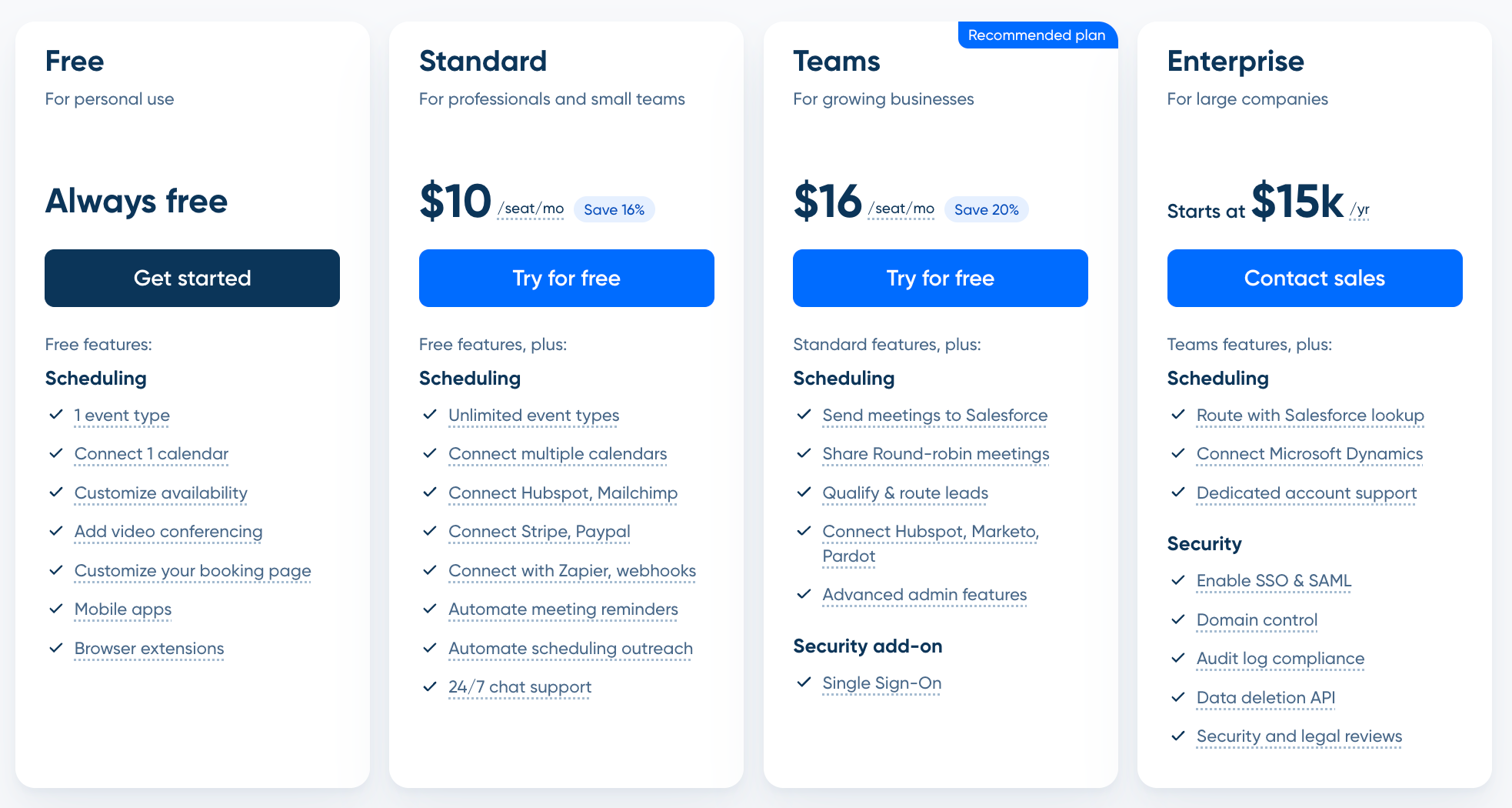
Calendly pricing starts with a free plan. Paid plans start at roughly $10/user/month for Standard and $16/user/month for Teams when billed annually. Enterprise pricing is custom and typically starts around $15,000+ annually depending on team size, security requirements, and governance needs.
Is Calendly free?
Yes. Calendly offers a free plan that supports basic one-on-one scheduling, one connected calendar, booking links, and video conferencing integrations. However, advanced workflows, routing, automation, and team features require paid plans.
What is included in the Teams plan?
The Teams plan includes:
- round robin scheduling
- routing forms
- CRM integrations
- Salesforce syncing
- admin controls
- shared scheduling workflows
- workflow automations
- and collaborative scheduling features for growing revenue teams.
Does Calendly have hidden costs?
Calendly itself is relatively transparent, but costs can rise quickly as teams scale. Common hidden costs include:
- seat-based pricing expansion
- enterprise upgrades
- advanced governance requirements
- SSO access
- routing workflows
- admin overhead
- and annual contract commitments.
Is Calendly Enterprise worth it?
For large organizations that need advanced security, governance, SSO, audit logs, domain control, and centralized scheduling administration, the Enterprise plan can be worth it. For smaller teams, the operational and pricing overhead may be unnecessary.
What is the best Calendly alternative?
Knock AI is one of the strongest Calendly alternatives for modern GTM teams because it combines scheduling with buyer identity, conversational qualification, intent scoring, routing, and multi-channel engagement workflows.
Does Calendly work for revenue teams?
Yes, especially for basic inbound scheduling and SDR coordination. But many revenue teams eventually need more than meeting booking alone. As qualification, buyer engagement, routing, and pipeline conversion become more important, companies often add additional systems around Calendly or move toward more revenue-focused platforms.


.svg)


.svg)
.svg)
.svg)


.svg)
.svg)



.svg)


