star iconstar iconstar icon
Get Started

How to Analyze Which Clicks Actually Create Pipeline (Not Just Traffic)

Complete guide for B2B marketers to understand which clicks generate qualified conversations and revenue. Covers intent signals, ICP filtering, CTA performance, and click-to-opportunity journey.

Most marketers track button clicks, CTR, and maybe form fills.But these metrics don’t answer what really matters:

Today, first-party assets (pricing pages, comparison docs, chat links, PDFs, emails, G2, LinkedIn posts, QR codes) are creating micro-moments of intent.

But without visibility into what happens after the click, you can’t see:

This is why pipeline drops even when traffic goes up.

Track the Real Journey (Not Just Conversions)

Here’s the workflow you can implement today, even without any tool.

Step 1: Choose 8–10 Clicks to Analyze

Select the buttons you expect to show intent:

Step 2: Map the Full Journey From Click to Opportunity

Build a simple spreadsheet with these columns:

Stage What to Track Examples
Clicked Record source/page/referrer Pricing page / G2 / LinkedIn / email
Engaged Chat message / form / demo / download Form submission OR chat started
Reply Received AI or human response Email sent / chat reply / meeting done
Qualified ICP match (firmographic + intent) Title + company matched buyer criteria
Opportunity Deal opened Opportunity created in CRM

This immediately shows where momentum dies.

Step 3: Identify Who Clicked (De-anonymization)

To see what really converts, use tools like:

Once you know who clicked , filter ONLY ICP before analyzing any results.

Step 4: Analyze Performance Per Click

For each button, calculate:

Metric Examples
% Engagement Did the click lead to action?
% Reply Received Was momentum kept alive?
% Qualified Was it ICP or noise?
% Opportunity Did sales open a deal?
Sum Deal Amount Pipeline per CTA

This turns every click into a conversion source, not just a report number.

Step 5: Find What Attracts ICP (Not Just Visitors)

Once ICP filtering is applied, real patterns emerge:

This helps you answer: “What should we scale, fix, or stop?”

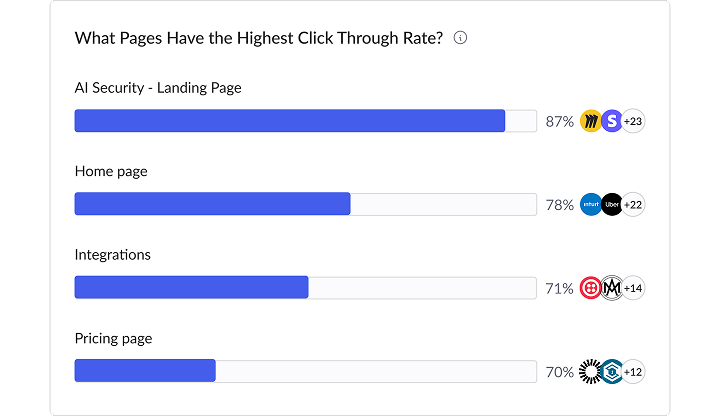
What Pages Habe the Highest Click Through Rate

Real Workflow Example

When your SDR is on vacation and leads pile up:

Scenario Outcome Today What You Actually Want
A VP clicks “Get a Quote” Form submitted → waits See reply time + missed ICP moment
G2 “Contact us” click Sent to inbox → forgotten Track reply received & qualification
QR code at event Meeting booked → waits See Opportunities + No 'Show rate'
Chat message sent AI replies but no record Understand ICP vs support request

Once you track the journey, you learn clearly:some clicks never had intent and others carried buying signals right away.

Results You Can Expect

Teams using this framework, even manually, usually find:

This is how first-party assets become dependable pipeline drivers.

Common Mistakes to Avoid

Mistake Why It Hurts
Measuring only total clicks ICP signals get lost
Tracking only form submissions You miss chat/direct momentum
Optimizing pages without tracking copy/source Button psychology matters
Replying too slowly Intent expires in 90 seconds
Treating all channels equally Referral ≠ G2 ≠ LinkedIn

Where Knock AI Fits

Knock AI simply automates the whole thing at scale.
Instead of running this in spreadsheets and using de-anonymization tools, Knock AI:

Comparison of click-to-pipeline journey stages.

  1. Maps your first-party buttons to clear intent signals and categories:
    • “Get a Quote”, “Talk to Sales”, “Compare Plans”, “Watch Demo”
    • Each button is tagged as a specific intent type (e.g., Pricing, Compare, Demo Request, Learn).
    • This lets you see which intent moments actually lead to qualified pipeline, not just clicks.
  2. De-anonymizes clicks so you can filter performance by ICP criteria
    • Identifies who clicked using de-anonymization enrichment (industry, company size, role, region, tech stack, etc.).
    • Lets you filter only ICP clicks, so you’re not optimizing based on students, competitors, or random visitors.
    • Now you can answer: “Which buttons and sources attract our real buyers?”
  3. Tracks every click at the lead level inside your CRM
    • Every tracked click is written to the contact/account in HubSpot, Salesforce, etc.
    • You can see: “This opportunity clicked X, Y, Z before becoming a deal.”
    • This makes it possible to analyze:
      • What actions convert more per ICP segment
      • Where is the main leakage in the funnel
How do I track pipeline created by specific buttons?

So the workflow is:

Without Knock: you can still run the method with spreadsheets, de-anonymization tools, enrichment tools, and CRM exports.

With Knock: the same method runs automatically across all your first-party assets and channels, in real time, with CRM-quality data and ICP filters built in.

Ready to Knock AI Out the Competition?

triple blue underlinetriple blue underline
Chat with an Expert