Buying Signal: 15 B2B Buying Signals Every Sales Team Should Track
Buying Signals: 15 Signals Every B2B Sales Team Should Track
TL;DR: What Are Buying Signals?
Buying signals are actions, behaviors, conversations, or business changes that suggest a person or company may be interested in purchasing a product or service. They help sales teams recognize potential buyers, understand purchase intent, and figure out when and how to approach them.
Think about it. Someone repeatedly checking your pricing page, a few employees from the same company exploring your product, or a prospect asking about integrations and implementation timelines. These aren't random activities worth ignoring. They could be signs that a buying decision is taking shape.
Here are some common buying signals every B2B sales team should watch:
Repeated pricing and product page visits: A prospect may be comparing features, evaluating plans, or narrowing down their options.
Multiple employees from the same company engaging: Different people researching your product could indicate that an internal buying committee is forming.
Questions about pricing, integrations, and security: Specific product questions often reveal that a prospect is evaluating whether your solution fits their requirements.
Funding, hiring, and leadership changes: Business developments can create new budgets, operational requirements, and technology needs.
Previous customers or champions joining new companies: Someone who already knows and trusts your product could become a valuable connection at their new organization.
AI-referred visits and cross-channel engagement: Buyers researching through ChatGPT, Google, LinkedIn, and other channels may leave useful clues about their interests and evaluation process.
Repeated conversations and engagement: A prospect returning to ask questions or explore specific features may be showing stronger interest than someone who visits once and disappears.
The bottom line: Don't wait for someone to fill out a demo form before recognizing their interest. Buyers often leave clues long before they officially approach your sales team. The trick is knowing which signals matter, understanding the context behind them, and acting at the right time.
What Are Buying Signals in Sales?
Think about the last time you purchased something expensive. Did you walk into a store and buy it immediately? Probably not. You likely researched a few options, compared prices, checked reviews, asked questions, and then decided which one made the most sense.
B2B buyers do pretty much the same thing, except their buying journey is usually more complicated. They might visit your website, explore product features, compare competitors, speak with colleagues, check integrations, and evaluate pricing before ever contacting your sales team.
And here's the interesting part: a prospect doesn't have to request a demo to show that they're interested in your product.
Buying signals appear at different stages of the B2B buyer journey. Someone reading an educational blog post might be in the early research stage. Someone repeatedly visiting your pricing page could be comparing solutions. And someone asking about implementation timelines or contract terms might be getting closer to a purchasing decision.
For sales teams, recognizing these behaviors creates an opportunity to start relevant conversations before prospects officially raise their hands.
However, not all buying signals look the same. Some are direct and easy to recognize, while others require you to connect a few dots.
Explicit vs. Implicit Buying Signals
Buying signals generally fall into two categories: explicit and implicit.
Explicit buying signals are direct actions or statements that show a prospect is considering a purchase. For example, someone requesting a product demo, asking for an enterprise quotation, or discussing contract terms is giving you a fairly clear indication of interest.
Implicit buying signals are less obvious. They involve behaviors or business developments that may suggest purchase intent without the prospect directly expressing it. Repeated pricing-page visits, competitor research, and relevant hiring activity are a few examples.
Here's how the two differ:
Explicit buying signals
Implicit buying signals
Requesting a product demo
Repeated pricing-page visits
Asking for a quotation
Comparing competing products
Discussing contract terms
Multiple employees researching a product
Asking about implementation timelines
Hiring for relevant departments
Submitting an RFP
Exploring technical documentation
For example, imagine a company visiting your pricing page several times over two weeks. That's an implicit buying signal. Now, imagine someone from that company contacts your sales team to discuss enterprise pricing and implementation. That's an explicit buying signal.
Both are valuable, but they tell you different things about where the prospect might be in their buying journey.
And don't dismiss implicit signals just because they're not direct. If you wait until someone requests a demo, you might miss opportunities to engage buyers while they're still researching their options.
Now, let's get into the 15 buying signals every B2B sales team should pay attention to, what they mean, and how you can act on them.
See Knock AI in Action — Book Your Live Demo Today
15 Buying Signals Every B2B Sales Team Should Track
Not every prospect will request a demo or contact your sales team when they start evaluating a product. Some will quietly research your website, compare alternatives, check integrations, or involve colleagues in the decision.
The trick is knowing which activities deserve your attention. Here are 15 buying signals worth tracking, what they can tell you, and how your sales team can act on them.
1. Repeated Visits to Pricing and Product Pages
When someone repeatedly visits your pricing, product, features, or solution pages, they may be evaluating whether your product is right for their business. One visit could be casual research. Multiple visits across different sessions suggest the person has a reason to keep coming back.
For example, imagine a VP of Sales visiting your pricing page three times in a week and exploring your enterprise features. They could be comparing plans, checking whether your product supports their requirements, or preparing to discuss it internally.
This behavior is worth paying attention to. We found that returning visitors were 2× as likely to visit pricing pages as first time visitors. Pricing interest also increased from 1.2% of first sessions to 2.6% by visits three to four. (Source)
What should sales do? Look at repeat activity alongside the company's ICP fit and other engagement. If the account matches your target market, offer a relevant next step rather than sending a generic sales message.
2. Multiple Employees From the Same Company Engaging With Your Brand
Sometimes the strongest buying signal isn't one person showing interest. It's several people from the same company researching your product.
Different stakeholders often evaluate different parts of a solution. An operations manager might explore product features, an IT director could check integrations, and a VP might visit your pricing page. Individually, these activities provide limited context. Together, they can reveal a broader evaluation process.
This is especially important in enterprise sales, where purchasing decisions rarely involve just one person. We found that enterprise accounts had an average of 10.3 identified visitors, compared with 1.7 for SMB accounts. (Source)
That doesn't mean every account with several visitors is ready to buy. It does show why looking at account-level engagement can reveal more than tracking individual leads in isolation.
What should sales do?Identify the people engaging with your brand, understand their roles, and look for connections between their activities. This helps you understand who might be researching, evaluating, influencing, or approving a purchase.
3. Engagement With Technical Documentation, Integrations, and Security Resources
When prospects start exploring your API documentation, integration guides, product architecture, or security resources, they may be checking whether your product fits their existing infrastructure.
This type of research often becomes important when a company moves beyond general product discovery and starts evaluating practical requirements. For example, a prospect might review your Salesforce integration documentation and security requirements before involving its IT team.
Why does this matter? A product can look great in a demo but still be unsuitable if it doesn't work with a company's existing systems or meet its security requirements. Technical research can help you understand what the buying team needs to validate before moving forward.
What should sales do? Pay attention to the specific resources being explored. If a prospect is researching integrations, share relevant technical information. If security documentation is getting attention, make it easy to access your compliance information and involve a solutions engineer when necessary.
4. Demo, Trial, Contact, and Scheduling Interactions
Clicks on demo, trial, contact, and scheduling buttons can indicate that someone is considering a direct interaction with your company. But there's an important difference between clicking a CTA and actually completing the action.
For example, a prospect might open your meeting scheduler, check available times, and leave without booking. That doesn't necessarily mean they've lost interest. They might have been interrupted, found the process inconvenient, or decided they weren't ready to share their details.
We found an interesting difference between conversion paths: 42% of buyers who clicked a no-form "talk now" button started a conversation, compared with just 5% to 7% of demo or contact CTA clickers completing the associated form. The median difference was 7.5× in favor of the conversation path. (Source)
This challenges the assumption that every interested buyer wants to fill out a form.
What should sales do? Track meaningful interactions, including incomplete booking attempts, and provide an easy way for prospects to continue. A direct conversation can sometimes be a better next step than asking someone to complete another form.
5. Direct Product Questions Through Chat and Messaging Apps
When someone asks about your pricing, use cases, integrations, implementation, or product capabilities, they're giving you something more useful than a page view: context about what they actually need.
These questions can come through website chat, LinkedIn, or messaging apps. For example, a prospect might ask whether your platform integrates with its CRM and how long implementation typically takes. Those questions tell you what the company is evaluating and where it might need reassurance.
We found that 57% of buying conversations voluntarily revealed qualifying context. Pricing information appeared in 28% of conversations, use cases in 27%, and technology-stack information in 23%. (Source)
In other words, conversations can reveal information that prospects might never provide in a traditional form.
What should sales do? Answer the question directly, understand the requirement behind it, and connect the prospect with the right person. Don't turn every conversation into a scripted pitch. Start by helping the buyer make progress.
6. Competitor Comparisons and Review-Site Research
When a prospect starts comparing your product with competitors, reading reviews, or exploring alternative solutions, they may be narrowing down their options.
This research can happen on platforms such as G2 and Capterra, as well as through comparison pages, competitor websites, and product review articles. For example, a company evaluating three sales platforms might compare features, read customer reviews, and create a shortlist before speaking with vendors.
This matters because the prospect may already understand the problem they're trying to solve. Their focus has shifted toward deciding which solution is the best fit.
What should sales do? Try to understand which products the prospect is comparing and what matters most in their evaluation. Is it pricing, integrations, ease of implementation, customer support, or a particular feature? Use that context to address relevant differences instead of relying on a generic competitor pitch.
7. Previous Champions Joining a New Company
Here's an opportunity that sales teams sometimes overlook: a former customer or product champion joining a new company.
Imagine someone who previously advocated for your product at Company A taking a new role as VP of Revenue at Company B. They already understand your solution, know how it works, and may have experienced its value firsthand. That existing relationship can create a natural reason to reconnect.
However, a job change alone isn't proof of buying intent. The opportunity becomes more meaningful when the person's new company matches your ICP, their role is relevant, and you have useful relationship history from the previous account.
What should sales do? Reconnect with the person using your existing relationship. Acknowledge their new role, ask about their priorities, and explore whether your product could be relevant to their current responsibilities. Keep the conversation personal rather than treating the job change as an automatic sales trigger.
8. New Executives and Decision-Makers Joining a Company
A new executive can bring fresh priorities, different technology preferences, and changes to a company's existing strategy. That's why leadership transitions are worth monitoring.
For example, a newly appointed CRO might review the company's sales technology stack, rethink its pipeline strategy, or introduce new processes for the revenue team. A new CTO could reassess infrastructure, security, and software investments.
These changes don't automatically mean the company is looking to purchase your product. But they can create a window where existing processes and tools are being evaluated.
What should sales do? Research the executive's background, responsibilities, and likely priorities before reaching out. Look for a connection between their role and the problem your product solves. A relevant conversation about their new objectives is much more useful than a generic message congratulating them on the appointment.
9. Hiring for Relevant Departments and Roles
A company's hiring activity can tell you where it's investing and which departments it plans to grow.
For example, a SaaS company hiring 15 SDRs may be preparing to expand its outbound sales operations. A business recruiting several RevOps specialists could be investing in its revenue processes, while increased security hiring might indicate a stronger focus on security operations.
These developments can point toward potential technology requirements, but they need context. Hiring more salespeople doesn't automatically mean a company needs another sales platform.
What should sales do? Connect the hiring activity to a possible business challenge. Look at the roles being advertised, the departments involved, and the company's broader growth plans. Then consider whether your product could support that investment.
10. Funding Rounds, Acquisitions, and Business Expansion
Major business developments can change a company's technology requirements. Funding rounds, acquisitions, geographic expansion, and the launch of new business units can all create new operational challenges.
For example, a startup that raises a Series B round and begins expanding its sales team into new markets may need better systems to manage leads, coordinate teams, or support its growing operations.
These events are useful signals because they provide context about what might be changing inside the business. However, funding alone doesn't prove that a company has a budget for your particular product.
What should sales do? Research what the company is planning after the announcement. Is it entering new markets, expanding a department, acquiring another business, or launching a new product? Connect your outreach to a specific operational need that could emerge from that development.
11. Technology Adoption or Replacement
A company's technology stack can reveal a lot about its operational priorities. Adopting a new CRM, changing marketing automation platforms, migrating infrastructure, or replacing legacy software can create new requirements.
For example, a company moving to a new CRM might need additional tools that integrate with its updated system. Another business replacing an older platform could be looking for better automation, reporting, or scalability.
This signal is particularly useful when your product complements the technology a company already uses. It can help you understand compatibility requirements and identify potential opportunities before a prospect directly contacts you.
What should sales do? Use technographic information to understand the company's existing tools and recent technology changes. Look for relevant integrations, potential gaps, and replacement requirements. Then explain how your product fits into the company's current setup.
12. Pricing, Procurement, and Contract Discussions
Questions about enterprise pricing, contract duration, annual billing, discounts, procurement, and vendor onboarding can indicate that a prospect is assessing whether a purchase is commercially feasible.
For example, a prospect might ask about annual billing, enterprise discounts, payment terms, and vendor approval requirements. These questions suggest they're looking beyond product capabilities and considering what it would take to move forward.
This is an important stage because a deal can stall even when the buyer likes your product. Budget constraints, legal reviews, procurement processes, and contract requirements can all affect the decision.
What should sales do? Understand the commercial requirements and identify who needs to be involved. Be transparent about pricing and contract terms, share the necessary documentation, and bring in finance, legal, or procurement stakeholders when appropriate.
13. RFPs, Implementation Timelines, and Explicit Purchase Requirements
Some buying signals are much more direct than others. A request for proposal, a defined implementation date, or a formal list of vendor requirements can indicate that a company is actively evaluating solutions.
Imagine an enterprise inviting three vendors to respond to an RFP and expecting to select a provider before the next quarter. The company has likely established an evaluation process, defined requirements, and set expectations around the purchasing timeline.
This gives your sales team useful information about where the opportunity stands and what needs to happen next.
What should sales do? Understand the decision process, evaluation criteria, timeline, and stakeholders involved. Confirm which requirements are essential, identify any gaps in your offering, and coordinate with the relevant teams before submitting a proposal. The goal is to demonstrate that your solution meets the company's actual requirements.
14. Visitors Arriving From ChatGPT and Other AI Search Platforms
Buyers are increasingly using AI assistants such as ChatGPT, Perplexity, Claude, and Gemini to research products, compare alternatives, and shortlist vendors. As a result, visitors arriving from AI platforms can provide another useful source of buying context.
We found that AI-referred buyers converted at 2.2× the rate of Google organic visitors and reached sales-ready conversion 3.7× as often. These visitors were also 2× as likely to reach pricing, demo, or contact pages. (Source)
There's an important distinction here: a human visiting your website after researching through ChatGPT is different from an AI agent visiting your website to gather information or perform an action. Sales teams should understand which type of activity they're looking at.
What should sales do? Track AI-referred visitors alongside their on-site behavior. If they explore high-intent pages or start a conversation, make it easy for them to connect with a sales representative. Don't assume every AI referral is purchase-ready, but don't overlook the channel either.
15. Engagement Across Multiple Channels and Repeat Interactions
B2B buyers rarely follow one perfectly predictable path. Someone might discover your product through Google, return directly to your website, engage with a LinkedIn post, open a resource shared over email, and eventually explore your pricing page.
Looking at each interaction separately can make the buyer's journey difficult to understand. Connecting those activities gives sales teams a more complete picture of how an account is engaging with the business.
We found that buyers engaging through two or more channels were 6.8× more likely to become associated with a deal than repeat visitors who stayed on one channel. It also found that 55% of deal-attached buyers crossed channels, compared with 3.9% of all visitors. (Source)
What should sales do? Connect engagement across your website, email, LinkedIn, shared resources, events, and other channels. Look at the overall account journey rather than treating every interaction as an unrelated activity. This helps your team understand where interest is developing and choose a more relevant way to engage.
Buying Signals in Action: 3 Real-World B2B Scenarios
Individual buying signals become more meaningful when you connect them. A pricing-page visit alone might not tell you much. But combine it with product research, engagement from other employees, and a direct conversation, and you start to see a clearer picture of what's happening inside an account.
Here are three examples:
Scenario
Buying signals you're seeing
What it could mean
What sales should do
1. A prospect researches without filling out a form
Repeated pricing-page visits, product documentation engagement, anonymous browsing, followed by a direct conversation.
The prospect may be actively evaluating your product but isn't ready to identify themselves or speak with sales yet. We found that 86% of people who chatted had never filled out a form, and 57% had never left an email address.
Don't rely only on form submissions. Pay attention to on-site behavior and make it easy for interested visitors to start a conversation.
2. An entire company evaluates your solution
An operations manager explores features, an IT director reviews integrations, a VP checks pricing, and procurement asks about contract terms.
These could be members of the same buying committee evaluating the product from different perspectives, rather than four unrelated visitors.
Connect their activity at the account level, identify each stakeholder's role, and understand what the buying team needs to move forward.
3. A former champion opens a new opportunity
A former customer joins a new company that matches your ICP, engages with your brand, and is followed by research activity from other employees.
An existing relationship combined with fresh account engagement could indicate a relevant new opportunity. A job change alone, however, doesn't prove buying intent.
Reconnect with the former champion, understand their new priorities, and explore whether your product could help their current team.
The bigger lesson is simple: don't evaluate buying signals in isolation. Connect individual behavior, account activity, and relationship history to understand where a potential opportunity is developing.
How to Identify, Track, and Prioritize Buying Signals
Sales teams can identify buying signals by monitoring website activity, conversations, content engagement, company changes, technology adoption, and professional relationships. But collecting signals is only the first step. The real value comes from connecting them with company fit, buying committee information, and historical engagement to understand which accounts deserve attention.
Here's a practical process to make that happen.
1. Monitor First-Party Website Activity
Your website is one of the most valuable sources of buying signals because it shows what prospects are actively researching.
Start by tracking:
Page views and repeat visits.
Pricing, product, and solution-page activity.
CTA clicks and form interactions.
Engagement across multiple sessions and devices.
Time spent exploring important pages.
But don't focus only on the number of clicks. The context behind an interaction matters just as much.
For example, someone spending time on your homepage is different from someone repeatedly exploring your pricing and comparison pages. In our analysis of 90+ B2B software websites, visitors who paused for at least 60 seconds on pricing, demo, or comparison pages before clicking to start a conversation were 4.8× as likely to start one as other visitors who clicked to begin a conversation.
This suggests that meaningful engagement with high-intent pages can tell you more than raw website traffic.
2. Track Conversations and Off-Site Engagement
Not every buying signal starts or stays on your website. Prospects might discover your product through LinkedIn, open a resource shared over email, attend an event, or interact with your team through a messaging app.
That's why you should also track:
Website chat conversations.
Knock Links shared through email, LinkedIn, and other channels.
Engagement with shared PDFs and sales resources.
Event and QR-code interactions.
LinkedIn and messaging-app conversations.
For example, a prospect might click a product comparison document shared by your sales representative, visit your website a few days later, and eventually ask a question through LinkedIn.
If these interactions are tracked separately, your team may miss the connection between them. Connecting off-site and on-site activity helps you understand how prospects discover, research, and engage with your business.
3. Monitor Company, Contact, and Technology Changes
Buying signals aren't limited to what prospects do. Changes happening inside their companies can also reveal potential opportunities.
Keep an eye on:
Funding rounds and acquisitions.
New executives and department heads.
Hiring activity and departmental growth.
Previous customers or champions changing jobs.
Technology adoption and replacement.
Geographic and business expansion.
For instance, a company hiring several RevOps specialists while adopting a new CRM could be investing in its revenue operations. Depending on what your product offers, this might create a relevant opportunity.
Company and contact enrichment can help sales teams understand these developments without manually researching every account. Information such as company size, industry, funding, technology stack, department headcount, job titles, and professional history provides useful context.
The goal isn't to treat every company change as a buying signal. It's to understand whether that change creates a business need your product can address.
4. Understand the Buying Committee and Existing Relationships
Once you identify an account showing interest, the next question is: Who's actually involved in the buying process?
In B2B sales, the person researching your product isn't necessarily the person approving the purchase. You might have a department manager exploring features, an IT leader evaluating technical requirements, and a senior executive responsible for the budget.
Try to understand:
Who is engaging with your brand?
What roles and departments do they represent?
Who could be the decision-maker or internal champion?
Which important stakeholders are missing?
Does your team already know someone in the account?
Have previous customers or champions joined the company?
Existing relationships can be particularly valuable. A former customer joining a new company, for example, may give your team a natural way to reconnect with an account.
Understanding the buying committee and your existing relationships helps you avoid relying on a single contact and gives you a better picture of how a potential purchase might happen.
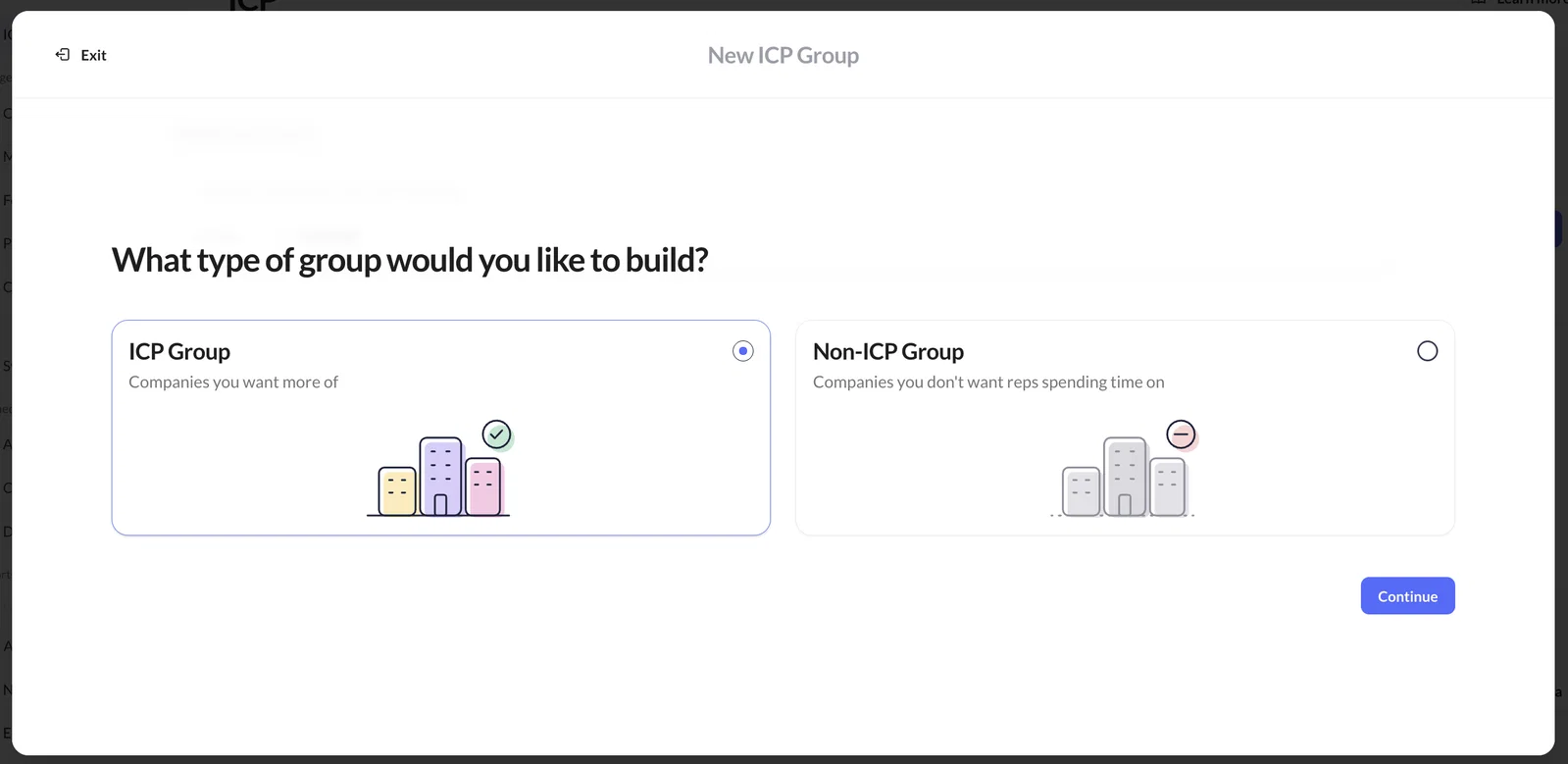
5. Combine Buying Signals With ICP Fit and Intent
Not every account showing buying activity deserves immediate attention. A company might visit your pricing page repeatedly, but if it doesn't match your ideal customer profile, it may not be a worthwhile opportunity.
A practical way to prioritize accounts is to consider four factors:
Signal Priority = ICP Fit + Intent + Engagement + Relationship Context
Here's what each factor means:
Factor
What to evaluate
ICP Fit
Does the company match your ideal customer profile in terms of industry, size, revenue, geography, and other relevant criteria?
Intent
Are recent actions, such as pricing-page visits, product research, or direct questions, suggesting purchase interest?
Engagement
How meaningful, frequent, and recent are the interactions across different channels?
Relationship Context
Does your team already know someone in the account? Are there former customers, champions, or existing professional connections?
This isn't a universal mathematical scoring formula. Think of it as a practical framework for evaluating accounts using more than one activity or data point.
For example, an ICP-fit enterprise account with several employees researching your product, repeated pricing visits, and an existing relationship with a former customer deserves more attention than an unrelated company that visited your homepage once.
6. Respond Quickly and Measure What Happens Next
Identifying buying signals is useful only if your sales team can act on them. If an account shows strong interest but nobody follows up, you could miss the opportunity.
Set up processes to:
Notify the right sales representative when important signals appear.
Track qualified opportunities, meetings, pipeline, and revenue.
Speed matters, too. In our analysis of 76 B2B software companies and 12,158 people who started chats, buyers who received a reply in under one minute became deals 2.6× as often as those who waited more than four hours. The observed deal rates were 13.2% and 5.2%, respectively.
This doesn't mean a fast reply guarantees a deal. But it does show why responding while a prospect is actively engaged can matter.
Finally, measure what happens after your team acts on a signal. Did the prospect respond? Was a meeting booked? Did the account become a qualified opportunity? Did it eventually generate pipeline or revenue?
That's how you move beyond simply collecting buying signals and start understanding which ones actually help your sales team create opportunities.
How Knock AI Helps Turn Buying Signals Into Revenue
Identifying buying signals is only the first step. Sales teams also need to understand who's showing interest, which company they belong to, whether the account fits their ICP, who else is involved, and what the best next action should be.
That's where things often get complicated. Website activity, CRM records, conversations, company information, and relationship history can all live in different places. Connecting them manually takes time and makes it harder for sales teams to act while buyer interest is still developing.
Knock AI connects buyer intent, company intelligence, relationship data, AI-powered engagement, qualification, routing, scheduling, and revenue measurement into a connected workflow. Here's how it helps.
1. Detect Buyer Intent Across Websites, Links, and Conversations
Knock AI captures buying signals across different interactions with your business. This includes website page views, link and CTA clicks, form starts and submissions, engagement with shared resources, and messages exchanged through lead conversations.
For example, when someone repeatedly visits your pricing page, clicks a product CTA, and later starts a chat, these activities can be brought together in an Intent Signals Timeline. This gives your team a chronological view of engagement across people, devices, and sessions.
Knock AI also provides two useful classifications:
Knock: Intent Score: Categorizes intent as High, Medium, or Low based on the type, recency, and volume of signals.
Knock: Intent Type: Classifies the interaction as Buying, Partnership, Support, or Job seeker. This classification is finalized after at least one chat message.
Instead of looking at individual clicks in isolation, your team can understand what people are doing and whether their activity suggests a potential buying opportunity.
2. Enrich Contacts and Companies to Understand Account Fit
A prospect showing interest doesn't automatically make them a good lead. You also need to understand who they are and whether their company fits your target market.
Knock AI enriches contact and company information to give sales teams more context. Contact enrichment can include names, job titles, locations, LinkedIn profiles, page visits, intent signals, attribution sources, and first-seen and last-seen information.
Company enrichment adds another layer, including industry, company size, headquarters, public or private status, funding information, estimated annual revenue, and company-level engagement.
With advanced enrichment, teams can also explore a company's technology stack across categories such as CRM, marketing automation, analytics, cloud, security, HR, finance, and more. Department-level headcount and detailed funding history provide additional context.
This helps sales teams answer a more important question than simply whether someone is interested: Is this the kind of company we actually want to sell to?
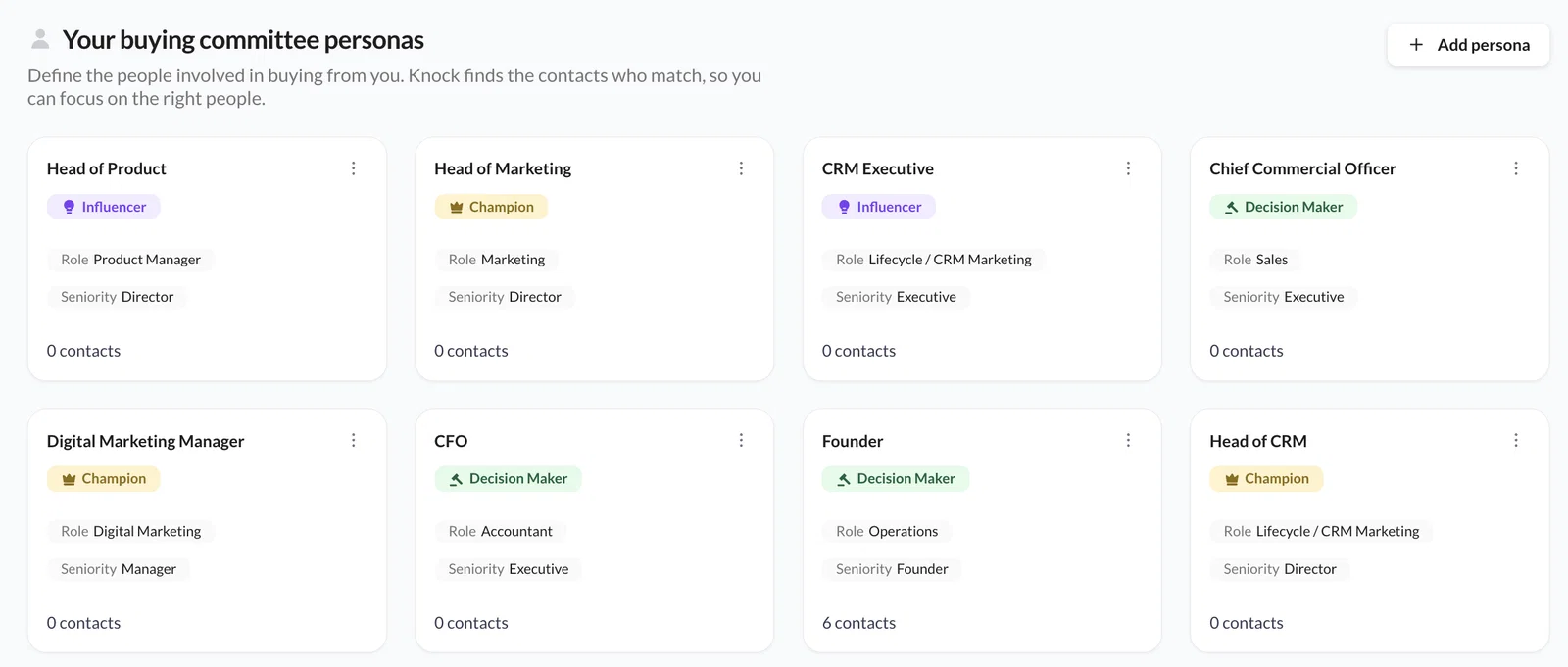
3. Map Buying Committees and Find Warm Relationships
Knowing that someone from an account is interested is useful. Understanding the people and relationships behind that account is even more valuable.
Knock AI's private Relationship Graph helps sales teams explore professional relationships, historical CRM activity, previous opportunities, and connections across their network.
It can help identify relevant buying personas, understand potential decision-makers and champions, and highlight stakeholders who may still be missing from the buying committee. It can also surface existing relationships within target accounts and potential warm introduction paths.
For example, imagine a former customer who previously advocated for your product joins a company that matches your ICP. Knock AI can help connect that person's relationship history with the new account context and its current engagement.
The idea is simple: don't just identify an interested contact. Understand the wider network and relationships that could influence the purchase.
4. Understand Where Buyers Come From With Attribution Enrichment
A buyer's journey rarely begins and ends on your website. They might discover your product through Google, read about it on G2, see a LinkedIn post, use ChatGPT to compare alternatives, or open a resource shared by your sales team.
Knock AI's attribution enrichment helps connect these touchpoints through first-touch attribution and engagement tracking across websites, off-site links, messaging apps, AI search, events, email, and other channels.
Knock Links can also help track engagement with shared assets, including PDFs, social posts, emails, and QR codes.
This gives sales and marketing teams a broader view of how buyers discover and engage with the business, rather than relying only on the last website visit or a single referral source.
5. Engage, Qualify, Route, and Schedule With AI
Once a buying signal is identified, your team needs a way to act on it. Knock AI brings AI-powered engagement and sales workflows into the same process.
Knock AI agents can engage prospects, understand whether they're asking about buying, support, partnerships, or job opportunities, and answer questions using configured knowledge sources and guardrails. They can also collect qualification information, offer meetings when appropriate, and hand conversations over to human representatives when needed.
From there, Knock AI's routing capabilities help direct prospects based on factors such as ICP fit, geography, company size, intent, account information, and CRM ownership. Leads can be assigned to individual representatives or round-robin teams, depending on the configured workflow.
Knock Scheduling then connects qualified prospects with available representatives using calendar availability and time zones. Knock AI also supports scheduling within messaging experiences and configured follow-up or LinkedIn outreach workflows.
The important part is that AI and human representatives work together. AI can handle initial engagement and qualification, while salespeople step in when a conversation requires deeper expertise, relationship-building, or commercial discussion.
6. Connect Engagement to CRM, Pipeline, and Revenue
Finally, sales teams need to understand whether all this activity is actually creating business results.
Knock AI connects with supported CRM and marketing systems, including Salesforce and HubSpot, to bring relevant enrichment, intent, meeting, ownership, and attribution information into the broader revenue workflow.
With its Website Revenue Report and connected attribution capabilities, teams can get a better view of how website engagement relates to meetings, opportunities, and revenue. This also helps identify where potential buyers are dropping out of the journey and where conversion opportunities may be getting missed.
Knock AI helps sales teams move beyond simply collecting buying signals. It connects the information and workflows needed to identify potential buyers, understand their accounts and relationships, engage the right people, book meetings, and measure the revenue impact.
Buying Signals vs. Intent Data vs. Lead Scoring: What's the Difference?
Buying signals, intent data, and lead scoring are closely related, but they aren't the same thing. Here's a simple way to understand the difference:
Concept
What it means
Example
Buying signals
Actions or changes that suggest potential purchase interest.
A prospect repeatedly visits your pricing page.
Intent data
Information collected from buyer activities that helps you understand their interests and research behavior.
A company researching your product category and comparing competitors.
Lead scoring
A method of prioritizing prospects based on selected criteria, such as company fit, engagement, and intent.
An account receives a high score because it matches your ICP and has recently shown strong buying signals.
Are Buying Signals the Same as Intent Data?
Not exactly. Buying signals are the individual actions or developments that may indicate purchase interest, while intent data is the information collected from those activities. For example, a prospect visiting your pricing page is a buying signal. Data about that visit, its frequency, and other related research can contribute to your understanding of buyer intent.
How Are Buying Signals Different From Lead Scoring?
Think of buying signals as inputs and lead scoring as a way to prioritize those inputs. A repeated pricing-page visit, a product question, or a new decision-maker joining a company can all be buying signals. Lead scoring combines relevant signals with additional criteria, such as ICP fit, company size, engagement, and recency, to help sales teams decide which prospects deserve attention first.
In short: Buying signals tell you what's happening, intent data helps you understand buyer interest, and lead scoring helps you decide where to focus your sales efforts.
B2B Buying Signals Cheat Sheet: Where to Find Them and How to Act
Knowing what counts as a buying signal is useful, but sales teams also need to know where to find these signals, what they indicate, and what to do when they appear.
Use this table as a practical reference when monitoring potential buyers and deciding on your next sales action.
Buying signal
Where to find it
What it could indicate
Recommended sales action
Repeated pricing-page visits
Website analytics, visitor intelligence
Active pricing or vendor evaluation
Offer a relevant pricing discussion or demo
Repeated product-page visits
Website analytics, intent tracking
Growing interest in specific product capabilities
Share relevant product information
Multiple employees visiting your website
Account-level visitor intelligence
Broader company evaluation or buying committee activity
Identify stakeholders and map their roles
Technical documentation engagement
Website analytics, documentation tracking
Technical validation and integration research
Share technical resources or involve a solutions engineer
Demo or scheduling interactions
CTA tracking, scheduling activity
Interest in speaking with sales
Provide an easy way to book a meeting
Direct product questions
Website chat, LinkedIn, messaging apps
Specific requirements, objections, or purchase considerations
Answer the question and qualify the underlying need
Competitor comparisons and reviews
G2, Capterra, comparison pages
Vendor evaluation and shortlisting
Address relevant competitive differences
Former champion joining a new company
CRM history, professional networks
Potential warm relationship at a new account
Reconnect and explore the new company's requirements
New executives joining
Company announcements, LinkedIn
Possible changes in strategy or technology priorities
Research their priorities before reaching out
Relevant hiring activity
Careers pages, LinkedIn, job boards
Department growth or investment in a business function
Connect the hiring activity to a relevant business problem
Funding and acquisitions
Funding databases, company announcements
Potential expansion and new operational requirements
Research growth plans and identify relevant opportunities
Technology adoption or replacement
Technographic intelligence, company announcements
Changing infrastructure or software requirements
Check compatibility and identify potential technology gaps
Pricing and procurement discussions
Sales conversations, CRM
Commercial evaluation and purchase planning
Address pricing, contracts, and procurement requirements
RFPs and implementation timelines
Procurement portals, direct conversations
Formal vendor evaluation and defined purchase timelines
Understand requirements, stakeholders, and decision deadlines
AI-search referrals
Website analytics, attribution data
Product discovery through AI-assisted research
Monitor subsequent engagement and offer a direct conversation
Cross-channel engagement
Attribution tools, Knock Links, CRM
Interest developing across multiple touchpoints
Connect interactions and coordinate relevant follow-up
FAQs
1. What are buying signals in B2B sales?
Buying signals in B2B sales are actions, conversations, or business developments that suggest a company or its employees may be considering a purchase. Examples include repeated pricing-page visits, product comparisons, demo requests, questions about integrations, and discussions about procurement or implementation.
2. What are the strongest buying signals?
Some of the strongest buying signals include demo requests, enterprise pricing discussions, procurement questions, security evaluations, RFPs, and confirmed implementation requirements. However, their significance depends on the company's fit with your ICP and the wider context. Multiple relevant signals from the same account can provide a stronger indication of an active evaluation.
3. What is the difference between explicit and implicit buying signals?
Explicit buying signals directly communicate purchase interest. For example, requesting a demo, asking for a quotation, or discussing contract terms. Implicit buying signals are indirect behaviors that may suggest interest, such as repeatedly visiting pricing pages, researching competitors, or exploring technical documentation.
4. How do you identify buying signals?
You can identify buying signals by monitoring website activity, conversations, content engagement, company developments, technology adoption, and professional relationships. Look for patterns across multiple interactions and connect them with company information, ICP fit, and buying committee activity to understand which accounts may represent genuine opportunities.
5. How do you track buying signals automatically?
Sales teams can use website visitor identification, intent-data platforms, CRM integrations, company enrichment, attribution tools, and AI-powered engagement platforms. These solutions help collect information about prospect activity, connect interactions across channels, enrich contact and company records, and notify sales teams when relevant signals appear.
6. Are job changes considered buying signals?
Job changes can create potential sales opportunities, particularly when former customers, champions, or decision-makers join companies that match your ICP. Their previous experience with your product can provide a useful starting point for a new relationship. However, a job change alone does not confirm purchase intent. Look for relevant engagement and business needs before reaching out.
7. Can AI identify buying signals?
Yes. AI-powered platforms can analyze website activity, conversations, contact information, and company-level engagement to identify patterns associated with potential buying interest. They can also help classify intent, prioritize accounts, qualify prospects, and route conversations to the right sales representatives. Human sales teams can then focus on relationship-building and more complex conversations.
8. How quickly should sales teams respond to buying signals?
Sales teams should respond as quickly as practical when a relevant, high-intent signal appears, particularly when a prospect starts a conversation or asks a direct product question. In our analysis of 76 B2B software companies and 12,158 people who started chats, buyers who received a reply in under one minute became deals 2.6× as often as those who waited more than four hours. The observed deal rates were 13.2% and 5.2%, respectively. (Source)
Don't Just Find Buying Signals. Act on Them.
Buying signals help sales teams recognize potential purchase interest before prospects explicitly ask to speak with them. But recognizing a signal isn't the same as creating an opportunity.
You need to understand the account, identify the people involved, uncover existing relationships, and respond with relevant information at the right time.
The best sales teams don't simply collect more signals. They connect buyer intent with context and turn it into meaningful conversations.
Want to turn buying signals into actual sales conversations? Explore how Knock AI connects buying signals, account intelligence, relationship mapping, AI engagement, and meeting conversion in one revenue-focused workflow.