HubSpot Forms Review (2026): Features, Pricing & Limitations
HubSpot Forms Review (2026): Is It Still the Best Way to Capture B2B Leads?
Most companies don't have a traffic problem.
They have a conversion problem.
Marketing teams spend months building SEO programs, running paid campaigns, sponsoring webinars, publishing content, and generating demand. Buyers show up. They visit pricing pages, download resources, attend events, and sometimes even start filling out forms.
Then they disappear.
Not because they weren't interested.
Because buying momentum is fragile.
A prospect who looks ready to buy at 10:00 AM can be buried in meetings by 10:15. A demo request submitted today may not receive a meaningful response until tomorrow. By then, the buyer may already be evaluating competitors or discussing alternatives internally.
That's the challenge traditional lead-capture systems were never designed to solve.
HubSpot Forms became one of the most popular form builders in B2B because it made lead capture simple. Marketers could quickly create forms, route submissions to HubSpot CRM, trigger workflows, and automate follow-up.
But modern revenue teams are increasingly asking a different question:
Is capturing a lead enough?
Or should businesses focus on identifying, enriching, qualifying, and engaging buyers before they ever leave the page?
In this HubSpot Forms review, we'll examine the platform's features, pricing, strengths, limitations, and where it fits within today's B2B buying journey. We'll also explore why many GTM teams are investing in form enrichment, buyer activation, marketing automation, and Inbound AI SDRs to convert more existing demand into the pipeline.
See Knock AI in Action — Book Your Live Demo Today
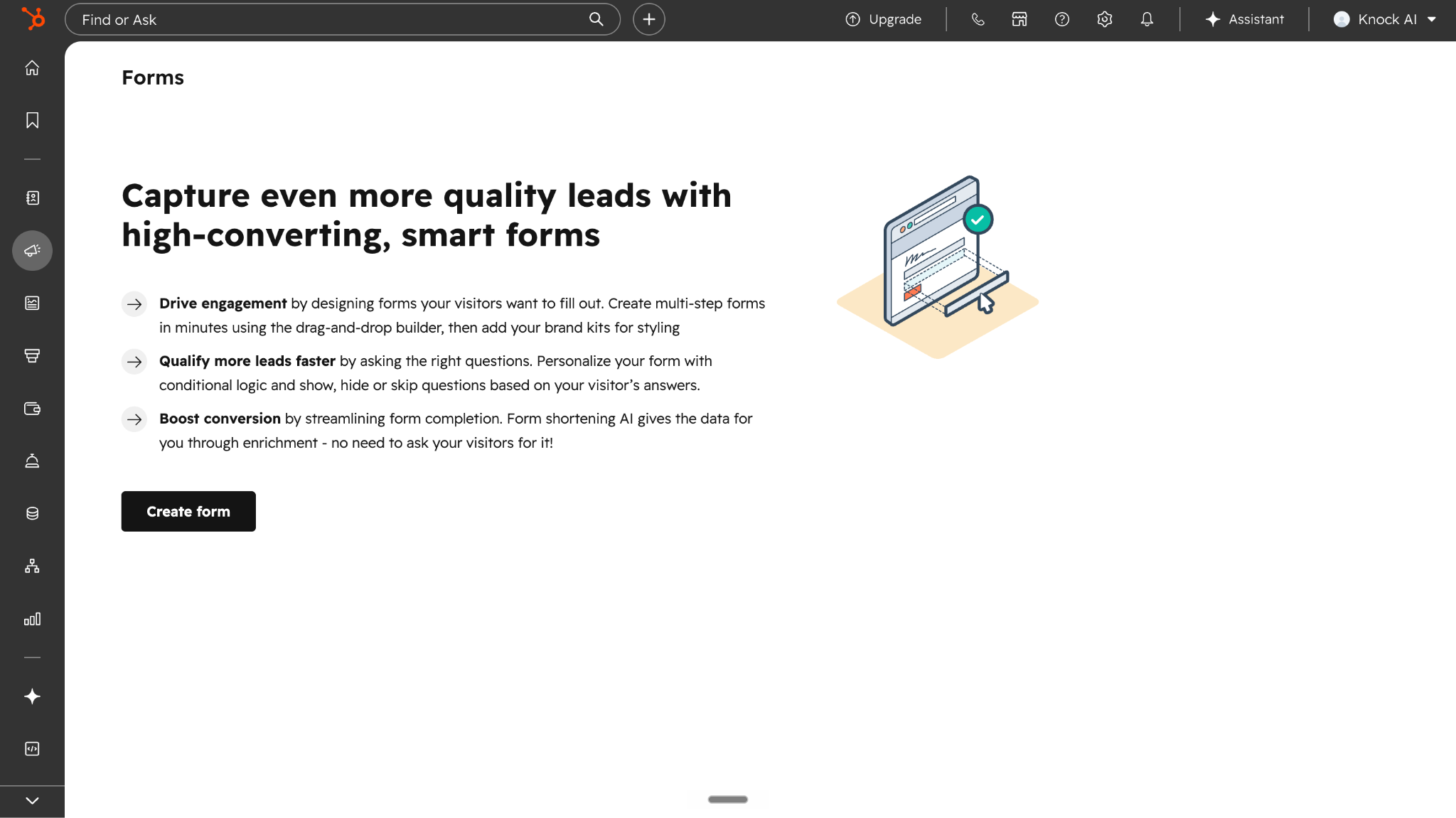
HubSpot Forms is a lead capture and form builder tool included within HubSpot's Marketing Hub. It allows businesses to create online forms that collect visitor information, sync submissions directly into HubSpot CRM, and trigger automated marketing and sales workflows.
Marketers commonly use HubSpot Forms for demo requests, contact forms, newsletter signups, webinar registrations, content downloads, event registrations, and lead generation campaigns.
One of the platform's biggest advantages is its tight integration with the broader HubSpot ecosystem. When a visitor submits a form, their information is automatically stored in HubSpot CRM, where teams can segment contacts, enroll them into nurture campaigns, assign leads to sales representatives, trigger automation workflows, and track engagement over time.
Key Capabilities of HubSpot Forms
Drag-and-drop form builder Create forms without coding using pre-built templates and customizable fields.
HubSpot CRM integration Automatically sync form submissions into HubSpot CRM for lead management and sales follow-up.
Marketing automation workflows Trigger emails, lead routing, lifecycle stage updates, task creation, and other workflows after a form submission.
Progressive profiling and smart fields Reduce repetitive data entry by displaying different questions based on information already stored in the CRM.
Conditional logic Personalize user experiences by showing different fields, messages, or redirects based on responses.
Reporting and analytics Track form views, submissions, and conversion rates directly inside HubSpot.
Who Should Use HubSpot Forms?
HubSpot Forms is a strong fit for:
Companies already using HubSpot CRM
Marketing teams running content-driven lead generation campaigns
Organizations using gated content, webinars, newsletters, and demo request workflows
Businesses looking for an easy-to-manage form builder with built-in automation
Teams that want marketing and sales data managed within a single platform
Teams prioritizing buyer activation and conversational qualification over traditional form-based workflows
At its core, HubSpot Forms is designed to help businesses capture leads and move them into the CRM. For many organizations, that remains an effective approach. However, as buying behavior evolves, some revenue teams are expanding beyond lead capture and exploring ways to identify, enrich, qualify, and engage buyers before a form is ever submitted.
Key Features of HubSpot Forms
HubSpot Forms offers much more than a basic contact form builder. Because it sits inside the broader HubSpot ecosystem, forms can connect directly to CRM records, marketing automation workflows, lead routing systems, and reporting dashboards. Below are the platform's most important features.
Drag-and-Drop Form Builder
HubSpot provides a visual form builder that allows marketers to create forms without writing code. Users can add custom fields, rearrange layouts, embed forms on websites, or publish standalone form pages.
The platform includes templates for common use cases such as contact requests, newsletter subscriptions, content downloads, event registrations, support inquiries, and demo requests. For most marketing teams, creating and deploying a form takes only a few minutes.
CRM Integration
One of HubSpot Forms' biggest strengths is its native integration with HubSpot CRM.
When a visitor submits a form, their information is automatically stored as a contact record within the CRM. Sales and marketing teams can then view submission history, website activity, lifecycle stages, campaign engagement, and previous interactions from a single location.
This eliminates manual data entry and helps ensure that lead information remains centralized across teams.
Conditional Logic
HubSpot Forms supports conditional logic, allowing businesses to personalize form experiences based on user responses.
For example, a prospect selecting "Enterprise" may see different follow-up questions than a startup founder. Users can also be redirected to different pages or experiences based on their answers.
This functionality helps marketers collect more relevant information while creating a more tailored experience for visitors.
Progressive Profiling
Progressive profiling is designed to reduce repetitive questions for returning visitors.
Instead of asking the same information every time, HubSpot can recognize existing contacts and display new questions that help build a richer customer profile over time.
For example, a visitor who previously provided their name and email may be asked about company size or job title on their next interaction.
This allows marketers to gradually collect data without requiring long forms upfront.
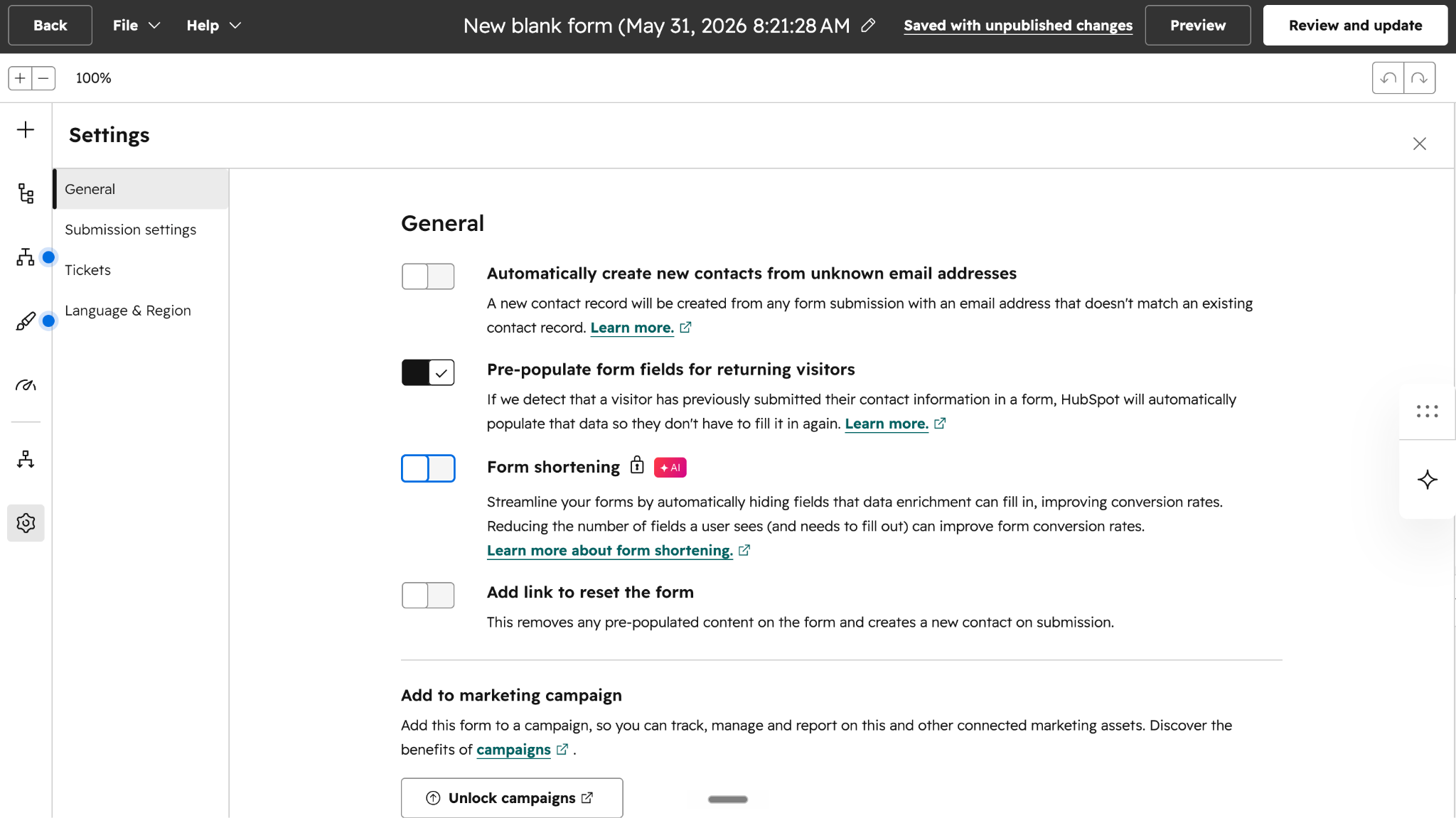
Form Shortening
Form shortening automatically hides fields when HubSpot already has the required information.
Rather than displaying every question, the platform can prefill known details and only request missing information. This reduces friction and can improve completion rates, especially for returning visitors.
HubSpot positions form shortening as a way to make lead capture faster while collecting the information needed for qualification and segmentation.
Lead Routing & Marketing Automation
HubSpot Forms integrates directly with HubSpot's automation engine.
After a submission occurs, businesses can automatically:
Assign leads to sales representatives
Send follow-up emails
Trigger nurture campaigns
Update lifecycle stages
Create tasks for SDRs
Notify internal teams
Route leads based on territory or ownership rules
This automation helps reduce manual work and ensures leads move into the appropriate sales or marketing workflow.
Analytics & Reporting
HubSpot includes built-in reporting for form performance.
Teams can track metrics such as:
Form views
Submission volume
Conversion rates
Traffic sources
Campaign performance
Contact growth
These insights help marketers understand which forms generate the most leads and identify opportunities to improve conversion rates.
While HubSpot provides strong reporting around submissions and conversions, it primarily measures activity after visitors interact with a form. This becomes important when evaluating how many potential buyers leave before ever submitting their information, a challenge we'll explore in the next section.
Getting started with HubSpot Forms is relatively straightforward, especially for businesses already using HubSpot CRM or Marketing Hub.
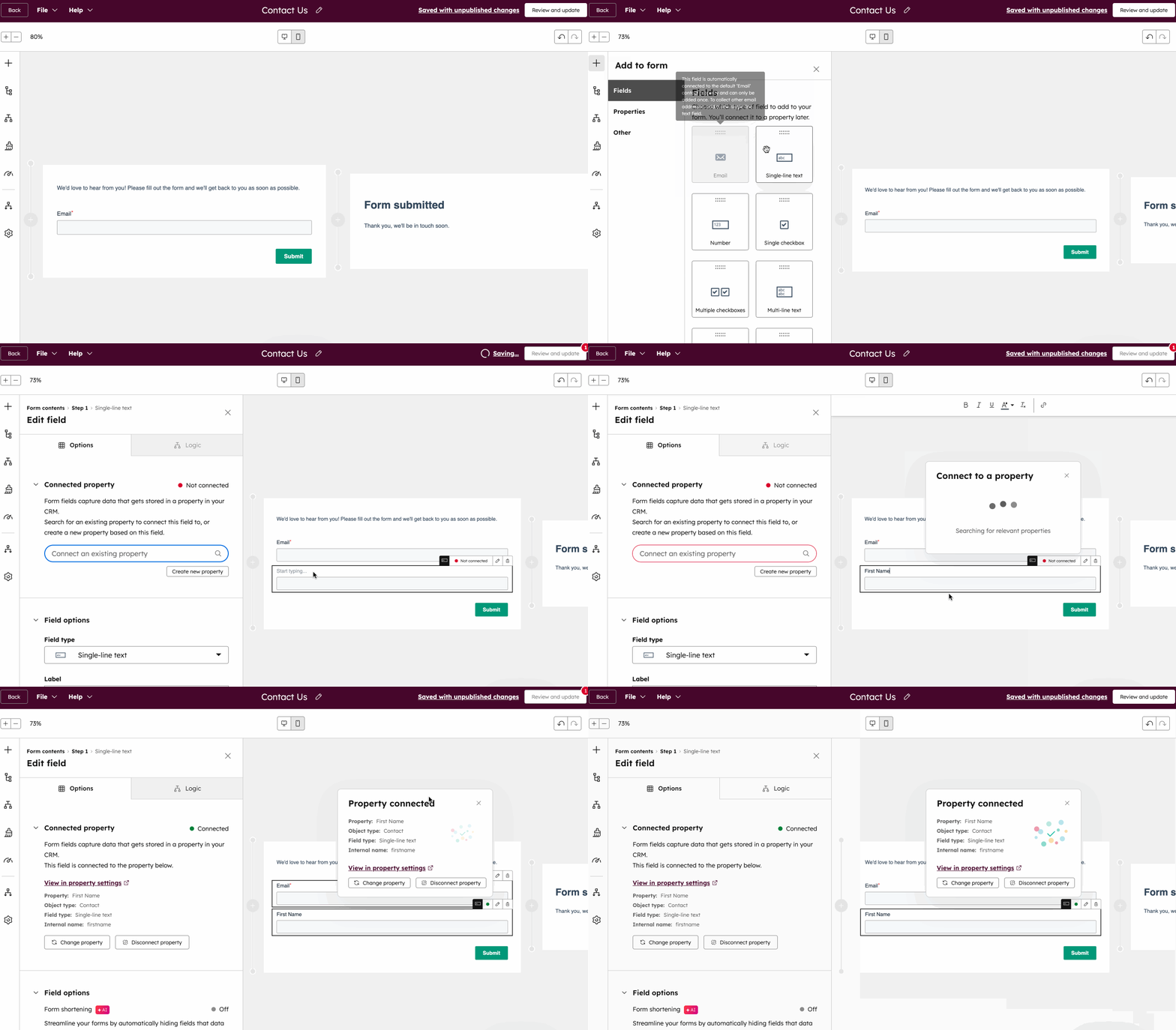
First, create a form using HubSpot's drag-and-drop builder. You can choose from pre-built templates or build a custom form from scratch by adding the fields you want to collect, such as name, email, company, job title, or any custom property.
Next, embed the form on your website, landing page, blog post, or publish it as a standalone page. HubSpot provides embed codes and native integrations that make deployment simple, even for non-technical teams.
Once a visitor submits the form, their information is automatically synced to HubSpot CRM. The contact record is created or updated, allowing sales and marketing teams to access submission data, engagement history, and other CRM information from a single location.
From there, businesses can automate follow-up actions using HubSpot workflows. Common automations include sending confirmation emails, enrolling contacts into nurture campaigns, assigning leads to sales representatives, updating lifecycle stages, and triggering internal notifications.
While the process is simple to implement, the real challenge often begins after the form is submitted: qualifying buyers, maintaining momentum, and converting captured leads into a pipeline.
HubSpot Forms Pricing (2026)
HubSpot Forms is available within HubSpot's Marketing Hub. While basic form functionality is available on free plans, advanced automation, lead routing, reporting, and CRM capabilities require paid tiers.
Plan
Starting Price*
Best For
Key Form Capabilities
Free
$0
Small businesses and startups
Basic forms, CRM integration, lead capture
Starter
From $15/month
Small teams needing simple automation
Forms, CRM sync, basic marketing tools
Professional
From $800/month
Growing marketing teams
Advanced automation, lead scoring, personalization, reporting
*Pricing is based on publicly available HubSpot information at the time of writing and may change. Additional costs may apply for onboarding, contacts, seats, and HubSpot Credits.
*Pricing may change over time. Always verify current pricing directly with HubSpot.
Hidden Costs to Consider
The advertised subscription price is only one part of the total cost of ownership.
For Professional and Enterprise plans, HubSpot requires onboarding services that can add several thousand dollars in upfront costs. Professional plans currently include a one-time onboarding fee, while Enterprise plans require a larger onboarding investment.
Organizations should also evaluate how pricing scales as their database grows. Marketing Hub pricing is influenced by contact volume, which means costs can increase as lead generation efforts expand.
Additional users and seats may introduce incremental costs depending on team size and required access levels. Businesses using advanced AI, automation, or customer engagement features may also consume HubSpot Credits, which operate separately from standard subscription pricing.
None of these costs are unusual for enterprise marketing platforms. However, when evaluating HubSpot Forms, it's important to consider the total cost of ownership rather than focusing solely on the entry-level monthly price.
Pros and Cons of HubSpot Forms
Like any lead capture platform, HubSpot Forms has strengths and trade-offs. The platform excels at collecting contact information and integrating that data into marketing and sales workflows, but some limitations become more noticeable as buyer behavior evolves.
Pros
Cons
Native integration with HubSpot CRM
Form abandonment remains a common challenge
Powerful marketing automation and workflows
Anonymous visitors often leave without identifying themselves
Easy-to-use drag-and-drop form builder
Qualification typically begins after form submission
Progressive profiling and conditional logic
Forms introduce friction into the buying journey
Built-in analytics and conversion reporting
Delays between form completion and meaningful engagement can reduce momentum
Automatic lead routing and assignment
Limited ability to engage buyers before they submit information
Supports a wide range of lead generation use cases
Not designed for real-time conversational qualification
Works seamlessly within the HubSpot ecosystem
Relies heavily on visitors willingly sharing their information
HubSpot Forms remains a strong choice for organizations already invested in HubSpot's CRM and marketing automation ecosystem. However, many of its advanced features, such as progressive profiling, form shortening, conditional logic, and conversational tools, exist to address a larger challenge: buyers increasingly prefer faster, lower-friction ways to engage.
This shift is one reason many revenue teams are exploring form enrichment, buyer activation, conversational marketing, and AI-powered qualification strategies alongside traditional forms.
The Biggest Limitation of HubSpot Forms
HubSpot Forms does exactly what it was designed to do: capture lead information and push it into your CRM.
The problem is that modern B2B buying journeys don't always fit neatly into that process.
Before a lead can be routed, nurtured, scored, or contacted, a visitor must first decide to complete the form. That seemingly simple step introduces several challenges that affect almost every B2B marketing team.
Form Abandonment
Not every visitor who starts a form completes it.
Some get distracted. Some aren't ready to share their information. Others simply don't want to trade personal details for access to a demo, resource, or conversation. And some skips the lead capture forms completely.
This creates a blind spot. Marketing teams can see completed submissions, but they often lose visibility into the buyers who showed interest and then disappeared before converting.
Even when a buyer visits your pricing page multiple times, downloads resources, or spends significant time researching your solution, traditional forms provide no value unless that visitor eventually submits their information.
As a result, many high-intent prospects leave without ever entering the CRM.
Delayed Follow-Up
Forms capture information. They don't create conversations.
In many organizations, a form submission triggers a series of downstream processes: enrichment, scoring, routing, assignment, qualification, and follow-up. While automation has improved these workflows, delays still occur.
Research from MIT found that companies responding to leads within five minutes are dramatically more likely to qualify opportunities than those waiting even 30 minutes.
The challenge is simple: buyers move faster than most sales processes.
Buyer Friction
Many of HubSpot's most popular features exist to reduce friction.
Progressive profiling, smart fields, conditional logic, and form shortening all help make forms easier to complete.
But they also highlight a larger reality.
If buyers loved filling out forms, businesses wouldn't need to continuously optimize ways to make forms shorter, smarter, and less intrusive.
The market has spent years trying to improve forms because forms naturally create friction.
Intent Decay
Perhaps the biggest challenge is timing.
Buyer intent is not permanent.
A prospect researching your product at 10:00 AM may be buried in meetings by 10:15. Someone considering a demo today may be evaluating competitors tomorrow.
Many modern GTM teams operate around a simple principle: the highest-intent engagement window is incredibly short. Some revenue leaders estimate that buying momentum begins fading in less than 90 seconds after intent appears.
The exact number may vary, but the lesson remains the same:
The longer it takes to engage a buyer, the lower the probability of converting that interest into a pipeline.
A lead captured tomorrow is often worth less than a buyer engaged today.
This reality is driving a broader shift across revenue teams. Instead of focusing exclusively on lead capture, many organizations are investing in form enrichment, buyer activation, conversational engagement, and AI-powered qualification systems designed to engage prospects while intent is still active.
Why Modern Revenue Teams Are Moving Beyond Forms
Forms are not disappearing anytime soon.
But for many B2B organizations, forms are no longer the center of the buying journey. They are becoming just one touchpoint in a broader strategy focused on buyer activation, lead qualification, and real-time engagement.
Leads Are Not Revenue
For years, marketing teams measured success through lead volume.
More form submissions meant more leads. More leads meant more opportunities. At least in theory.
The reality is more complicated.
A lead is simply a record in a CRM. Revenue is created when a buyer engages, qualifies, progresses through the sales process, and eventually becomes a customer.
This is why many GTM teams are shifting their focus from lead generation metrics to pipeline generation metrics. Instead of asking, "How many forms did we collect?" they're asking, "How many buying conversations did we create?"
Buyers Research Independently
Modern B2B buyers complete a significant portion of their research before speaking with sales.
They visit websites, compare vendors, read reviews, attend webinars, join communities, download resources, and discuss options internally long before filling out a contact form.
By the time someone reaches a form, much of the buying journey may have already happened.
This shift has made it increasingly important to identify buying intent earlier and engage prospects while they are actively evaluating solutions.
The Rise of Buyer Activation
As buyer behavior changes, a new concept has emerged across revenue teams: buyer activation.
Buyer activation focuses on engaging prospects the moment meaningful intent appears rather than waiting for a form submission or demo request.
Instead of treating buyers as leads to be collected, teams treat them as opportunities to be activated through conversations, qualification, education, and personalized engagement.
This approach is driving growing interest in technologies such as form enrichment, identity resolution, CRM enrichment, real-time qualification, and Inbound AI SDR platforms.
Conversational Marketing Changes Everything
Traditional forms ask buyers to wait.
Conversational marketing allows buyers to engage immediately.
Whether through website chat, messaging channels, AI assistants, or real-time qualification experiences, conversational engagement reduces friction and gives prospects a faster path to answers.
Rather than collecting information first and starting the conversation later, conversational marketing starts the conversation immediately and collects information naturally throughout the interaction.
For many buyers, that creates a significantly better experience.
Why Speed Matters More Than Volume
The highest-performing revenue teams understand a simple truth:
Not all leads have equal value.
A highly engaged buyer researching solutions right now is often worth far more than multiple low-intent leads that may never enter an active buying cycle.
This is why speed-to-engagement has become a critical competitive advantage. The faster a business can identify intent, qualify interest, answer questions, and connect buyers with the right resources, the more likely it is to convert demand into pipeline.
The future of B2B growth isn't simply generating more leads.
It's activating more of the demand you already have.
HubSpot Forms vs Form Enrichment
For years, marketers have focused on optimizing forms.
They shortened them. Added conditional logic. Introduced progressive profiling. Removed unnecessary fields, built multi-step experiences.
All of those improvements helped.
But they were still trying to solve the same problem: asking buyers to stop what they're doing and fill out a form.
Form enrichment takes a different approach.
Instead of collecting information first and starting the conversation later, form enrichment identifies, enriches, qualifies, and engages buyers while they're actively showing intent.
Traditional Forms vs Form Enrichment
Capability
Traditional Forms
Form Enrichment
Data Collection
Ask buyers for information
Identify information automatically
Qualification
After form submission
During engagement
Experience
Static fields
Dynamic and conversational
Buyer Friction
High
Reduced
Visitor Visibility
Limited to form fills
Includes anonymous buyer activity
Follow-Up
Starts after submission
Begins immediately
Lead Management
Lead capture
Buyer activation
Conversion Focus
Form completions
Pipeline creation
What Is Form Enrichment?
Form enrichment is the process of automatically identifying and enhancing buyer information before, during, or immediately after engagement.
Rather than relying entirely on a prospect to manually complete every field, form enrichment combines identity resolution, CRM enrichment, firmographic data, behavioral signals, and qualification workflows to create a more complete buyer profile automatically.
The goal is simple: reduce friction while increasing conversion rates.
Instead of asking buyers for information you may already know, enrichment technologies can populate company details, job titles, account ownership, industry data, CRM history, buying signals, and qualification attributes in real time.
How Form Enrichment Works
Modern form enrichment platforms combine multiple data sources to build a richer understanding of a buyer.
When a visitor arrives on a website, engages with a chatbot, attends a webinar, clicks a review site listing, downloads a resource, or interacts with a campaign, enrichment systems can connect those actions to company and contact data.
That information can then be used to:
Enrich CRM records automatically
Identify account ownership
The route leads to the correct sales team
Score buying intent
Trigger marketing automation workflows
Personalize conversations and follow-up
In many cases, buyers no longer need to complete lengthy forms before meaningful engagement can begin.
Why Marketers Are Adopting Form Enrichment
Marketing teams are under increasing pressure to generate more pipeline from existing traffic.
The challenge is that forms create friction, and friction reduces conversions.
Every additional field creates another opportunity for abandonment. Every delay between submission and follow-up creates another opportunity for buyer intent to disappear.
Form enrichment helps solve both problems.
By reducing manual data entry, improving lead quality, accelerating qualification, and enabling faster engagement, enrichment technologies help teams convert more anonymous traffic into qualified opportunities.
This is one reason why modern revenue teams are investing more heavily in form enrichment, CRM enrichment, buyer activation, conversational marketing, and Inbound AI SDR platforms.
The goal is no longer just collecting leads.
It's converting buying intent into pipeline before momentum disappears.
HubSpot Forms vs CRM Enrichment
HubSpot Forms and CRM enrichment solve different problems.
Forms are designed to collect information from buyers. CRM enrichment is designed to enhance and expand that information after it's collected, or, in some cases, before a buyer ever submits a form.
Many companies assume that collecting more fields creates better lead quality. In reality, asking for more information often reduces conversion rates and increases form abandonment.
CRM enrichment takes the opposite approach: collect less, enrich more.
HubSpot Forms vs CRM Enrichment
Capability
HubSpot Forms
CRM Enrichment
Primary Purpose
Capture lead information
Enhance lead and account records
Data Source
Buyer-provided
Internal + external data sources
Company Information
Manually entered
Automatically enriched
Contact Information
Form fields
Contact enrichment databases
Firmographic Data
Limited
Company size, industry, revenue, location, technologies
Intent Signals
Limited
Behavioral and buying intent data
CRM Accuracy
Depends on form completion
Continuously updated
Lead Quality
Based on submitted fields
Based on enriched buyer intelligence
Routing Intelligence
Post-submission workflows
Real-time qualification and routing
What Is CRM Enrichment?
CRM enrichment is the process of automatically enhancing contact and account records with additional information.
Rather than relying solely on what a prospect enters into a form, enrichment platforms append valuable data such as:
Company name
Industry
Employee count
Revenue range
Job title
Seniority level
Geographic location
Technology stack
Account ownership
Buying intent signals
The result is a more complete customer record without forcing buyers to fill out lengthy forms.
Why CRM Enrichment Matters
Incomplete CRM records create problems across the entire revenue organization.
Marketing struggles with segmentation.
Sales teams waste time researching prospects.
RevOps teams face routing challenges.
Leadership loses visibility into pipeline quality.
CRM enrichment helps solve these issues by improving data quality and enabling more intelligent qualification, routing, personalization, and reporting.
This is why CRM enrichment, contact enrichment, and lead enrichment software have become core components of modern GTM stacks.
Forms collect information.
CRM enrichment transforms information into actionable buyer intelligence.
Why HubSpot Is Expanding Beyond Forms
One of the most interesting things about HubSpot's product strategy is that it no longer revolves around forms alone.
While forms remain a foundational part of the platform, HubSpot has invested heavily in conversational experiences, AI-powered engagement, and real-time customer interactions.
Recent product launches and investments include:
Breeze AI
HubSpot's Breeze AI initiative introduces AI-powered capabilities across marketing, sales, and customer engagement workflows.
Instead of relying solely on static lead capture, Breeze helps teams automate conversations, qualification, content generation, segmentation, and customer interactions.
Customer Agent
HubSpot's AI-powered Customer Agent can answer questions, assist visitors, and provide support without requiring immediate human involvement.
This reflects a broader industry trend toward conversational engagement rather than traditional form-based experiences.
Live Chat and Conversational Tools
HubSpot continues to invest in live chat, conversational bots, messaging experiences, and real-time engagement tools.
These products allow buyers to ask questions immediately rather than waiting for email follow-ups after submitting a form.
WhatsApp and Messaging Channels
Modern buyers increasingly communicate through messaging platforms.
HubSpot's WhatsApp integration reflects growing demand for engagement channels that feel faster and more natural than traditional lead forms.
Conversational Bots
HubSpot's conversational bots are designed to help businesses qualify visitors, answer questions, route conversations, and accelerate engagement directly from websites.
These capabilities extend beyond simple lead capture and move closer to real-time buyer engagement.
What This Means for Marketers
Forms are still valuable.
They're effective for resource downloads, demo requests, event registrations, support inquiries, and countless other use cases.
But HubSpot's own roadmap highlights a larger industry shift.
Revenue teams increasingly want conversations, qualification, enrichment, automation, and engagement, not just form submissions.
The future of inbound conversion is not replacing forms entirely.
It's combining forms with conversational experiences, AI-powered qualification, CRM enrichment, buyer activation, and real-time engagement strategies that help convert more demand into pipeline.
Even HubSpot's evolution suggests that the future of inbound conversion extends beyond traditional forms.
While forms focus on collecting information, Inbound AI SDR platforms engage buyers in real time, qualify intent, enrich records, route opportunities, and move prospects toward revenue outcomes while buying momentum is still active.
Capability
HubSpot Forms
Inbound AI SDR
Real-Time Qualification
❌
✅
Identity Resolution
❌
✅
CRM Enrichment
Limited
✅
Intent Detection
❌
✅
Meeting Scheduling
Via workflows
✅
AI Follow-Up
Limited
✅
Buyer Re-Engagement
❌
✅
Conversation Intelligence
❌
✅
Multi-Channel Engagement
Limited
✅
Pipeline Activation
Limited
✅
What Is an Inbound AI SDR?
An Inbound AI SDR (AI Sales Development Representative) is an AI-powered system that engages inbound buyers, qualifies leads, enriches records, detects intent, routes opportunities, and schedules meetings automatically.
Unlike traditional lead capture workflows that begin after a form submission, Inbound AI SDRs engage buyers while intent is still active. They can answer questions, identify accounts, determine qualification, enrich CRM records, and route opportunities to the appropriate sales team in real time.
The goal is not simply generating leads.
The goal is converting demand into qualified pipeline faster.
Why Inbound AI SDRs Are Growing
Modern B2B buyers expect immediate engagement.
They research independently, compare vendors, visit review sites, attend webinars, engage in communities, and evaluate solutions across multiple channels before ever speaking with sales.
As a result, revenue teams are investing in AI lead qualification, buyer activation, conversational marketing, and Inbound AI SDR platforms that can engage prospects instantly rather than waiting for a form submission.
This shift is one of the biggest reasons Inbound AI SDRs have become one of the fastest-growing categories in modern revenue technology.
Best HubSpot Forms Alternatives
While HubSpot Forms remains one of the most popular form builders available, it's no longer the only option for capturing and converting demand.
Different platforms solve different problems. Some focus on building better forms. Others focus on workflow automation, data collection, or buyer activation.
Platform
Best For
Knock AI
Buyer activation, form enrichment, CRM enrichment, and Inbound AI SDR workflows
Typeform
Conversational forms and user experience
Fillout
Airtable, Notion, and workflow-driven forms
Jotform
Enterprise forms and operational workflows
Formstack
Compliance-focused organizations and regulated industries
Knock AI
Knock AI is designed for revenue teams that want to go beyond traditional lead capture. It combines form enrichment, CRM enrichment, identity resolution, real-time qualification, AI follow-up, buyer re-engagement, and Inbound AI SDR capabilities into a single platform.
"Knock AI is built around preserving buyer momentum, not just capturing buyer information."
Typeform
Typeform focuses on creating conversational and visually engaging forms. It's a strong option for organizations prioritizing user experience and higher form completion rates.
Fillout
Fillout has become popular among teams using Airtable, Notion, and modern no-code workflows. It offers flexible form creation and strong integration capabilities.
Jotform
Jotform is one of the most established form builders in the market. It supports complex workflows, approvals, operational processes, and enterprise-grade form management.
Formstack
Formstack is often chosen by organizations operating in regulated industries that require security, compliance, workflow automation, and advanced document generation capabilities.
Knock AI: Best Alternative for Buyer Activation
Most HubSpot Forms alternatives focus on building better forms.
Knock AI focuses on reducing dependence on forms altogether.
The platform is built around buyer activation: identifying, qualifying, enriching, routing, and engaging buyers while intent is still active.
Knock AI starts engagement the moment buying intent appears.
Instead of asking visitors to complete forms and wait for follow-up, Knock AI helps revenue teams identify buyers, qualify opportunities, enrich records, and create a pipeline in real time.
Form Enrichment
Knock AI enriches buyer records automatically, reducing the need for lengthy forms and minimizing friction throughout the buying journey.
CRM Enrichment
The platform continuously enriches CRM records with company information, contact data, account ownership, buying signals, attribution data, and qualification intelligence.
Inbound AI SDR
Knock AI functions as an Inbound AI SDR by engaging buyers, answering questions, qualifying opportunities, routing ownership, and booking meetings automatically.
Identity Resolution
Knock AI combines company-level and contact-level identity resolution to help revenue teams understand who is engaging and why.
Real-Time Qualification
Instead of waiting for SDR follow-up, buyers can be qualified immediately using behavioral signals, conversation intelligence, firmographic data, CRM history, and buying intent.
AI Follow-Up and Buyer Re-Engagement
One of Knock AI's strongest differentiators is its ability to preserve buying momentum.
The platform can automatically follow up through email and LinkedIn conversations, re-engage buyers who abandon chats, and recover prospects who start scheduling but never complete the booking process.
This helps prevent valuable opportunities from leaking out of the funnel.
Multi-Channel Buyer Activation
Modern buying journeys happen across multiple touchpoints.
Rather than relying on a single form submission, revenue teams can engage buyers wherever intent appears.
The result is a faster path from demand to pipeline and a more complete view of the buyer journey.
FAQs
What is HubSpot Forms?
HubSpot Forms is a lead capture tool within HubSpot Marketing Hub that allows businesses to collect visitor information, create forms, automate follow-ups, and sync submissions directly to HubSpot CRM.
Is HubSpot Forms free?
Yes. HubSpot offers a free version of its form builder. However, advanced features such as automation, lead scoring, enhanced reporting, and AI-powered capabilities require paid Marketing Hub plans.
How much does HubSpot Forms cost?
HubSpot Forms is included within Marketing Hub. While basic functionality is available for free, advanced plans start at approximately $800/month for Professional and $3,600/month for Enterprise, with additional costs for onboarding, contacts, seats, and HubSpot Credits.
What are HubSpot Forms' limitations?
The biggest limitations include form abandonment, anonymous website traffic, buyer friction, delayed qualification, and intent decay. Forms collect information, but they typically don't engage, qualify, or activate buyers in real time.
What is form enrichment?
Form enrichment automatically identifies and enhances buyer information instead of requiring visitors to manually fill out every field. It helps reduce friction, improve conversion rates, and create richer lead profiles.
What is CRM enrichment?
CRM enrichment enhances contact and account records with additional information such as company details, firmographics, job titles, account ownership, and buying signals. This improves lead quality, routing, personalization, and reporting.
What is an Inbound AI SDR?
An Inbound AI SDR is an AI-powered sales development representative that engages, qualifies, enriches, routes, and schedules inbound buyers automatically. Unlike forms, it focuses on creating a pipeline rather than simply capturing leads.
Are AI SDRs better than forms?
For many B2B organizations, yes. Forms capture information, while AI SDRs can identify buyers, answer questions, qualify intent, enrich records, and engage prospects immediately. The result is often faster qualification and higher conversion rates.
What is the best HubSpot Forms alternative?
It depends on your goals. Typeform is strong for conversational forms, Fillout for no-code workflows, and Formstack for compliance-focused organizations. For buyer activation, form enrichment, CRM enrichment, and Inbound AI SDR capabilities, Knock AI is one of the strongest alternatives.
Can HubSpot Forms identify anonymous visitors?
Not by themselves. HubSpot Forms require visitors to submit information before they become known contacts. Anonymous visitors who leave without converting typically remain unidentified.
How do marketers reduce form abandonment?
Common strategies include shortening forms, using progressive profiling, reducing required fields, implementing conditional logic, and leveraging form enrichment technologies that minimize manual data entry.
How do you qualify leads without forms?
Modern revenue teams increasingly use conversational marketing, CRM enrichment, buyer activation platforms, and Inbound AI SDRs to qualify buyers in real time. These approaches allow qualification to happen through conversations and behavioral signals rather than form submissions alone.


.svg)


.svg)
.svg)
.svg)


.svg)
.svg)


.svg)